

Super Assistants – How MCP Servers Unlock Multichannel Automation In Your Workflow
Every day, messages, meetings, and leads flow through tools like Slack, Gmail, Google Calendar, Airtable, LinkedIn, and WhatsApp. When these channels are disconnected, you spend your time copying data, chasing updates, and reacting to notifications instead of focusing on meaningful work.
The Super Assistants MCP Server template for n8n turns that chaos into a coordinated, automated system. It connects your core tools into a single orchestration layer so outreach, CRM updates, scheduling, and messaging can run in the background while you stay focused on the work that truly moves your business forward.
Think of this template as a starting point for building your own network of “super assistants” that never forget a follow-up, never miss a lead, and always keep your systems in sync.
The Shift: From Manual Busywork To Confident Automation
Most teams feel the friction of multichannel work:
- Messages in Slack that never make it into the CRM
- Leads sitting in Airtable without a scheduled meeting
- LinkedIn outreach that is hard to track or report on
- Emails that require manual triage and follow-up
It is easy to assume that fully automating all of this requires custom code, weeks of integration work, and a dedicated engineering team. In reality, with the right structure and a reusable template, you can start small, automate one flow, and expand from there.
The Super Assistants template is designed exactly for that journey. It gives you a clear, opinionated architecture that you can adopt in minutes, then gradually adapt to your exact use cases.
Mindset First: Build A System That Works While You Don’t
Automation is not just about saving clicks. It is about building a system that:
- Captures every opportunity automatically
- Keeps your CRM, inbox, and calendars aligned
- Supports your team with consistent, repeatable processes
With n8n and MCP Servers, you are not just wiring tools together, you are creating a reliable automation layer that can grow with your business. The Super Assistants template shows you how to structure that layer around a powerful concept: the MCP Server.
What Is An MCP Server In n8n?
An MCP (Multi-Channel Pipeline) Server is a centralized orchestration node that exposes a set of connectors, or tools, for a specific platform. Instead of building one-off integrations, you treat each platform as a single “server” with clearly defined operations.
In the Super Assistants template, each MCP Server is the gateway for a channel:
- Slack MCP Server for internal communication
- Gmail MCP Server for email workflows
- Google Calendar MCP Server for scheduling
- Airtable MCP Server for CRM and data storage
- Unipile MCP Servers for LinkedIn and WhatsApp messaging
The result is a consistent API surface that your assistants and workflows can rely on. You get reusable operations, predictable behavior, and a structure that makes it easy to extend automation across multiple channels.
Inside The Super Assistants Template: Your Automation Building Blocks
The template ships with a set of carefully designed MCP Servers. Each one gives you a focused toolkit for a specific platform, so you can compose powerful workflows without reinventing the basics.
Slack MCP Server (BenAI-content)
The Slack MCP Server turns Slack into both a command center and a notification hub.
Connectors included:
- Send messages to channels
- Send direct messages (DMs)
- List workspace users
- Search messages
Use it to:
- Distribute automated status updates or alerts
- Trigger workflows from Slack commands or channel mentions
- Send async notifications when CRM records change
CRM MCP Server (Airtable)
The Airtable MCP Server becomes your central CRM brain. It ensures your assistants always work with accurate, structured data.
Capabilities:
- Get a single record
- Search records with formula filters
- Retrieve base schema
- Create and update records with typecasting
Typical uses:
- Store contacts, deals, and opportunities for your assistants
- Search and enrich CRM records before doing outreach
- Ensure reliable data writes with typecasted create/update operations
Google Calendar MCP Server (Ben)
The Google Calendar MCP Server handles scheduling so you no longer need to manually coordinate meeting times.
Supported operations:
- Create events
- Delete events
- Update events
- Retrieve events
- Check availability
Great for:
- Automated meeting scheduling and calendar invitations
- Checking attendee availability before proposing times
- Syncing event details after changes in the CRM
Email MCP Server (Gmail)
The Gmail MCP Server lets you design email flows that are both scalable and personalized.
Common operations:
- Send emails
- Create drafts
- Reply to threads
- Add labels
- Fetch messages
Use it to:
- Run outreach sequences that use CRM data to personalize messages
- Build draft review flows with human-in-the-loop approvals
- Automate categorization and routing in your inbox
Unipile Messaging & LinkedIn MCP Servers
The Unipile MCP Servers are designed for managing LinkedIn and WhatsApp conversations at scale.
Key features:
- Retrieve LinkedIn profile details
- Search LinkedIn and publish posts
- Send invitations and messages through the Unipile messaging API
These capabilities are essential for building consistent, trackable social outreach flows that feed directly into your CRM and reporting.
How The Architecture Fits Together In n8n
The Super Assistants template is more than a collection of nodes. It is a visual architecture that shows you how to organize multichannel automation in a clean, scalable way.
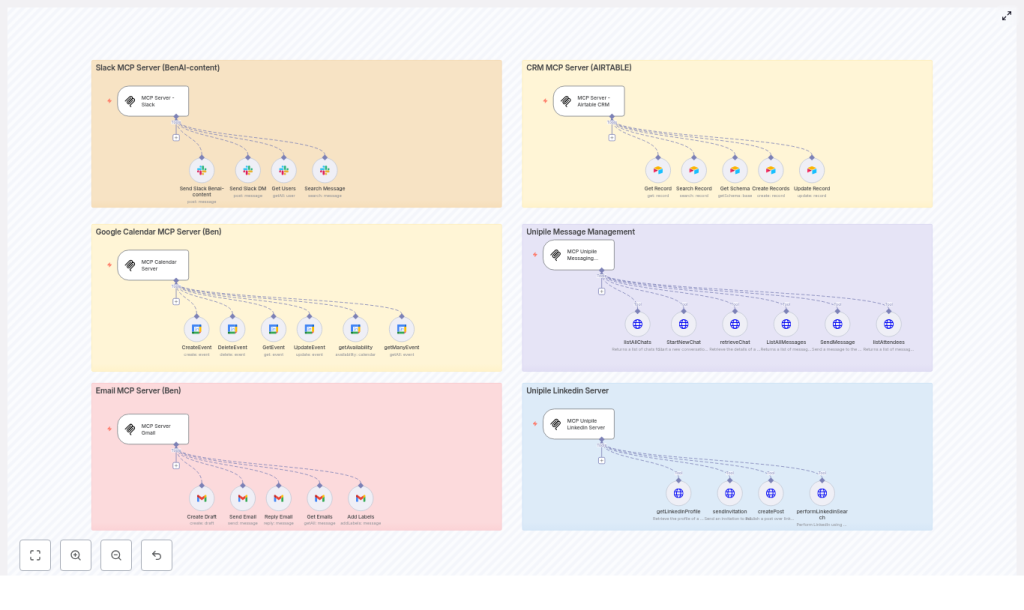
In the n8n editor, the template is grouped into six panels:
- Slack
- Airtable
- Google Calendar
- Gmail
- Unipile Messaging
- Unipile LinkedIn
At the center is an MCP trigger. This trigger listens for events on specific webhook paths, such as n8nMCP-Slack or n8nMCP-Gmail, then routes each request to the correct tool node.
Each tool node encapsulates a single operation, for example:
getRecordfor AirtablecreateEventfor Google CalendarsendMessagefor Slack or Unipile
This modular structure makes your workflows easier to test, debug, and extend. You can improve one operation without breaking the rest of the system.
The Core Flow Pattern
Most automations in this template follow a simple, powerful pattern:
- A trigger event occurs, such as a Slack command, an incoming email, or a scheduled job.
- The MCP trigger receives the event, normalizes the payload, and forwards it to the relevant tool node.
- The tool node performs read or write operations in Airtable, Gmail, Google Calendar, Slack, or Unipile.
- The results are used to post updates to Slack, update CRM records, or start or continue message threads via Unipile.
Once you understand this pattern, you can start designing your own automations using the same structure.
Real-World Journeys You Can Automate Today
The Super Assistants template is not theoretical. It is built for real use cases that teams run every day. Here are three journeys you can automate and then adapt to your own workflow.
1. Automated Meeting Booking From Your CRM
Starting from a lead record in Airtable, your assistant can:
- Check calendar availability using the Google Calendar MCP Server
- Propose meeting times in Slack or via email with the Gmail MCP Server
- Create a calendar event after the time is confirmed
- Update the CRM record in Airtable with meeting details automatically
This flow turns a manual back-and-forth into a smooth, automated experience that respects everyone’s time.
2. Personalized LinkedIn Outreach At Scale
With the Unipile LinkedIn MCP Server, you can:
- Search targeted prospects via the Unipile LinkedIn API
- Pull profile metadata to understand each contact better
- Draft a tailored invite under 300 characters
- Send the invitation through the Unipile messaging API
- Log every outreach touchpoint in Airtable for reporting and follow-up
This gives you a repeatable outreach system that stays consistent while still feeling personal.
3. Inbox Triage And Follow-up Without The Overwhelm
Using the Gmail MCP Server, you can create a smarter inbox:
- Fetch new emails and label or thread them automatically
- Create follow-up tasks in Airtable when action is required
- Detect messages that signal a sales opportunity
- Notify a Slack channel and assign an owner in the CRM when a hot lead appears
Instead of living in your inbox, you get a system that highlights what matters and routes it to the right person.
Getting Started: Setup Checklist For Your Super Assistants
Deploying the Super Assistants template is straightforward. Treat this as your launch checklist:
- Provision an n8n instance and import the Super Assistants template.
- Configure API credentials:
- Slack Bot token
- Gmail OAuth2 credentials
- Google Calendar OAuth2 credentials
- Airtable API token
- Unipile HTTP headers for LinkedIn and messaging
- Verify base IDs and table IDs for Airtable operations.
- Test each MCP trigger path such as
n8nMCP-Slackandn8nMCP-Gmailwith sample payloads. - Set environment variables for account IDs used by Unipile LinkedIn and WhatsApp.
Once these are in place, you have a fully functioning multichannel automation framework ready to customize.
Best Practices For Reliable, Scalable Automation
To keep your Super Assistants robust as you grow, follow these best practices:
- Use granular, permissioned API keys instead of broad-scoped tokens.
- Typecast Airtable writes to avoid schema errors when field types change.
- Implement retry and backoff strategies for network calls to external APIs.
- Centralize logging and error notifications, for example by posting errors to a Slack operations channel.
- Keep human-in-the-loop review for outbound messages to sensitive or high-value targets.
Security & Compliance: Building Trust Into Your Automations
As your assistants handle more personal and business-critical data, security and compliance become non-negotiable. Make sure you:
- Store least-privilege keys and rotate them on a regular schedule.
- Encrypt secrets and use the n8n credentials vault or environment-managed secrets.
- Log access and changes to CRM records for auditability.
- Respect LinkedIn and WhatsApp platform policies to avoid account flags or restrictions.
Troubleshooting: Turning Errors Into Learning
Even well-designed workflows can fail occasionally. When a node fails in n8n, use it as an opportunity to strengthen your system:
- Inspect the raw error payload in the n8n execution details.
- Check for rate limits and apply throttling if necessary.
- Validate that OAuth tokens have not expired, and configure refresh flows if required.
- Re-run failed workflows after addressing transient network issues.
Over time, these small improvements make your Super Assistants more resilient and trustworthy.
Extending The Template: From First Wins To A Full Automation Ecosystem
The real power of the Super Assistants MCP Server template is its extensibility. Once you have your first flows running, you can gradually expand and experiment.
Ideas to extend your automation system:
- Add SMS or Twilio nodes to reach users on mobile.
- Integrate analytics platforms, such as Google Analytics or Mixpanel, to track engagement and conversion.
- Use language models to auto-generate message drafts and A/B test outreach copy.
Each new node or integration becomes another building block in your automation stack, helping your team reclaim time and focus for higher-value work.
Your Next Step: Turn This Template Into Your Own Super Assistant
The Super Assistants MCP Server template gives you a ready-made, modular framework for orchestrating multichannel workflows across Slack, Gmail, Google Calendar, Airtable, and Unipile. It reduces integration complexity, standardizes operations, and accelerates the deployment of intelligent assistants that handle outreach, scheduling, CRM updates, and messaging for you.
You do not need to automate everything at once. Start with a single flow, test it, refine it, and then build from there. Each improvement compounds, freeing your team from repetitive tasks and creating a more focused, proactive way of working.
Ready to begin? Import the Super Assistants template into your n8n instance, configure your credentials, and run the included test payloads. From there, iterate. Adapt the flows to your team, add new channels, and watch your automation ecosystem grow.
If you would like support tailoring the template to your environment, you can reach out for a walkthrough or request a template audit to unlock even more potential from your n8n setup.
Call to action:

