


The Recap AI: How One Marketer Turned RSS Feeds Into a Daily Podcast With a Single n8n Workflow
On a rainy Tuesday morning, Mia stared at her content calendar and sighed.
She was a solo marketer at a growing SaaS startup, and her CEO had a simple request: “Can we have a short daily podcast that recaps the most important news in our space? Nothing fancy, just 5 minutes, every morning.”
It sounded simple. Until Mia tried to do it manually.
Every day looked the same: open RSS feeds, skim headlines, click through articles, copy text into a doc, summarize, write a script, record, edit, export, upload. By the time she finished, the “daily brief” felt more like a full-time production job. She knew there had to be a better way to turn RSS updates and web content into production-ready podcast episodes.
That is when she discovered an n8n template called The Recap AI – Podcast Generator.
The Problem: A Great Podcast Idea, No Time To Produce It
Mia’s idea was solid. She wanted a short, friendly, daily audio brief that:
- Pulled from trusted RSS feeds with industry news and product updates
- Included full article context, not just truncated RSS summaries
- Sounded like a real host, not a robotic voice reading headlines
- Could be produced in minutes, not hours
The manual workflow simply did not scale. As the company’s campaigns ramped up, she had less and less time for repetitive tasks like copying text, drafting scripts, and recording voiceovers.
She needed automation, not another to-do list item.
After some research on n8n workflows and AI podcast tools, she found exactly what she was looking for: a template that connected RSS feeds, a scraping API, an LLM scriptwriter, and ElevenLabs text-to-speech into one continuous, automated pipeline.
The Discovery: An n8n Template Built For Automated Podcast Production
The template was called The Recap AI – Podcast Generator. Its promise was simple but powerful:
“Turn RSS updates and web content into production-ready podcast episodes with a single n8n workflow.”
As Mia dug into the description, she realized it was designed exactly for creators like her who wanted:
- RSS-to-audio automation – ingest RSS feeds and output finished show audio
- Flexible scraping – pull full article text when RSS summaries were not enough
- AI scriptwriting – concise, friendly scripts written for a single host
- High-quality TTS – ElevenLabs v3 audio tags for natural, expressive narration
If it worked, she could go from “idea” to “daily show” with almost no manual production work.
Setting the Stage: What Mia Needed Before Pressing Play
Before turning this into her new daily engine, Mia prepared the basics:
- An n8n instance, hosted in the cloud so it could run on its own
- A curated RSS feed URL that matched her niche, focused on product launches and SaaS news
- A Firecrawl API key, added as an HTTP header credential in n8n
- An LLM credential (she chose her preferred model and connected it to n8n)
- An ElevenLabs API key, configured as an HTTP header credential, with audio output set to
mp3_44100_192
With those in place, she imported the workflow JSON for The Recap AI, opened it in n8n, and began walking through the nodes one by one.
Rising Action: Watching the Workflow Come to Life
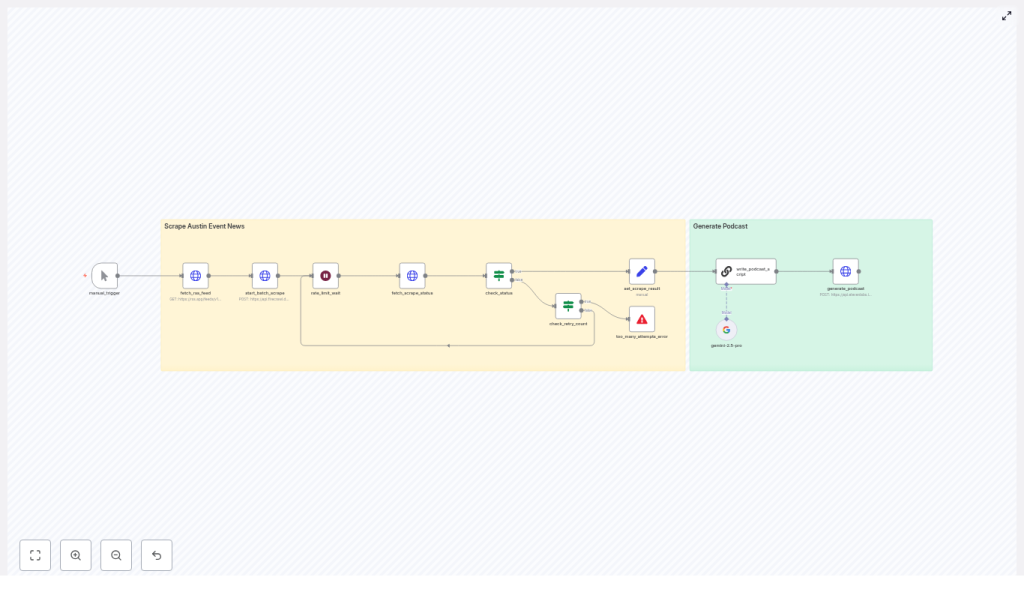
1. The Manual Trigger – Her Safe Test Button
Mia started with the Manual Trigger node. It became her “safe test button,” letting her run the workflow on demand while she tuned prompts and parameters.
Later, she planned to schedule it with n8n’s cron for daily episodes, but for now, she wanted full visibility into every step.
2. Fetching the RSS Feed – Raw Material for Her Show
The next piece was the Fetch RSS Feed node. Here, she pasted the URL from her curated SaaS news feed. n8n pulled in a list of items with titles, summaries, and URLs.
She quickly realized that feed selection was part of her editorial control. By choosing the right RSS sources, she could decide whether her show focused on local events, industry announcements, or product release notes.
Once the feed returned clean items, she was ready for the next step.
3. Starting the Batch Scrape With Firecrawl
Mia had always been frustrated by RSS summaries that ended with “…” right when it got interesting. The template solved that with a Start Batch Scrape (Firecrawl) node.
The workflow automatically:
- Collected all article URLs from the RSS feed
- Built a JSON payload
- Sent it to Firecrawl’s API
- Requested the full-page content for each article in Markdown format
This ensured that when the AI wrote her script, it was working with complete, readable source text, not half-finished snippets.
4. Handling Scrape Status and Rate Limits
Firecrawl’s scraping happens asynchronously, so the template included a smart system for waiting and checking.
The workflow used:
- Fetch Scrape Status to periodically poll Firecrawl for completion
- A rate_limit_wait node to respect API rate limits and pause between checks
Built-in retry logic and a capped retry counter meant Mia did not have to babysit long-running scrapes. If a site was slow, the workflow would patiently retry within safe limits.
5. The First Moment of Tension: What If Scraping Fails?
During her first test, one of the articles came from a site with an odd redirect. She wondered what would happen if Firecrawl struggled.
That is when she appreciated the Check Status & Error Handling logic.
An IF node checked the scrape status. If everything completed, the workflow moved forward. If the number of retries exceeded the configured threshold, a stop-and-error node halted the workflow and surfaced a clear error message.
No silent failures, no mystery bugs. Just a precise signal that she could route to alerts later via Slack or email.
The Turning Point: From Raw Articles To a Polished Script
6. Merging Scraped Content Into a Single Source
Once Firecrawl finished its work, the Set Scrape Result node took over. It merged all the Markdown content into a single field called scraped_pages.
That consolidated text was the input for the AI scriptwriter. Instead of juggling multiple items, the LLM could see the full context in one place and choose the best stories for that day’s episode.
7. The AI Scriptwriter Node – Giving Her Show a Voice
The heart of the template was the AI Scriptwriter (LangChain / LLM) node. This is where Mia’s show truly started to sound like a real podcast.
The node combined:
- The raw scraped content from
scraped_pages - A carefully crafted system prompt
The included prompt was optimized to:
- Select 3 to 4 non-controversial, audience-relevant events
- Write concise, natural-sounding copy for a single host
- Insert ElevenLabs v3 audio tags like pacing, emphasis, and subtle emotional cues
She tweaked the prompt to match her brand, turning the generic host into a specific persona: a friendly, slightly witty guide for SaaS founders who wanted a quick morning brief.
She changed the instructions to keep the tone light, avoid divisive topics, and stay focused on product launches and actionable news. In other words, she used prompt tuning to make the show hers.
Resolution: Hearing the First Automated Episode
8. Generating the Podcast With ElevenLabs v3
Now came the moment she had been waiting for. The script, already annotated with ElevenLabs v3 audio tags, flowed into the Generate Podcast (ElevenLabs v3) node.
The workflow posted the text to ElevenLabs’ TTS endpoint and requested an mp3 file. Because the script included tags like [excitedly], [chuckles], and carefully placed pauses, the result sounded surprisingly human.
No flat, robotic monotone. Instead, it felt like a real host guiding listeners through the day’s top SaaS stories.
Within minutes, Mia had a production-ready MP3 that she could upload to her podcast host or publish directly in her company’s content hub.
Customizing The Recap AI To Match Her Brand
Once the core flow worked, Mia started to refine it.
Fine-Tuning the Script and Show Format
- Prompt tuning: She adjusted tone, host persona, and event selection rules so the show felt like an “insider brief” for SaaS founders.
- Show length control: She tweaked the instructions so the LLM produced slightly longer summaries on major launches and shorter notes for minor updates.
- Content filtering: She added logic to skip politics and highly divisive topics, keeping the show focused and broadly appealing.
Choosing the Right Voice
In ElevenLabs, Mia experimented with different voices and stability settings. She tried both Natural and Creative modes, listening for the one that best matched her imagined host.
Once she found it, she locked in that voice profile and kept the tags from the template to maintain pacing and expression.
Making It Reliable: Monitoring and Best Practices
As the podcast became part of the company’s content strategy, Mia treated the workflow like a small production system.
She added:
- Alerts for scraping failures or too-many-retries errors, routed to Slack
- Respectful rate limit handling for Firecrawl and ElevenLabs, with caching where possible
- A simple human-in-the-loop review step for the first few episodes, so she could approve scripts and audio before publishing
- Privacy safeguards, redacting any personally identifying information before sending text to TTS
After a few successful runs, she grew confident enough to let the workflow publish on a schedule with only spot checks.
Scheduling and Automation: From Manual Trigger To Daily Show
Once everything looked solid, Mia swapped the Manual Trigger for a scheduled one.
Using n8n’s cron node, she configured the workflow to run early each weekday morning. By the time her audience woke up, the new episode was already live.
The full checklist she followed looked like this:
- Import The Recap AI workflow into her n8n instance
- Connect RSS, Firecrawl, LLM, and ElevenLabs credentials
- Run several manual tests and refine prompts and filters
- Set up alerts and basic observability
- Enable daily scheduling via cron
Real-World Uses: How Others Could Apply the Same Template
As the show gained traction, Mia realized this template could work for much more than SaaS news. She shared some ideas with her team:
- Local news brief: A daily episode covering community events, local politics filters applied, and cultural highlights.
- Industry roundup: A weekly digest of product launches and blog posts, with expert synthesis tailored to a specific vertical.
- Newsletter-to-audio: Turning an existing written newsletter into a spoken version for subscribers who prefer listening on the go.
In each case, the core engine stayed the same: RSS feed in, scraping and scriptwriting in the middle, expressive TTS out.
When Things Go Wrong: Mia’s Troubleshooting Checklist
During early tests, she hit a few snags, so she kept a quick troubleshooting list on hand:
- Verify all API keys and credential mappings in n8n
- Check that RSS item URLs are valid and not stuck in redirect loops
- Confirm Firecrawl is returning content in Markdown and that the LLM receives clean plain text
- Look for ElevenLabs rate limit issues or voice compatibility problems with v3 audio tags
With those checks, most issues were easy to diagnose and fix.
The Outcome: A Consistent, High-Quality Podcast Without a Studio
Within a few weeks, Mia’s “small experiment” had turned into a reliable channel. The Recap AI – Podcast Generator template gave her:
- A consistent, branded daily brief
- Minimal manual work after initial setup
- Production-ready audio that sounded human and engaging
- Room to focus on strategy and editorial decisions instead of repetitive tasks
The combination of n8n automation, Firecrawl scraping, LLM synthesis, and expressive ElevenLabs TTS made it possible to run a professional-sounding show without a studio or a full audio team.
Your Next Step: Turn Your Feeds Into a Show
If you are sitting on great content sources but do not have the time to produce a podcast manually, Mia’s story is a blueprint you can follow.
Here is how to start:
- Import The Recap AI – Podcast Generator workflow into your n8n instance.
- Connect your RSS feeds, Firecrawl, LLM, and ElevenLabs API keys.
- Run a manual test, tweak the prompt to match your host persona, and review the first script and audio file.
- Set up basic monitoring and scheduling for daily or weekly episodes.
With a bit of prompt tuning and light human review, you can publish sharp, short, and highly shareable episodes on a regular schedule.
Ready to try it? Import the Recap AI workflow now and start generating your first automated episode today.
