


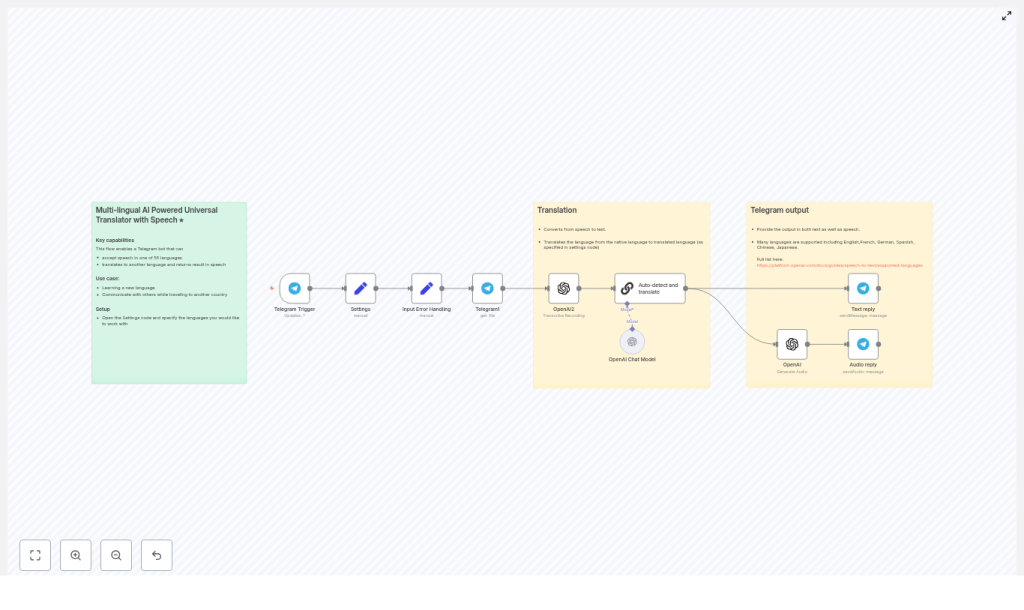
Transform Telegram voice notes into translated text and audio responses with a fully automated n8n workflow. This production-ready template uses OpenAI speech-to-text and chat models to detect the spoken language, translate between two configured languages, and reply in both text and synthesized audio. It is ideal for building multilingual Telegram bots for travel, language learning, international teams, or customer support operations.
Use case: A Telegram voice translator powered by n8n
Voice-based translation significantly improves accessibility and user experience. Instead of typing, users simply speak in their preferred language and receive an accurate translation as a Telegram message and, optionally, as an audio reply. By combining n8n with OpenAI, you gain access to high-quality speech recognition and natural language understanding without managing complex infrastructure or bespoke machine learning pipelines.
This workflow encapsulates best practices for automation professionals: clear separation of configuration, resilient handling of non-voice inputs, and modular OpenAI integration for transcription, translation, and text-to-speech.
Key capabilities of the workflow
- Listens for Telegram updates and filters for voice messages.
- Downloads the voice file from Telegram using the message payload.
- Transcribes the audio to text with OpenAI speech-to-text.
- Automatically detects the source language and translates between a configured language pair using an OpenAI chat model.
- Sends the translated text back to the user as a Telegram message.
- Optionally generates and returns a TTS audio reply of the translated text using OpenAI audio generation.
Prerequisites and environment requirements
- An n8n instance (cloud-hosted or self-hosted).
- A Telegram bot token to configure the Telegram Trigger and Telegram nodes.
- An OpenAI API key with access to speech-to-text, chat, and audio generation endpoints.
- Basic familiarity with n8n nodes, credentials management, and workflow deployment.
Architecture overview
The template is organized as a left-to-right n8n workflow that starts with a Telegram Trigger and then moves through configuration, input handling, transcription, translation, and response delivery. Each node has a clearly defined responsibility, which makes the flow easy to customize and extend.
1. Entry point: Telegram Trigger
Node: Telegram Trigger
This node receives all updates from your Telegram bot. For each incoming update, it inspects the payload and forwards events that contain a voice message. The trigger exposes the Telegram file_id and chat metadata required for subsequent processing.
2. Global language configuration
Node: Settings (Set node)
The Settings node acts as a central configuration point. It defines two key string fields:
language_native– the primary language of your users (for example,english).language_translate– the target language for translation (for example,french).
These values are referenced later by the translation prompt to determine whether the input should be translated from native to target or in the opposite direction.
3. Input normalization and error handling
Node: Input Error Handling (Set node)
Not every incoming update will be a voice message. This helper node extracts and normalizes the message.text field where present and is used to avoid workflow failures when users send non-voice messages. It provides a simple safety layer that ensures the rest of the pipeline only processes valid voice inputs or handles exceptions gracefully.
4. Audio retrieval from Telegram
Node: Telegram (file)
Once a valid voice message is detected, this node downloads the corresponding audio file from Telegram. It uses the file_id contained in the trigger payload to fetch the audio data as a binary file, which is then passed to OpenAI for transcription.
5. Speech-to-text transcription with OpenAI
Node: OpenAI Transcribe (OpenAI node)
This node connects to OpenAI’s speech-to-text API and converts the downloaded audio into text. It represents the core transcription step, turning user speech into structured input that can be processed by the translation logic. The node output includes the recognized text and the language inferred by the model.
6. Language detection and translation logic
Node: OpenAI Chat Model (Auto-detect and translate)
A lightweight OpenAI chat model is used to both identify the language of the transcribed text and perform the translation between your defined language pair. The prompt is designed to:
- Determine whether the text is written in
language_nativeorlanguage_translate. - Translate in the appropriate direction between these two languages.
- Return only the translated text, without extra commentary or formatting beyond what is required.
The Settings node values are injected into the prompt, so you can easily change the language pair without modifying the rest of the workflow logic.
7. Returning translated text to Telegram
Node: Telegram Text reply
After translation, this node sends the translated text back to the user as a Telegram message. Markdown formatting is enabled, which allows you to style responses or add additional context if you customize the prompt or message body.
8. Optional TTS response: Generate and send audio
Nodes: OpenAI (Generate Audio) + Telegram Audio reply
For an enhanced user experience, the workflow can also convert the translated text into speech using OpenAI’s text-to-speech capabilities. The generated audio file is then sent back to the user as a Telegram voice or audio message.
This dual output (text plus audio) improves accessibility for users who prefer listening or have visual impairments, and it supports language learners who benefit from hearing pronunciation.
Step-by-step deployment guide
- Import the workflow template
Download or copy the JSON for this template and import it into your n8n instance via the workflow import function. - Configure credentials
In n8n, set up:- Telegram credentials using your bot token for the Telegram Trigger and Telegram nodes.
- OpenAI credentials using your OpenAI API key for the transcription, chat, and audio generation nodes.
- Set translation languages
Open the Settings (Set) node and define:language_native(for example,english)language_translate(for example,french)
You can adjust these values at any time to switch the language pair without changing the rest of the workflow.
- Deploy and run initial tests
Activate the workflow, then send a voice message to your Telegram bot. The expected behavior is:- Telegram Trigger fires on the voice message.
- The audio is downloaded, transcribed, and processed by the OpenAI chat model.
- The bot replies with the translated text, and if the audio generation path is enabled, with a translated audio response as well.
- Refine prompts and behavior
If you need domain-specific terminology or a particular tone, edit the prompt in the Auto-detect and translate node. You can enforce formality, use a specific register, or inject custom vocabulary relevant to your industry.
Best practices for accuracy and user experience
- Introduce confirmation flows
For critical use cases, consider adding a simple user confirmation step when the translation is ambiguous or when you suspect low confidence. For example, ask the user to confirm or correct the translation before taking further automated actions. - Use specialized prompts or models
For technical, medical, or legal content, extend the chat prompt with a glossary or examples, or select a more capable OpenAI model to handle domain-specific language. - Control audio duration and cost
Limit maximum recording length or implement chunking for long audio to avoid timeouts and manage API costs. Shorter segments also reduce latency and improve responsiveness. - Leverage caching for repeated phrases
For common phrases or templates, implement a caching strategy within n8n (for instance via a database or key-value store) to reuse recent translations, reduce OpenAI calls, and improve performance.
Privacy, compliance, and cost management
Every transcription and audio generation request to OpenAI incurs usage-based charges. Monitor your n8n logs and OpenAI dashboard to estimate cost per message, and consider implementing rate limits or quotas for high-volume bots.
From a privacy perspective, voice data is particularly sensitive. Before sending user audio to OpenAI or any third-party provider, ensure that your consent, data processing agreements, and retention policies comply with relevant regulations. For strict data residency or compliance requirements, evaluate self-hosted or on-premise alternatives where appropriate.
Troubleshooting common issues
- No transcription output
Confirm that the Telegram (file) node successfully downloads the audio and that the OpenAI API key is configured correctly. Check for errors in both nodes within n8n. - Incorrect language detection or translation direction
Refine the prompt in the Auto-detect and translate node. Make the instructions explicit about the two languages and include examples of when to translate from native to target and when to reverse the direction. - Audio reply not playing correctly
Ensure that the OpenAI audio generation node outputs a format supported by Telegram, such as MP3 or OGG. If necessary, add a conversion step or adjust node settings so the audio is compatible with Telegram clients.
Advanced enhancements for production deployments
- Per-user language preferences
Store user-specific language pairs in a database and look them up at runtime. This allows each user or chat to have its own native and target languages instead of relying on a single global setting. - Inline language selection
Add Telegram inline keyboards to let users select or change the target language on demand, which is especially useful for multilingual communities. - Configurable voices and TTS quality
Extend the Settings node to include preferred voice type or quality level. Use these values when calling the OpenAI audio generation endpoint to offer multiple voice options. - Monitoring and analytics
Integrate logging and metrics collection to track translation latency, error rates, and usage volumes. This data helps you optimize prompts, scale infrastructure, and manage cost.
FAQ
Which languages can this workflow handle?
OpenAI’s speech-to-text models support more than 55 languages. The n8n workflow itself is language agnostic. As long as the languages are supported by the OpenAI models, you can configure any pair in the Settings node using language_native and language_translate.
Can the bot translate in both directions automatically?
Yes. The Auto-detect and translate node is designed to check whether the transcribed text is in the native language or the target language, then translate in the appropriate direction. You do not need separate workflows for each direction.
Conclusion and next steps
This n8n workflow template provides a robust foundation for a Telegram voice translation bot. With minimal configuration, you can deploy a multilingual assistant that listens to voice messages, transcribes them, detects the language, translates between your chosen language pair, and responds with both text and audio.
Get started now: import the template into your n8n instance, configure your Telegram and OpenAI credentials, set your language pair, and send a test voice note to your bot. Within minutes, you will have an operational voice translator running on top of n8n.
If you require advanced customization, such as complex prompts, user-specific preferences, or integration with additional systems, feel free to reach out for guidance or a tailored implementation.
Call to action: Deploy this workflow in your n8n environment today and validate it with a few sample voice messages. If you need support with configuration, scaling, or integration into your existing automation stack, contact us for a walkthrough or custom setup.
