


Ultimate Guide to Automating Email Workflow with AI and n8n
From Inbox Overwhelm to Focused Work
Most professionals know the feeling of opening their inbox and instantly losing focus. Important messages are buried under promotions, social updates, and endless notifications. You start the day with good intentions, then suddenly it is noon and you have done nothing but manage email.
Automation gives you a different path. Instead of reacting to every new message, you can design a system that sorts, summarizes, and even replies for you. In this guide, you will walk through a powerful email automation workflow built with n8n, Gmail, OpenAI’s language models, and Google Sheets. It is not just a technical setup, it is a foundation for reclaiming your time and attention.
Shifting Your Mindset: Let Your Inbox Work For You
Automation is not about replacing you. It is about removing the repetitive, low-value tasks that drain your energy so you can focus on the conversations and decisions that actually matter.
Think of this workflow as your personal email assistant that:
- Checks your inbox every few minutes without fail
- Understands what type of email just arrived
- Decides how to handle it based on clear rules you define
- Creates summaries, logs data, and even writes replies
Once this is in place, you are no longer starting from chaos. You are reviewing a curated, organized inbox that already did most of the work for you.
How the n8n Email Automation Workflow Works
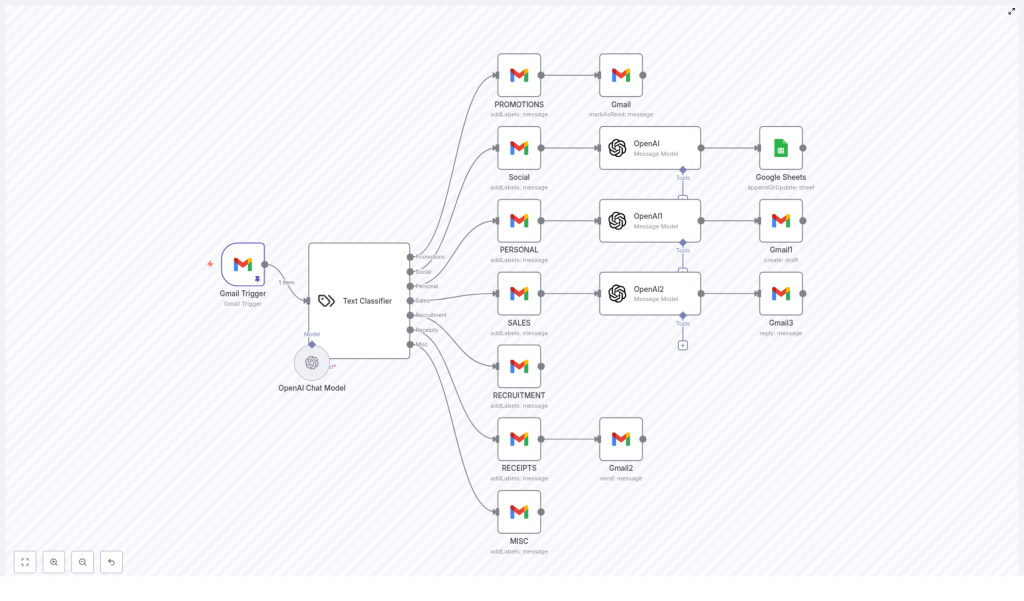
This workflow template uses n8n as the automation engine, connecting Gmail, OpenAI, and Google Sheets into a single, smart system. Here is the core flow:
- Trigger: Every 5 minutes, n8n checks for new emails in your Gmail account.
- Classification: An AI text classifier powered by OpenAI’s GPT-4o-mini model analyzes each email.
- Categorization: Each email is assigned to a specific category such as Promotions, Social, Personal, Sales, Recruitment, Receipts, or Misc.
- Automated Actions: Based on the category, the workflow takes different actions like labeling, summarizing, forwarding, logging, or replying.
Once you understand this structure, you can start to customize, extend, and turn this into your own email command center.
Step 1: Intelligent Email Categorization With AI
The first big transformation comes from getting instant clarity on what each email is about. Instead of manually scanning subjects and snippets, the workflow uses a Text Classifier node in n8n that sends the email content to OpenAI.
The classifier looks at the subject line and the email snippet and assigns one of these predefined labels:
- Promotions: Marketing, newsletters, and promotional campaigns.
- Social: Social media notifications and platform updates.
- Personal: Messages from friends, family, or close contacts.
- Sales: Client communications, sales inquiries, and related documents.
- Recruitment: Job applications, hiring discussions, and recruiter outreach.
- Receipts: Transactional emails such as invoices, payment confirmations, and receipts.
- Misc: Everything that does not neatly fit in the other categories.
With this single step, your inbox becomes structured data that n8n can act on. You move from reacting to emails one by one to managing categories with clear rules.
Step 2: Tailored Actions For Each Email Category
Once an email is categorized, the workflow does not stop at labeling. It triggers specific, meaningful actions for each type of message. This is where you start to see real time savings and a calmer inbox.
Promotions: Keep Marketing Noise Under Control
Promotional emails are important at times, but they should not interrupt your deep work. For emails labeled as Promotions, the workflow:
- Applies a promotions label in Gmail
- Marks the email as read automatically
You can still review these later, but they no longer clutter your primary inbox or demand immediate attention.
Social: Summarize And Log Your Notifications
Social notifications can be useful signals, but they are rarely urgent. For emails categorized as Social, the workflow uses OpenAI to generate a concise summary, then logs that information into Google Sheets.
The process looks like this:
- Send the email content to an OpenAI node for summarization
- Append or update a row in a Google Sheet with:
- Email ID
- Date
- Subject line
- AI-generated summary
- Snippet ID
Instead of digging through dozens of notifications, you can scan a single sheet and see what happened across your accounts at a glance.
Personal: Draft Thoughtful Replies Automatically
Personal emails deserve care, but you do not always have the time or energy to draft the perfect response immediately. For Personal emails, the workflow:
- Sends the email content to OpenAI
- Generates a personalized response draft
- Saves that reply as a Gmail draft
Each draft is formatted with clear paragraph breaks and always signs off with “Best, Jono”. You can then review, tweak if needed, and send. The emotional effort of starting from a blank page is gone, while your tone and presence remain.
Sales: Respond To Opportunities Automatically
Sales conversations move quickly. Slow replies can mean missed opportunities. For Sales emails, the workflow takes a bolder step:
- Uses an OpenAI model to compose a professional, context-aware reply
- Formats the message with appropriate paragraph breaks and signs off with “Best, Jono”
- Sends the reply automatically from Gmail
This lets you stay responsive to clients even when you are in meetings, traveling, or focused on deep work. You can always refine the prompt and logic in n8n to match your brand voice and sales style.
Recruitment: Keep Hiring Conversations Organized
Recruitment emails can be easy to lose in a busy inbox, yet they are often high impact. For Recruitment messages, the workflow:
- Applies a dedicated recruitment label in Gmail
This is a simple starting point that you can extend. For example, you might later add steps to log candidates in a sheet, notify your team, or create tasks in your project management tool.
Receipts: Centralize Your Financial Records
Receipts and transactional emails are critical for bookkeeping, but they do not need your active attention. For emails categorized as Receipts, the workflow:
- Forwards the email to a specific Gmail account, such as a finance, accounting, or record keeping address
This keeps your financial records centralized and makes life easier at tax time or during reporting, all without manual forwarding.
Misc: Keep Everything Labeled And Searchable
Not every email fits neatly into a box. For Misc emails, the workflow:
- Applies a miscellaneous label
- Leaves the email without any additional automated action
Even here, you still benefit from basic organization and easier search, and you can later refine your categories or add new rules as patterns emerge.
Step 3: Summarization And Logging With OpenAI And Google Sheets
Beyond handling emails in the moment, this workflow also helps you build a structured history of your communication. The integration with OpenAI and Google Sheets is a key part of that.
For social emails in particular, the workflow:
- Generates a short, clear summary using an OpenAI node
- Writes that summary, along with metadata like email ID, date, subject, and snippet ID, into a Google Sheet
Over time, this becomes a valuable log that you can filter, analyze, or connect to other dashboards. You are not just reacting to email, you are quietly building a data layer for your communication.
Step 4: Smarter Replies With OpenAI Language Models
The most visible impact of this workflow is in how it handles replies for Sales and Personal emails. By connecting n8n to OpenAI’s language models, you get intelligent, human-like responses that respect your tone and structure.
The system is configured so that:
- Sales emails receive a fully automated reply, sent directly from Gmail
- Personal emails receive a drafted reply, saved as a Gmail draft for your review
- All replies use appropriate paragraph breaks for readability
- Every message ends with the sign-off “Best, Jono” for consistency
This balance between automation and control lets you move faster while still staying in charge of the conversations that matter most.
Why This n8n Email Workflow Is A Growth Tool, Not Just A Convenience
Once you put all of these pieces together, you get more than a clever automation. You get a system that can grow with you and your business.
- Time-saving: Repetitive tasks like sorting, labeling, summarizing, and replying are handled for you, freeing hours each week.
- Consistency: Every reply is polite, professional, and on brand, with a unified tone and sign-off.
- Organization: Your inbox is cleaner, your labels are meaningful, and important data is logged in Google Sheets.
- Scalability: You can extend this workflow with more categories, more conditions, or deeper integrations as your needs evolve.
Most importantly, this setup gives you momentum. Once you see how much difference one workflow can make, you start to notice other parts of your work that are ready for automation too.
Using The Template As Your Starting Point
You do not have to build all of this from scratch. The n8n workflow template already connects Gmail, OpenAI, and Google Sheets for you and includes the logic for categorization, labeling, forwarding, summarization, and replying.
You can:
- Import the template into your n8n instance
- Connect your Gmail, OpenAI, and Google Sheets credentials
- Adjust labels, prompts, and destinations to match your workflow
- Iterate and expand as you discover new use cases
Treat this template as a foundation. Start with the default behavior, then refine the AI prompts, tweak the reply style, or plug in additional tools as your processes mature.
Your Next Step: Build The Future Of Your Inbox
Every automated workflow you create is a small investment that keeps paying you back. This email automation with n8n and OpenAI is a powerful first step toward a more focused, intentional way of working.
If you are ready to reduce inbox stress, respond faster, and free up time for the projects that move you forward, start with this template, make it your own, and keep experimenting. Each improvement brings you closer to an inbox that truly serves you.
