


Ultimate Guide to DIGIPIN Generation & Decoding – Told Through an n8n Story
A Delivery That Almost Failed
On a humid afternoon in Delhi, Priya, a product manager at a growing logistics startup, watched yet another support ticket pop up on her screen.
“Package delayed. Address not found. Please help.”
It was the same story every day. Messy addresses, confusing landmarks, and drivers calling customers several times just to find the right building. Her company had recently expanded its service to smaller towns and semi-urban areas across India, and the problem was getting worse.
Priya knew the coordinates for each delivery were accurate somewhere in their database. Latitude and longitude were being captured from app check-ins and GPS. But they were nearly impossible to share with customers and delivery partners in a way that was simple and human friendly.
She needed something compact, precise, and easy to integrate into their existing tech stack. That is when she stumbled upon India Post’s geolocation system: DIGIPIN, and an n8n workflow template that promised to generate and decode DIGIPINs on the fly.
The Discovery: What Is DIGIPIN Really Solving?
As Priya dug into the documentation, she realized DIGIPIN was exactly the kind of tool her team needed.
DIGIPIN is India Post’s innovative geolocation code system. Instead of long decimal coordinates, it encodes precise latitude and longitude into a compact 10-character alphanumeric code, such as 32C-849-5CJ6. That short code can be shared in a message, printed on a label, or used in a check-in system while still pointing to a highly accurate spot on the map.
She started mapping the potential impact on their operations:
- Last-mile delivery – Drivers could receive a simple DIGIPIN along with the address, making it easier to confirm the exact drop-off point.
- Check-in systems – Field agents at events or service locations could check in with a DIGIPIN instead of typing or copying long coordinates.
- Digital address verification – Her team could validate user-submitted locations with a standard code, improving data quality.
- Location sharing – Customers could share where they are without exposing raw coordinates in every interaction.
Now the question was not why DIGIPIN, but how to implement it quickly, reliably, and in a way her developers would actually like.
The Technical Rabbit Hole: How DIGIPIN Works
Priya’s lead developer, Arjun, took over the technical investigation. He wanted to be sure this was not just another black-box API that would lock them in or break when rate limits were hit.
He discovered that DIGIPIN uses a simple but clever geometric approach. It starts with a fixed bounding box that roughly covers India, then repeatedly subdivides that box into a grid.
The Core Idea
The DIGIPIN system works by subdividing a fixed geographic bounding box into a 4×4 grid, over and over, across 10 levels. At each level, the latitude and longitude fall into one of the 16 smaller grid cells. Each cell maps to a specific character in a predefined alphanumeric grid. That character is appended to the DIGIPIN code.
To keep the code readable, hyphens are inserted after the 3rd and 6th characters. So you end up with a format like XXX-XXX-XXXX, where each character refines the location further.
The Character Grid
Arjun found the grid used to map cell positions to characters:
[  ['F', 'C', '9', '8'],  ['J', '3', '2', '7'],  ['K', '4', '5', '6'],  ['L', 'M', 'P', 'T']
]
Every character of a DIGIPIN comes from this grid, based on which cell the coordinates land in at each subdivision step.
How a DIGIPIN Is Generated
To make sure he understood it correctly, Arjun walked Priya through the generation process on a whiteboard:
- Start with a bounding box for latitude from 2.5 to 38.5 and longitude from 63.5 to 99.5.
- Split this box into 16 smaller grids (4 rows x 4 columns).
- Find which grid cell contains the target latitude and longitude.
- Look up the corresponding character from the grid and append it to the DIGIPIN string.
- Update the bounding box to just that cell, and repeat the process 10 times.
- After generating 10 characters, insert hyphens after the 3rd and 6th characters to get the final DIGIPIN format.
Each step zooms in further, shrinking the bounding box and increasing the precision of the location encoded in the final code.
How a DIGIPIN Is Decoded
Decoding, Arjun explained, is essentially the same logic in reverse.
- Strip out the hyphens and validate that the DIGIPIN has the correct length.
- For each character, locate it in the predefined 4×4 grid.
- Based on its row and column, shrink the current bounding box to the corresponding grid cell.
- After processing all 10 characters, compute the center of the final, smallest bounding box.
- That center point is the approximate latitude and longitude encoded in the DIGIPIN.
It was elegant, deterministic, and did not require any external service. All Arjun needed was a place to host the logic and expose it as simple webhooks.
The Turning Point: Finding the n8n DIGIPIN Workflow
Priya had already standardized many of their internal processes using n8n, a popular workflow automation tool. So when she found an n8n workflow template for DIGIPIN generation and decoding, it felt like the missing puzzle piece.
Instead of building a custom microservice from scratch, Arjun could drop in a ready-made workflow, adjust a few details, and plug it into their existing systems.
What the n8n Workflow Includes
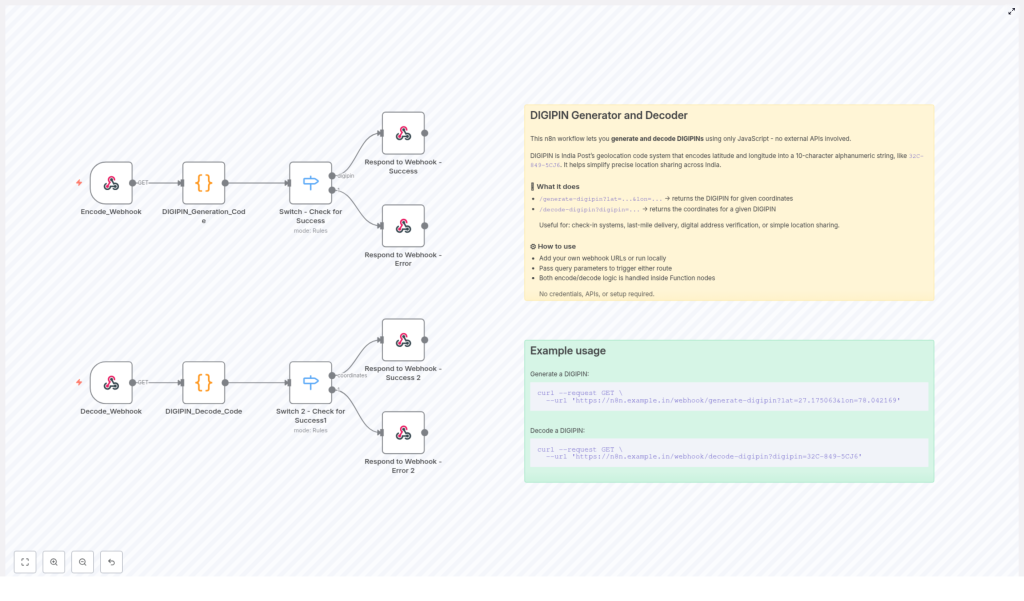
The workflow was designed to handle both DIGIPIN generation and DIGIPIN decoding using JavaScript inside n8n function nodes. The key components were:
Encode_Webhooknode that acceptslatandlonas query parameters and triggers DIGIPIN generation.DIGIPIN_Generation_Codefunction node, which implements the encoding logic based on the bounding box and 4×4 grid.Switch - Check for Successnode that decides whether to send a success or error response after generation.Decode_Webhooknode that receives adigipinquery parameter for decoding.DIGIPIN_Decode_Codefunction node that performs the reverse logic to get latitude and longitude.Switch 2 - Check for Success1node that routes decoding results to success or error handlers.- Dedicated Webhook Success and Error response nodes that format everything as clean JSON API responses.
With this structure, Priya’s team could treat DIGIPIN like a simple internal API, without spinning up a separate backend service.
Putting It To Work: Real Requests, Real Results
To convince the rest of the team, Arjun ran a live demo in their next standup. He opened his terminal and called the n8n instance where he had imported and configured the DIGIPIN workflow.
Generating a DIGIPIN from Coordinates
He started by showing how to generate a DIGIPIN for a known landmark. Using curl, he hit the encode webhook:
curl --request GET \ --url 'https://n8n.example.in/webhook/generate-digipin?lat=27.175063&lon=78.042169'
The response came back as JSON, with a clean DIGIPIN string representing those coordinates. No extra tooling, no external API keys, just their n8n instance doing the work.
Decoding a DIGIPIN Back to Latitude & Longitude
Next, he reversed the process. He took a sample DIGIPIN and passed it to the decode webhook:
curl --request GET \ --url 'https://n8n.example.in/webhook/decode-digipin?digipin=32C-849-5CJ6'
Again, the workflow replied with JSON, this time returning the approximate latitude and longitude encoded in the DIGIPIN.
For the operations team, this meant they could now accept DIGIPINs from customers, decode them on their own infrastructure, and match them with delivery zones or service areas.
Why This n8n DIGIPIN Workflow Changed Their Game
As the weeks passed, Priya started to notice fewer support tickets about “address not found” and more positive feedback from drivers who liked the clarity of having a DIGIPIN in their delivery details.
Looking back, she realized the n8n workflow offered several practical advantages that made adoption painless.
Key Benefits for Teams Using n8n
- No external dependencies – All encoding and decoding runs inside JavaScript function nodes within n8n. There are no external APIs to call, which means no additional latency, no API keys, and stronger privacy by keeping location logic in-house.
- Easy to customize – If India Post updates the DIGIPIN specification, Arjun can adjust the bounding box or character grid directly in the function code. No need to wait for a third-party library update.
- Production ready – The workflow includes robust error handling and clear webhook responses, so it can be dropped into existing apps, internal tools, or partner integrations without major refactoring.
Most importantly, it aligned perfectly with how Priya’s team already worked. They could maintain the logic visually in n8n, version it, and integrate it with other automations like notifications, analytics, or customer support flows.
From Pain Point to Playbook
What started as a recurring headache with failed deliveries turned into a reusable playbook for precise location handling inside their organization. DIGIPIN became more than a code; it became a shared language between operations, engineering, and drivers.
For Priya, the journey was clear:
- Recognize that raw latitude and longitude are not user friendly.
- Adopt DIGIPIN as a compact, human shareable geolocation standard.
- Use the n8n DIGIPIN workflow to generate and decode codes safely within their own infrastructure.
- Integrate it into delivery flows, check-in systems, and address verification processes.
Start Your Own DIGIPIN Story
If you are building anything that touches location sharing, address verification, or last-mile delivery in India, you can follow the same path:
- Import the DIGIPIN workflow template into your n8n instance.
- Use the provided
Encode_WebhookandDecode_Webhookendpoints to test generation and decoding. - Connect those endpoints to your apps, CRMs, delivery tools, or internal dashboards.
Ready to integrate precise geolocation into your product without building everything from scratch? Try this n8n DIGIPIN workflow today. Start with the sample curl commands, then adapt the workflow to your own business rules and data flows.
If this story resonates with the challenges your team faces, share it with your developers or operations leads. It might be the missing link in your location automation stack.
