


Unique QR Code Coupon System for Lead Generation
From Manual Chaos to Confident Automation
If you have ever tried to run a coupon campaign manually, you know how quickly it can become messy. Spreadsheets get out of sync, duplicate leads slip through, and you are never quite sure which codes are still valid. It is stressful, time consuming, and it pulls your focus away from what really matters: building relationships, growing your business, and creating better offers.
Automation gives you a different path. Instead of chasing down coupon codes and updating records by hand, you can design a system that quietly works in the background, assigns unique QR codes, validates them in real time, and keeps your CRM and sheets perfectly aligned.
This is where n8n comes in. With a single workflow, you can transform a basic coupon campaign into a powerful, trackable lead generation engine that runs on autopilot.
Shifting Your Mindset: From Tasks to Systems
Before diving into the template, it helps to think not just in terms of tools, but in terms of systems. Every time someone submits a form, scans a QR code, or redeems a coupon, you have an opportunity to:
- Capture clean, structured lead data
- Deliver a consistent, on-brand experience
- Track performance across your entire campaign
- Free yourself and your team from repetitive work
Instead of asking, “How do I send this coupon?” you start asking, “How can I design a repeatable flow that handles this for me, every time, without fail?”
The n8n workflow template described here is a practical example of that mindset. It turns form submissions, coupon assignment, and QR code validation into a single, cohesive system that you can adapt, extend, and improve over time.
The Vision: A Fully Automated QR Code Coupon Journey
At the heart of this setup is a unique QR code coupon system that connects your landing page, Google Sheets, SuiteCRM, and email delivery, all orchestrated through n8n automation.
The workflow is designed to handle two core actions from start to finish:
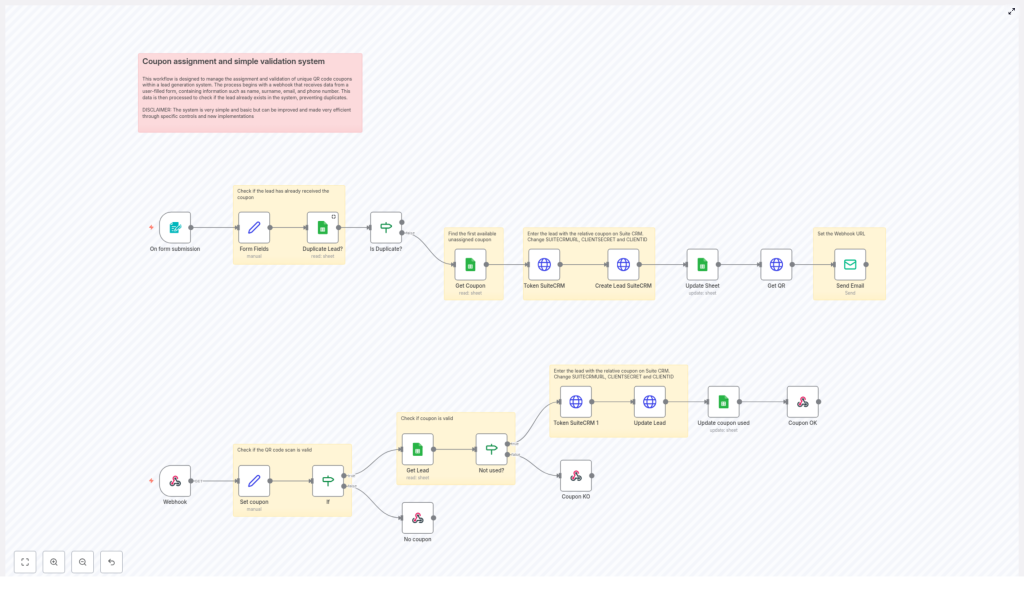
- Lead generation with coupon assignment – When a user submits a form, the system checks for duplicates, assigns a unique coupon, stores the lead in SuiteCRM, and sends a QR code by email.
- Coupon validation – When the QR code is scanned or the coupon code is submitted via webhook, the system validates the code, checks if it was already used, and updates your CRM and Google Sheet accordingly.
Once this is in place, every new lead follows the same reliable path. You get consistency, your leads get instant rewards, and your campaigns become easier to measure and scale.
Step 1 – Capturing Leads and Avoiding Duplicates
The journey begins when someone fills out your landing page form. You collect essential details such as Name, Surname, Email, and Phone. This is where n8n starts doing the heavy lifting for you.
Using the n8n form trigger, the workflow performs several actions in sequence:
- Form Fields node – Extracts the submitted data from the form so each field is cleanly available for later steps.
- Duplicate Lead? (Google Sheets node) – Checks a Google Sheet that acts as your lead and coupon database. It looks for the submitted email to see if this person already exists.
- If node – Based on the result, the workflow decides whether to treat this as a new lead or a duplicate. This protects you from accidentally assigning multiple coupons to the same person.
This simple logic already saves you time and prevents confusion. No more manually scanning spreadsheets or CRM records to see whether someone has already received a coupon.
Step 2 – Assigning a Unique Coupon and Sending the QR Code
When the workflow identifies a new lead, it moves into assignment mode. This is where the system starts to feel truly automated: a coupon is assigned, the CRM is updated, and a QR code is delivered, all in one smooth flow.
Here is what happens behind the scenes:
- Retrieve an available coupon from Google Sheets – The workflow selects the first unassigned coupon from your coupons sheet. This ensures each lead gets a unique code.
- Token SuiteCRM (HTTP Request node) – The workflow requests an authentication token from SuiteCRM using your API credentials. This token is needed for all subsequent CRM operations.
- Create Lead SuiteCRM (HTTP Request node) – Using the token, n8n creates a new Lead record in SuiteCRM, including the form data and the assigned coupon code.
- Update Sheet node – The Google Sheet is updated with the new lead details and the coupon assignment so your sheet stays in sync with your CRM.
- Get QR node – A QR code URL is generated that links directly to your coupon validation webhook. This is what turns a simple code into a scannable, trackable experience.
- Send Email node – Finally, an email is sent to the lead that includes the QR code image and clear instructions on how to redeem the coupon.
From the lead’s perspective, they submit a form and receive a professional, personalized coupon email in minutes. From your perspective, everything is handled automatically, with data captured and stored in the right places.
Step 3 – Validating Coupons via QR Code
The story does not end when the coupon is sent. The real value comes when you can reliably track redemptions and prevent misuse. This is where the coupon validation flow comes into play.
A dedicated webhook in n8n listens for incoming QR code validations. Whenever a coupon QR code is scanned or a coupon code is submitted, the workflow activates and runs through a clear validation process:
- Set coupon – Extracts the coupon code from the incoming request query so it can be checked against your records.
- If node – Confirms that a coupon code was provided and that it exists in your dataset.
- Get Lead (Google Sheets node) – Retrieves the lead details linked to that coupon from the Google Sheet.
- Not used? – Checks whether the coupon has already been redeemed or is still available.
When the Coupon is Valid
If the coupon exists and has not been used, the workflow completes the redemption process:
- Token SuiteCRM 1 node – Generates a SuiteCRM authentication token for this validation step.
- Update Lead (HTTP Request node) – Updates the corresponding lead in SuiteCRM, marking the coupon as used so your CRM always reflects the current status.
- Update coupon used (Google Sheets) – The Google Sheet is updated to mark the coupon as redeemed, keeping your sheet and CRM aligned.
- Coupon OK – Sends a response confirming that the coupon is valid and has been successfully processed.
This gives you accurate, real time visibility into who used which coupon and when, without any manual tracking.
When the Coupon is Invalid or Already Used
If the coupon does not exist or has already been redeemed, the workflow handles that gracefully too:
- No coupon / Coupon KO nodes – Reply with clear, appropriate messages indicating that the coupon is invalid or has already been used.
Instead of confusion at the point of redemption, you provide immediate, consistent feedback. Your system protects your promotions and your customers understand exactly what is happening.
Technical Notes, Best Practices, and Room to Grow
This template is not just a one-off solution. It is a solid foundation you can build on as your campaigns and business grow. To get the most from it, keep these points in mind:
API Credentials and Configuration
- Replace placeholders like
SUITECRMURL,CLIENTID,CLIENTSECRET, and email-related settings with your real environment values. - Test your authentication steps in n8n to confirm that SuiteCRM and your email provider respond correctly before going live.
Using Google Sheets as a Lightweight Database
- The workflow uses Google Sheets to store coupons and leads, which works very well for small and medium scale campaigns.
- If your volume grows significantly, you can use this template as a blueprint and later migrate to a more robust database or a different CRM, while keeping the same overall flow.
Security and Reliability
- Run your n8n instance over HTTPS to protect data in transit.
- Keep your webhook URLs private and consider adding rate limiting or additional validation to avoid misuse.
- Regularly review your logs in n8n to ensure each step is running smoothly and to catch any configuration issues early.
Customization and Experimentation
- Add more form fields and validation rules to qualify leads better.
- Adjust email content and design to match your brand and improve conversion.
- Integrate with other CRMs or marketing platforms if SuiteCRM is not your main system, using similar HTTP Request nodes.
- Introduce different coupon types, expiration dates, or segmentation logic as your campaigns evolve.
Think of this template as a starting point, not a finished product. As you learn what works best for your audience, you can refine, extend, and optimize it without rebuilding everything from scratch.
Turning This Template Into Your Next Growth Lever
Implementing a unique QR code coupon assignment and validation system is more than a technical upgrade. It is a strategic move toward smarter, more scalable marketing. You gain:
- Cleaner lead acquisition with automatic duplicate checks
- Faster, more reliable coupon delivery through QR code emails
- Accurate tracking of coupon usage inside Google Sheets and SuiteCRM
- More time and mental space to focus on strategy instead of manual tasks
Every campaign you run with this workflow teaches you something new. You can test different offers, tweak messaging, and experiment with follow-up sequences, all while knowing that the operational side is handled by automation.
Ready to Build Your Own Automated Coupon Engine?
You do not need to start from a blank canvas. This n8n workflow template gives you a ready made structure that you can plug into your environment, customize, and grow with.
Set it up once, iterate as you go, and let automation carry the repetitive workload so you can focus on high impact work: designing better campaigns, nurturing leads, and scaling your business.
Start deploying your unique QR code coupon system today and turn every new lead into a smooth, trackable, and rewarding experience.
