


Weekly Shopping List & Shopper Update Workflow
From Repeating Tasks To Reliable Automation
Every week, the same routine shows up on your to-do list: prepare a shopping list, send it out, follow up on changes, update shopper details, and make sure everything is correct. It is simple work, but it steals time and focus you could spend on strategy, growth, or simply taking a break.
This is where automation with n8n becomes a powerful ally. Instead of chasing the same tasks every Friday, you can let a workflow handle them for you, consistently and accurately. The Weekly Shopping List & Shopper Update Workflow is not just a small optimization. It can be your first step toward a more automated, focused way of working.
In this article, you will walk through the journey from manual process to a fully automated system that sends weekly shopping lists, displays shopper information in an online form, and updates shopper records with a confirmation page. You will see how each node in n8n plays its part, and how this template can become the starting point for even more powerful automation in your life or business.
Reimagining Your Weekly Shopping Process
Before diving into the technical steps, pause for a moment and imagine this scenario:
- Your shopping list is sent automatically every Friday, without you touching a thing.
- Shopper details are always up to date, because people can easily review and update their information online.
- Everyone receives clear confirmation when their details change, so there is no confusion or guesswork.
This is exactly what this n8n workflow template offers. It combines scheduling, data retrieval, email sending, and form-based updates into one coherent flow. You set it up once, then let it run in the background while you focus on higher-value work.
The Workflow At A Glance
The template is built around three connected areas, each covering a key part of the process:
- Weekly Shopping List Dispatch – automatically sends an email with the latest shopping list.
- Shopper Information Display Form – shows current shopper details in an online form for review or editing.
- Shopper Information Update and Confirmation – updates the database with new details and confirms the change.
Let us walk through these steps as a journey from automation trigger to final confirmation.
Step 1: Let n8n Handle Your Weekly Shopping List Dispatch
The journey begins with consistency. Instead of remembering every Friday to send a list, you let a Cron node do the remembering for you.
Automated Friday Trigger
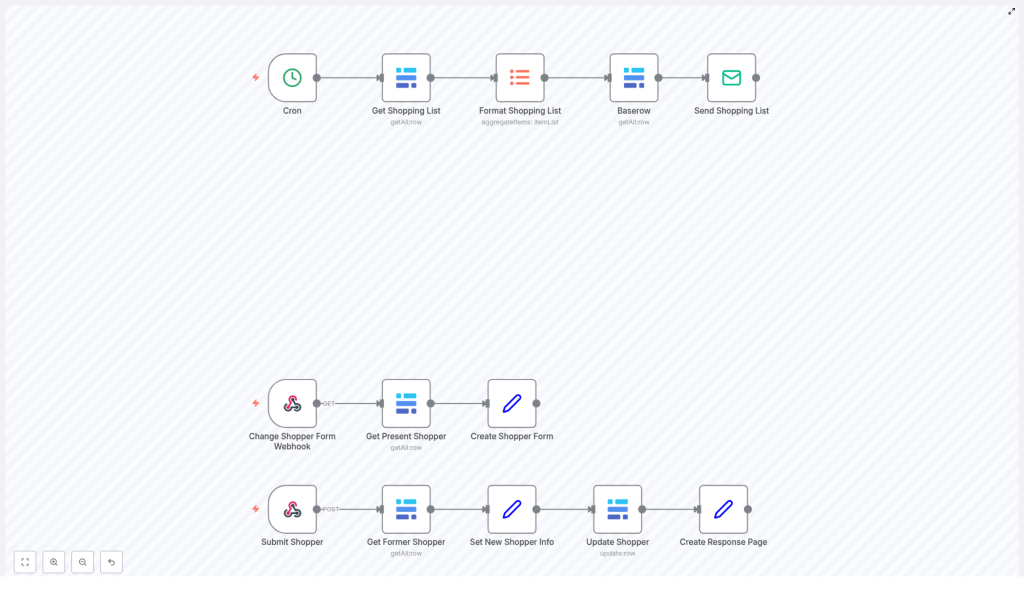
The workflow starts with a Cron node that triggers the process every Friday. This scheduled trigger ensures your shopping list workflow runs on time, every time, without manual effort.
Fetching And Formatting The Shopping List
Once triggered, the workflow uses the Get Shopping List node to fetch all current shopping list items from your database. This is the raw data that powers the rest of the flow.
Next, the Format Shopping List node aggregates and refines these items into a single, consolidated list. This step makes the data easy to read and ready to be shared, which is essential for a clear, professional shopping email.
Enriching With Shopper Details And Sending The Email
After the list is formatted, a Baserow node retrieves the relevant shopper details from your database. By combining the shopping list with accurate shopper information, the workflow personalizes the communication and keeps everything in sync.
Finally, the Send Shopping List node sends the email to the shopper. The result is a fully automated weekly shopping list dispatch that happens without you lifting a finger. You gain back time, reduce the chance of mistakes, and build a more reliable routine for your shoppers.
Step 2: Empower Shoppers With An Online Information Form
Automation is not only about sending data out. It is also about making it easy for people to update and correct their own information. That is where the shopper information display form comes in.
Starting With A Webhook
The Change Shopper Form Webhook node listens for a GET request. When someone visits the form URL, this webhook triggers the retrieval of the current shopper’s information.
Generating A Pre-Filled HTML Form
Once the webhook is triggered, the Create Shopper Form node builds an HTML form that is already filled with the existing shopper details. This means shoppers do not have to type everything from scratch. They can simply review, adjust what is outdated, and submit the changes.
This small convenience has a big impact. It reduces friction, encourages accurate data, and gives shoppers a sense of control over their own information.
Step 3: Update Shopper Information And Confirm The Change
The final part of the journey is about trust. When someone updates their details, they want to know the change has been applied correctly. The workflow handles this entire process from submission to confirmation.
Receiving Updated Shopper Details
When the shopper submits the form, the Submit Shopper webhook receives a POST request with the updated information. This triggers the second half of the workflow.
Applying The Changes In The Database
The workflow first fetches the previous shopper data, which can be useful for comparison or logging. It then sets the new shopper information based on the submitted form fields.
Using the Update Shopper node, the workflow writes these new details into the database. This step ensures that your records are always current and that the shopper information stays in sync with reality.
Creating A Clear Confirmation Page
To close the loop, the Create Response Page node generates an HTML confirmation page. This page confirms that the shopper details have been updated successfully.
This final confirmation builds confidence and reduces follow-up questions. Shoppers know their changes have been received and applied, and you know your system is accurate.
Why This n8n Workflow Template Matters
Behind the individual nodes and steps, there is a bigger story. By implementing this workflow, you are not just automating a weekly task. You are building a more resilient and scalable system for your work.
Key Benefits You Gain
- Automated weekly shopping list distribution via email, triggered by a reliable schedule.
- Simple online editing of shopper information through a pre-filled HTML form.
- Consistent, accurate data thanks to the use of the Update Shopper node and direct database updates.
- Instant confirmation for users after updating their details, providing clarity and trust.
A Stepping Stone To Broader Automation
This template is a great starting point for anyone looking to automate with n8n. Once it is running, you can build on it in many directions, for example:
- Add notifications to your internal team whenever shopper details change.
- Include logging or analytics nodes to track updates over time.
Each improvement turns a simple weekly shopping list workflow into a more powerful automation system tailored to your needs.
Adopt An Automation Mindset
Every repetitive process you automate frees up mental space and time. This workflow shows how a practical use case, like managing a weekly shopping list and shopper updates, can be transformed into a smooth, dependable automation.
As you implement this template, consider it a mindset shift. Instead of asking, “How do I get this done every week?” you start asking, “How can I design this so it runs itself?” That shift is where long-term productivity and growth begin.
Get Started With The Weekly Shopping List & Shopper Update Template
You already have the building blocks. This n8n template ties them together into a complete journey from scheduled email to updated shopper records and confirmation.
Use it as it is to streamline your shopping management process, or customize it to match your branding, your shopper needs, and your internal systems. Adjust the form design, extend the email content, or connect new tools as you grow more comfortable with n8n.
The important step is to start. Once this workflow is in place, you will see how much more you can automate and how much time you can reclaim.
