


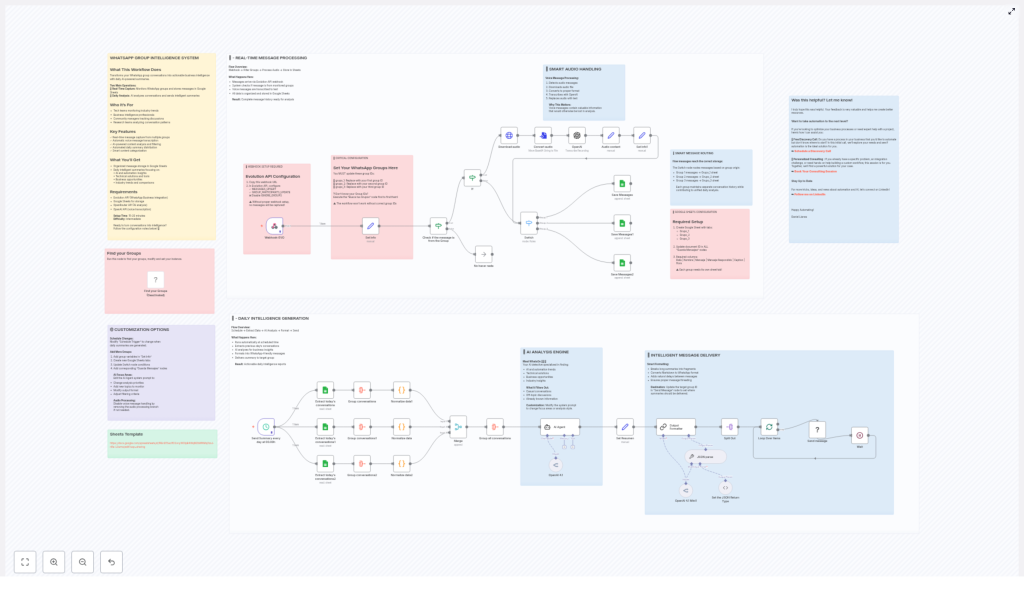
WhatsApp Group Intelligence System Workflow Guide
From Noise To Clarity: Turning WhatsApp Groups Into Daily Intelligence
Your WhatsApp groups are full of ideas, insights, questions, and opportunities. Yet most days, those messages rush by like a river you do not have time to cross. You scroll, skim, and promise yourself you will come back later, but later never comes.
This is where automation becomes more than a productivity trick. It becomes a way to reclaim your focus, protect your time, and turn scattered conversations into structured knowledge you can actually use.
The WhatsApp Group Intelligence System is an n8n workflow template designed to do exactly that. It quietly listens to your groups, organizes everything in Google Sheets, and every day delivers a clear, AI-powered summary of what truly mattered.
Think of it as your personal analyst that never sleeps, never misses a message, and hands you a concise briefing every morning so you can make better decisions with less effort.
Why This Workflow Matters For You And Your Team
If you are part of active WhatsApp groups, you already know the problem:
- Important links and ideas get buried in casual chat
- Voice notes hold valuable context that is hard to search later
- Team members are in different time zones and miss key conversations
- There is no single, structured place to review what happened in a day
This workflow helps you step out of reactive mode and into a more intentional, data-driven way of working.
Who Will Benefit Most
This n8n template is especially powerful for people and teams who live in group conversations:
- Tech teams monitoring industry trends and new tools
- Business intelligence professionals tracking signals and patterns
- Community managers who need to understand what members really care about
- Research teams analyzing conversation themes and questions over time
If you have ever thought, “There is so much value in these chats, but I cannot keep up,” this workflow is your next step toward a more automated, focused workflow.
What This n8n Workflow Actually Does
At its core, the WhatsApp Group Intelligence System has two main operations working together:
- Real-time capture of WhatsApp messages into Google Sheets
- Daily AI analysis that turns those messages into clear summaries
The result is a living, structured knowledge base plus a daily intelligence report you can read in a few minutes.
Key Features That Unlock The Transformation
- ✅ Real-time message capture from multiple WhatsApp groups
- ✅ Automatic transcription of voice messages using OpenAI
- ✅ AI-powered content analysis and smart filtering of noise
- ✅ Automated daily summary delivery back into WhatsApp
- ✅ Smart categorization of content into themes and opportunities
What You Receive Every Day
All your group conversations are stored in Google Sheets, ready for deeper analysis or reporting. On top of that, you get daily AI summaries focused on:
- AI and automation insights shared in the group
- Technical solutions, tools, and workarounds
- Potential business opportunities and leads
- Industry trends, comparisons, and useful references
Instead of guessing what you missed, you get a curated overview that lets you move forward with clarity.
Before You Begin: What You Need To Set Up
You can build this system in about 15-20 minutes if you already use n8n and have the required tools ready. The difficulty level is intermediate, which makes it a great project if you want to stretch your automation skills without going too deep into complexity.
Required Services & Integrations
- Evolution API for WhatsApp Business integration
- Google Sheets as your structured storage
- OpenRouter API for AI analysis
- OpenAI API for voice message transcription
With these four pieces in place, your n8n workflow can listen, store, analyze, and report automatically.
Part 1: Real-Time Message Processing – Capturing The Conversation Stream
Your journey with this workflow begins at the moment a WhatsApp message is sent. From there, n8n takes over and ensures nothing valuable slips through the cracks.
High-Level Flow
Flow overview:
Webhook → Filter Groups → Process Audio → Store in Sheets
What Happens Behind The Scenes
- Messages arrive through an Evolution API webhook
- The workflow checks whether each message comes from one of your monitored groups
- If it is a voice message, it is automatically transcribed into text
- All structured data is then saved into Google Sheets
The outcome is a complete, searchable message history that is ready for AI analysis and long-term reference.
Critical Step: Setting Your WhatsApp Group IDs
To make the system work for your own groups, you must tell the workflow which groups to track. This is done by updating the group IDs:
grupo_1: Replace with your first WhatsApp group IDgrupo_2: Replace with your second WhatsApp group IDgrupo_3: Replace with your third WhatsApp group ID
If you do not know your group IDs yet, run the “Find your Groups” node first. It will help you retrieve the IDs you need.
Important: The workflow will not function correctly without valid group IDs.
Webhook Configuration With Evolution API
For n8n to receive messages in real time, you need to configure the webhook in Evolution API.
- Copy the webhook URL from your n8n Webhook node
- In Evolution API, enable the following:
- ✅ MESSAGES_UPSERT
- ✅ GROUP_PARTICIPANTS_UPDATE
- ❌ Disable IGNORE_GROUPS
Without proper webhook setup, no messages will be captured, so take a moment to verify this step carefully.
Smart Audio Handling: Never Lose A Voice Note Again
Voice messages are often where people share the most context, nuance, and detail. This workflow treats them as first-class data, not as unsearchable noise.
Voice message processing sequence:
- Detects when an incoming message is an audio file
- Downloads the audio from WhatsApp via Evolution API
- Converts the file to the correct format if needed
- Uses OpenAI to transcribe the voice message into text
- Replaces the audio content with the transcribed text for storage and analysis
This means your AI analysis later can include the full content of voice notes, not just typed messages.
Smart Message Routing: Keeping Each Group Organized
If you track multiple groups, it is important to preserve context. This workflow uses a Switch node in n8n to route messages into the correct sheet.
- Messages from Group 1 → saved into the
Grupo_1tab - Messages from Group 2 → saved into the
Grupo_2tab - Messages from Group 3 → saved into the
Grupo_3tab
Each group keeps its own conversation history, while still feeding into a unified daily intelligence report later on.
Google Sheets Setup: Building Your Conversation Database
Before you run the workflow, prepare your Google Sheets document so n8n has a clear structure to work with.
- Create a Google Sheets file with the following tabs:
Grupo_1Grupo_2Grupo_3
- Copy the document ID and update it in all the “Save Messages” nodes in your n8n workflow
- In each tab, create these required columns:
Data | Nombre | Mensaje | Mensaje Respondido | Caption | Hora
Each group must have its own dedicated tab so the system can store and reference messages correctly.
Part 2: Daily Intelligence Generation – Turning History Into Insight
Once your messages are flowing into Google Sheets, the second part of the journey begins. This is where your system transforms raw conversation logs into meaningful, daily intelligence that supports better decisions.
High-Level Flow
Flow overview:
Schedule → Extract Data → AI Analysis → Format → Send
What The Daily Workflow Does
- Runs automatically at a scheduled time you define
- Extracts the previous day’s conversations from your Google Sheets tabs
- Uses AI to identify key insights, themes, and opportunities
- Formats the findings into WhatsApp-friendly messages
- Sends the final summary to a target group of your choice
End result: A concise, actionable daily intelligence report delivered right where you already work – in WhatsApp.
Meet Your AI Analyst: WhatsOn
At the heart of the analysis is an AI agent called WhatsOn, designed to act like a detective that scans your group conversations for what truly matters.
WhatsOn focuses on:
- AI and automation trends mentioned in your groups
- Technical solutions, tools, and tips that people share
- Potential business opportunities, leads, or ideas
- Industry insights, benchmarks, and comparisons
What it filters out by default:
- Casual small talk and off-topic chatter
- Repeated or already well-known information
- Messages that do not contribute to learning or decision making
You can customize the AI agent’s system prompt to adjust its focus, tone, or output format, which makes this workflow a flexible foundation for many use cases.
Intelligent Message Delivery Back To WhatsApp
Once the analysis is done, the workflow takes care of presenting the results in a way that feels natural in WhatsApp.
Smart formatting features:
- Splits long summaries into shorter message fragments
- Converts Markdown-style text into WhatsApp-friendly formatting
- Adds natural delays between messages so they are easier to read
- Maintains proper message threading for better context
To control where these summaries go, update the target group ID in the “Send Message” node. This can be a dedicated “Daily Summary” group, a leadership group, or any channel where decisions are made.
Customization: Make The Workflow Your Own
One of the biggest advantages of building this in n8n is that you are not locked into a rigid, one-size-fits-all tool. You can evolve this workflow as your needs, team, and ambitions grow.
Adjusting The Schedule
Use the “Schedule Trigger” node to decide when your daily summaries are generated. You might:
- Send a briefing first thing in the morning
- Generate an end-of-day wrap-up
- Run multiple summaries for different time zones
Adding More WhatsApp Groups
If you want to track more than three groups, simply extend the existing structure:
- Add new group variables in the “Set Info” node
- Create additional tabs in your Google Sheets document
- Update the Switch node conditions to route new groups correctly
- Create matching “Save Messages” nodes for each new group
Refining AI Focus Areas
You can shape your AI summaries by editing the AI Agent system prompt. For example, you can:
- Emphasize certain topics like sales opportunities or product feedback
- Change the tone to be more concise, more narrative, or more technical
- Ask for bullet points, sections, or specific output formats
- Adjust how aggressively it filters out non-essential content
Managing Audio Processing
If your groups rarely use voice notes, or you prefer a simpler setup, you can disable voice message handling by removing or deactivating that branch of the workflow. The rest of the system will continue to function normally.
Google Sheets Template
To speed up setup, you can start from this ready-made Google Sheets structure:
Taking The Next Step In Your Automation Journey
Implementing this workflow is more than just “setting up a template.” It is a mindset shift. You are choosing to let automation handle the repetitive work so you can spend your energy on strategy, creativity, and meaningful decisions.
You do not have to get it perfect on day one. Start with the basic setup, let it run for a few days, then refine:
- Tweak the AI prompt to match your priorities
- Add or remove groups as your needs evolve
- Experiment with different summary times
Each small improvement compounds over time, and soon you will have a custom intelligence system tailored to the way you and your team work.
Was This Helpful? I Would Love To Hear From You
Your feedback helps shape better tools and clearer guides. If this workflow helped you reclaim time or uncover insights you would have otherwise missed, let me know.
Want To Take Your Automation Even Further?
If you are ready to go beyond this template and design deeper automations for your business, here are two ways I can support you:
- 🚀 Free Discovery Call: Have a process you want to automate but are not sure where to begin? In this initial call, we will explore your use case and see whether automation is the right solution.
Schedule a Discovery Call - 💡 Personalized Consulting: Already know what you want to build and need expert guidance or hands-on help? This session is for specific problems, integrations, or custom n8n workflows.
Book Your Consulting Session
Stay Connected And Keep Learning
If you enjoy experimenting with automation, AI, and n8n templates, let us stay in touch. I regularly share ideas, examples, and insights on how to automate real-world processes.
