


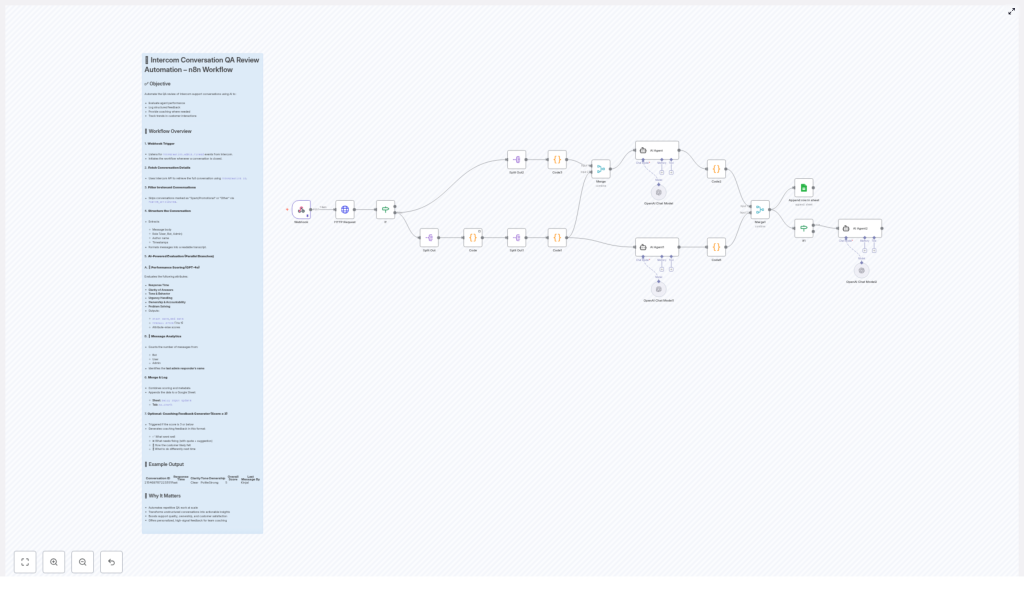
Automated QA Review for Intercom Conversations Using AI & n8n
Every customer conversation is a chance to build trust, strengthen your brand, and create loyal fans. Yet when your inbox is full and your team is busy, it is easy for quality checks to slip through the cracks. Manual QA reviews take time, they can feel inconsistent, and they often happen too late to really help your team grow.
That is where automation becomes a powerful ally. By combining n8n, Intercom, and AI, you can transform routine support interactions into a steady stream of insights, coaching moments, and measurable improvements. Instead of spending hours reviewing chats, you can focus on leading your team, improving processes, and designing a support experience you are proud of.
This article walks you through an n8n workflow template that automatically performs QA reviews on Intercom conversations using AI. Think of it as a practical first step toward a more automated, focused, and scalable support operation.
The Problem: Manual QA Slows You Down
Support leaders often know exactly what “good” looks like, yet they struggle to review conversations at scale. Common challenges include:
- Endless copy-pasting of chat logs into documents or spreadsheets
- Inconsistent scoring between different reviewers
- Little time left for meaningful coaching and training
- Difficulty spotting long term trends in support quality
As your team grows, this manual approach simply does not scale. The more conversations you have, the harder it becomes to keep quality high without burning out your managers.
The Shift: From Manual Checks To Automated Insight
Automating QA is not about replacing human judgment. It is about giving your team a reliable system that:
- Reviews every closed Intercom conversation consistently
- Highlights where agents excel and where they need support
- Delivers clear, structured feedback directly from your existing data
- Frees your time for strategic work instead of repetitive review tasks
With the right mindset, this n8n workflow is more than a technical setup. It becomes a foundation for a culture of continuous improvement, where data and AI support your people instead of overwhelming them.
The Goal: Automated QA for Intercom Conversations
The core objective of this automation is simple and powerful. Whenever an Intercom conversation is closed, the workflow automatically:
- Evaluates the conversation using AI, focusing on response time, clarity, tone, urgency handling, ownership, and problem solving
- Logs structured scores and metadata for every conversation in a Google Sheet
- Generates personalized coaching feedback for low scoring interactions
- Builds a long term data set so you can track support quality trends over time
Once this is in place, every closed conversation turns into a tiny feedback loop, helping your team get better with almost no extra effort.
How the n8n Workflow Works, Step by Step
Let us walk through how the template operates, from the moment a conversation closes in Intercom to the moment the insights land in your Google Sheet.
1. Webhook Trigger: Start When Intercom Says “Done”
The journey begins with a Webhook node in n8n. This webhook listens for conversation.admin.closed events sent by Intercom. Each time a conversation is closed by an admin, Intercom notifies this webhook.
That notification includes the conversation ID, which becomes the key used throughout the rest of the workflow. You no longer need to check which conversations to review, because the system starts the analysis automatically at the perfect moment.
2. Fetch Conversation Details from Intercom
Next, the workflow uses the Intercom API to fetch the full conversation details based on that ID. This step gathers:
- All messages exchanged in the conversation
- The role of each sender (User, Bot, Admin)
- Author names
- Accurate timestamps and metadata
Instead of scanning through messy chat logs, the workflow pulls everything into one clean, machine readable structure that AI can understand and evaluate.
3. Filter Out Irrelevant Conversations
Not every closed conversation deserves a full QA review. To keep your data focused, the workflow automatically filters out:
- Conversations marked as “Spam/Promotional”
- Conversations categorized as “Other” types that you do not want to analyze
Only relevant support conversations move forward, which protects your time and keeps your QA metrics meaningful.
4. Turn Raw Messages Into a Structured Transcript
Now it is time to prepare the conversation for AI evaluation. The workflow processes the raw Intercom data and creates a structured transcript that includes:
- Message body content with HTML tags removed, so the text is clean and readable
- The role of each sender, such as User, Bot, or Admin
- The author name for each message
- Timestamps formatted in a human friendly way
This step transforms a messy sequence of events into a clear narrative that an AI model can interpret just like a human reviewer would.
5. AI Evaluation in Parallel: Performance and Message Analytics
With the transcript ready, the workflow launches two AI powered analyses in parallel. Running them side by side keeps the process fast and efficient.
A. Performance Scoring with GPT-4o
First, the conversation is sent to GPT-4o for a detailed quality assessment. The model evaluates several key attributes, such as:
- Response time and how quickly the agent replied
- Clarity and politeness of the messages
- How well urgency was recognized and handled
- Ownership of the issue and willingness to help
- Effectiveness of problem solving and resolution
The output is structured and consistent. GPT-4o returns:
- Individual attribute scores
- The conversation start and end dates
- An overall score on a scale from 1 to 5
This gives you a quick, objective snapshot of how the conversation went, without reading every line yourself.
B. Message Analytics: Who Said What, and How Often
In parallel, another branch of the workflow focuses on message analytics. It counts how many messages were sent by each role:
- Number of Bot messages
- Number of User messages
- Number of Admin messages
It also identifies the last admin who responded. This is especially useful when multiple agents collaborate on the same conversation or when you want to track performance by individual team member.
6. Merge Results and Log Everything in Google Sheets
Once both analyses are complete, the workflow merges the results into a single dataset that includes:
- All performance scores from GPT-4o
- Message counts and the last responding admin
- Conversation timing and other key metadata
This combined record is then appended to a Google Sheet. Over time, this sheet becomes your lightweight QA database, where you can:
- Review individual conversations and scores
- Track quality trends week by week or month by month
- Export data for reporting or further analysis
No more scattered notes or ad hoc spreadsheets. You get a single, growing source of truth for support quality.
7. Optional Coaching Feedback for Low Scores
Numbers are useful, but they are not enough on their own. To truly help your team grow, you also need clear, constructive guidance.
That is why the workflow includes an optional coaching step. If the overall score for a conversation is 3 or less, an additional AI evaluation is triggered. This AI pass generates friendly, direct coaching feedback that covers:
- What the agent did well, so strengths are recognized
- Specific areas to improve, with exact quotes from the conversation
- Examples of better replies the agent could have used
- How the customer likely felt during the interaction
- Practical advice for handling similar situations in the future
This turns low scoring conversations into valuable learning opportunities instead of silent failures. Your team receives actionable tips that they can apply immediately, and you get a scalable way to support their development.
Why This n8n Automation Matters for Your Growth
Implementing this workflow is not just a technical upgrade. It is a strategic move that reshapes how you invest your time and energy as a support leader or business owner.
- Save time and gain consistency by removing manual, repetitive QA work and letting the automation review every closed conversation with the same criteria.
- Turn unstructured chat logs into insights that you can act on, instead of letting conversations disappear into the archive.
- Boost accountability and customer experience by making quality visible and measurable for every agent.
- Enable data driven coaching with clear scores, rich context, and AI generated guidance that helps your team grow faster.
Most importantly, this template is a gateway to a more automated way of working. Once you experience what one well designed workflow can do, it becomes easier to imagine and build the next one.
Using This Template as Your First Step to Deeper Automation
This n8n workflow template gives you a ready made foundation. You can use it as is, or customize it to fit your processes, your scoring model, or your data stack. A few ideas to extend it over time:
- Send low scoring conversation summaries to a private Slack channel for team leads
- Trigger follow up tasks in your project management tool when certain issues appear
- Segment QA results by product line, language, or customer type
Automation is a journey, not a single project. Start simple, let the data guide you, and refine as you go. With each improvement, you reclaim more time and create more space for deep work, coaching, and strategy.
Take Action: Turn Your Intercom Conversations Into Coaching Fuel
If you are ready to move beyond manual QA and let automation handle the heavy lifting, this template is a powerful place to begin. It combines Intercom, n8n, GPT-4o, and Google Sheets into a practical system that works quietly in the background while you focus on what matters most.
Build on the template, learn from it, and make it your own. Each conversation your team has can become a chance to learn, improve, and deliver a better customer experience.
Start today, experiment boldly, and let automation support the next stage of your personal and business growth.
