


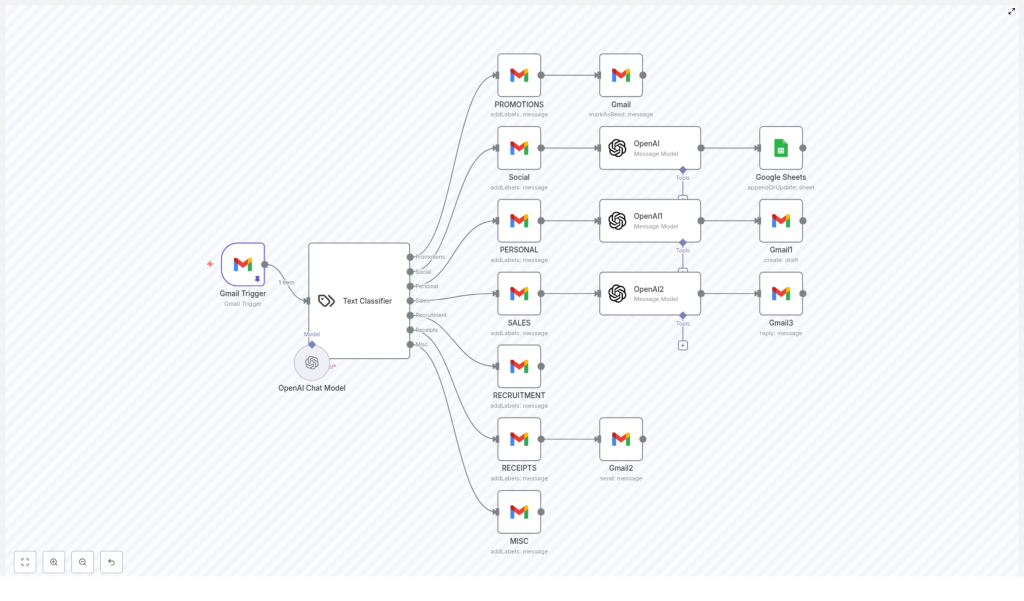
Automated Email Categorization and Response Workflow
Overview
This n8n workflow template delivers a fully automated email management pipeline by connecting Gmail with AI-driven classification and response logic. It combines a Gmail Trigger, an OpenAI-powered Text Classifier, and category-specific actions to sort, label, summarize, and respond to incoming messages with minimal manual intervention.
Designed for professionals and automation teams, this workflow runs on a 5-minute polling interval, analyzes each new message, assigns a semantic category, and then executes tailored downstream actions in Gmail and Google Sheets. The result is a more structured inbox, faster response times, and standardized communication at scale.
Key Capabilities
- Automatic detection of new emails in Gmail on a 5-minute schedule
- AI-based classification of messages using an OpenAI GPT-4o-mini model
- Automated Gmail labeling aligned with the detected category
- Category-specific handling, including summaries, drafts, auto-replies, and forwarding
- Persistent logging of relevant information in Google Sheets for reporting and audit
Workflow Architecture
1. Gmail Trigger – Inbound Email Monitoring
The workflow begins with a Gmail Trigger node configured to monitor your inbox. It checks for new messages every 5 minutes and initiates the workflow each time a new email is detected. This polling-based trigger ensures that:
- No manual refresh or intervention is required
- Processing remains near real-time without overloading the Gmail API
- All subsequent AI and automation logic only runs when new data is available
2. AI Text Classification with OpenAI
Once an email is captured by the trigger, its subject and snippet are passed to a Text Classifier node. This node uses the OpenAI GPT-4o-mini model to interpret the content and assign a high-level intent category.
The classifier maps each email into one of the following predefined categories:
- Promotions
- Social
- Personal
- Sales
- Recruitment
- Receipts
- Misc
Using a language model for classification provides greater flexibility compared to static keyword rules, which is particularly beneficial in production environments where email content and formats can vary significantly.
3. Automated Gmail Labeling
After classification, the workflow applies a corresponding Gmail label to each message. For example, promotional emails may receive a label such as CATEGORY_PROMOTIONS, while other categories receive their own dedicated labels.
This structured labeling strategy:
- Improves inbox organization for end users
- Enables downstream filtering, reporting, or routing rules
- Provides a clear audit trail of how emails were categorized by the automation
Category-Specific Automation Logic
Once an email is categorized and labeled, the workflow branches into different execution paths. Each category has its own handling logic designed around common operational requirements.
Promotions
Promotional emails are typically high volume and low priority. For this category, the workflow:
- Applies the appropriate Gmail label for promotions
- Marks the email as read automatically
This keeps the inbox clear of clutter while still retaining the messages for later reference if needed.
Social
Social notifications can be informative, but they are rarely urgent on an individual basis. For Social emails, the workflow:
- Generates a concise summary using the OpenAI integration
- Appends the summary and relevant metadata to a Google Sheet
This creates a consolidated log of social activity, which is valuable for tracking engagement trends or periodic review, without the need to inspect each notification separately.
Personal
For Personal emails, the workflow focuses on assisting rather than fully automating the response. It:
- Uses AI to draft a personalized reply based on the email content
- Creates a Gmail draft with the generated response
The human recipient can then review, edit, and send the draft, ensuring that sensitive or high-touch communications maintain a human approval step while still benefiting from AI-assisted writing.
Sales
Sales inquiries often require fast, consistent, and professional responses. For the Sales category, the workflow:
- Generates a sales-oriented reply using the OpenAI model
- Automatically sends the reply to the original sender via Gmail
This pattern is ideal for standard inquiries, lead qualification responses, or initial follow-ups, where speed and consistency are critical.
Recruitment
Recruitment-related emails are labeled for streamlined access and later processing. In this template:
- The email is tagged with the appropriate recruitment label
- No additional automated actions are executed within the current workflow
This provides a foundation that can be extended with further automation, such as ATS integration, candidate scoring, or interview scheduling.
Receipts
For Receipts, the workflow supports internal finance or record-keeping processes. It:
- Forwards the email to an internal address, for example an accounting or archival inbox
This ensures that payment confirmations and transaction records are routed to the appropriate internal stakeholders or systems without manual forwarding.
Misc
Any email that does not clearly fit another category is assigned to Misc. For these:
- The workflow applies a generic label to mark them as miscellaneous
This prevents uncategorized messages from being ignored while still keeping them distinguishable from higher priority classes.
Operational Benefits
- Time efficiency: Routine sorting, routing, and responses are handled automatically, which reduces manual triage and frees staff for higher value work.
- Inbox organization: Consistent labeling and handling rules keep Gmail accounts structured and easier to navigate, even at high email volumes.
- Consistent communication: AI-generated responses maintain a professional tone and standardized messaging for both personal-assist and fully automated replies.
- Centralized records: Storing summaries in Google Sheets provides a lightweight reporting and audit layer for social and other non-critical communications.
Implementation Considerations and Best Practices
- Start with the provided categories, then refine or extend them as you learn from real traffic.
- Review AI-generated drafts for personal and sensitive categories before enabling full auto-send behavior.
- Use Gmail labels strategically so that they can support additional filters, dashboards, or downstream n8n workflows.
- Monitor performance and misclassifications to continuously improve your prompts and classification logic.
Get Started
Deploy this n8n workflow to modernize your email operations, reduce inbox noise, and improve response times with AI-driven automation. It is suitable for individual professionals, sales teams, customer operations, and any organization that manages a high volume of inbound email.
If you would like to adapt this template to your specific processes or integrate it with additional systems, contact us to discuss a customized automation design.
