


How to Automatically Back Up n8n Workflows to a GitHub Repository
Why Automate n8n Workflow Backups
For teams that rely on n8n in production, treating workflows as versioned, auditable assets is essential. Automated backups protect against accidental deletions, configuration drift, and infrastructure failures, while also enabling proper change tracking and collaboration.
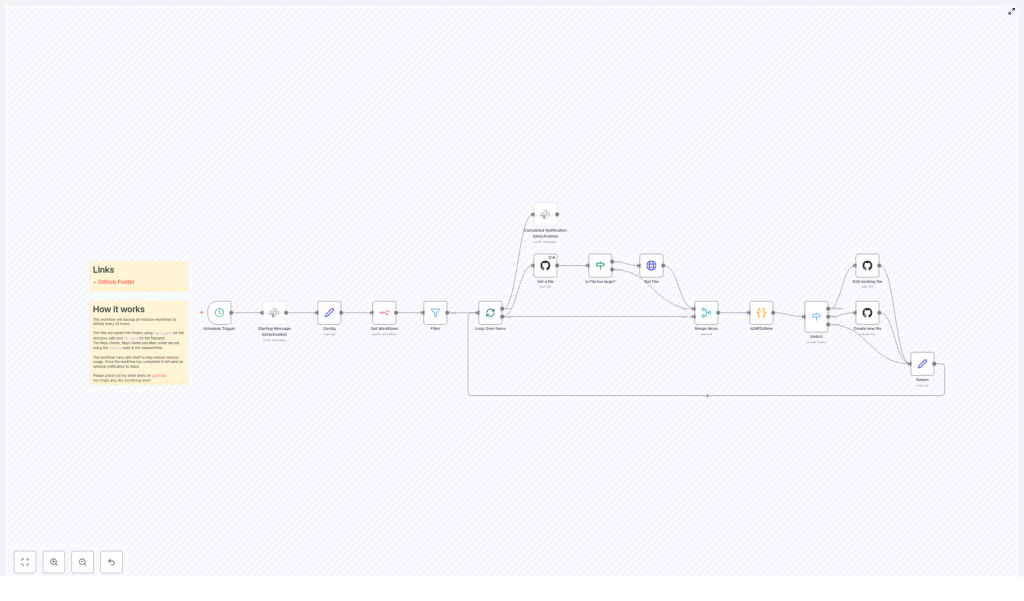
This article presents an n8n workflow template that periodically exports all workflows from an n8n instance and commits them as JSON files to a GitHub repository. By default, the workflow runs every 24 hours, compares the current state of each workflow with what is stored in GitHub, and then creates, updates, or skips files as appropriate. The result is a lightweight, fully automated version control layer for your automation environment.
High-Level Architecture of the Backup Workflow
The workflow is designed around a few core principles: scheduled execution, incremental backup, efficient comparison, and safe interaction with GitHub. At a high level it performs the following actions:
- Triggers on a fixed schedule to initiate the backup run.
- Retrieves workflows from the n8n instance, with an optimization to focus on recent updates.
- Loops through workflows one by one to control memory usage and error handling.
- Checks whether a corresponding JSON file exists in GitHub.
- Compares existing and current workflow definitions to detect changes.
- Creates or updates JSON files in a specified repository path.
- Optionally sends a Slack notification when the backup process completes.
Key Components and Nodes
1. Schedule Trigger – Automated Backup Cadence
The workflow begins with a Schedule Trigger node configured to run every 24 hours. This ensures that backups happen consistently without requiring manual intervention. The schedule can be adjusted to match your operational needs, for example to run more frequently in highly dynamic environments.
2. Centralized Configuration via Config Node
To make the template portable and easy to maintain, a dedicated Config node stores the core parameters used throughout the workflow:
repo_owner– GitHub user or organization that owns the repository.repo_name– Name of the GitHub repository where backups are stored.repo_pathandsub_path– Directory structure within the repository that will contain the workflow JSON files.
These configuration values are referenced by multiple GitHub nodes, which keeps the workflow flexible and reduces the risk of inconsistent settings.
3. Workflow Retrieval and Filtering
The Get Workflows node queries the n8n instance for all available workflows. To avoid unnecessary processing and API calls, the result is passed to a Filter node that narrows the list to workflows updated within the last 24 hours. This incremental backup strategy is particularly useful in large installations where hundreds or thousands of workflows may exist.
4. Loop Over Items for Controlled Processing
After filtering, each workflow is processed individually using a Loop Over Items node. This pattern offers several operational benefits:
- Improved reliability, since failures in one item do not affect the others.
- Reduced memory footprint, because only a single workflow payload is handled at a time.
- Clearer logging and troubleshooting, as each iteration corresponds to a specific workflow.
5. GitHub File Existence and Size Checks
Within the loop, the workflow first checks whether a corresponding JSON file already exists in the GitHub repository. This is handled by the GitHub Get a file node, which attempts to read the existing file based on the naming convention and repository path defined in the Config node.
If the file does not exist, or if GitHub reports that the file is too large to be retrieved directly, the workflow routes the item through additional logic:
- Is File Too Large? – A check that evaluates whether the file exceeds GitHub’s size limits.
- Get File – A node used to download and handle large files in a controlled way when necessary.
This pre-validation step prevents common API errors and ensures that large workflow definitions are handled gracefully.
6. Determining Whether a Workflow Has Changed
The comparison logic is encapsulated in an isDiffOrNew code node. Its purpose is to accurately determine whether the current workflow from n8n is:
- Identical to the version already stored in GitHub.
- Modified compared to the stored version.
- Completely new and not yet present in the repository.
To achieve a reliable comparison, the code node parses the JSON content of both versions and normalizes them by ordering the keys. This avoids false positives due to differences in key ordering and focuses solely on the actual configuration changes. The node then assigns a status flag for each item:
- same – No differences detected.
- different – The workflow has changed and requires an update in GitHub.
- new – No corresponding file exists, so a new JSON file must be created.
7. Routing Logic with Switch Node
The status flag produced by the comparison node is evaluated by a Switch node. This branching logic ensures that each workflow takes the appropriate path:
- If the status is same, the workflow item is effectively skipped, since no commit is required.
- If the status is different, the item is sent to the update path.
- If the status is new, the item is routed to the file creation path.
This conditional routing avoids unnecessary commits and keeps the Git history clean and meaningful.
8. Creating and Updating Files in GitHub
Two dedicated GitHub nodes handle file operations based on the routing result:
- Create new file – Used when a workflow is detected as new. It creates a new JSON file in the target repository and directory.
- Edit existing file – Used when a workflow is different. It updates the existing JSON file with the latest workflow definition.
Both nodes use the shared configuration values repo_owner, repo_name, and sub_path to construct the correct file path. Commit messages are typically structured to include the workflow name and its status, which provides clear context in the Git history and helps with later auditing.
9. Completion Handling and Optional Slack Notification
After each workflow has been processed, a Return node marks the end of the loop for that item. Once all items have passed through the loop, the workflow can optionally send a summary notification to Slack.
This optional Slack integration is useful for operations teams that want visibility into backup runs. It can be configured to post a confirmation of success, or extended to include counts of created, updated, or unchanged workflows.
Performance and Reliability Considerations
File Size Management
GitHub imposes limits on file size and API payloads. The template includes logic to detect and handle large files via the Is File Too Large? and Get File nodes. This prevents failures when interacting with large workflow definitions and ensures that even substantial automation setups can be backed up reliably.
Memory Optimization Through Batch Processing
To maintain stability in environments with a large number of workflows, the template makes use of a pattern where the workflow can call itself and process items in batches. This approach helps control memory usage and avoids loading the full set of workflows into memory at once. It is a best practice for large-scale n8n deployments that need to balance reliability with throughput.
Embedded Documentation
The template includes sticky notes and inline documentation directly in the n8n canvas. These annotations contain usage guidance and helpful links, which makes onboarding easier for new team members and simplifies ongoing maintenance.
Customizing the Backup Workflow for Your Environment
Before running the template in your own environment, you should adapt the configuration to match your GitHub setup and organizational standards.
Repository Configuration
Update the Config node with your own repository details:
repo_owner– Your GitHub username or the name of your organization.repo_name– The repository that will store the n8n workflow backups.repo_pathandsub_path– The directory path where the JSON workflow files should be written, for exampleworkflows/or a structured folder hierarchy by environment.
GitHub Credentials and Access
Ensure that the GitHub credentials configured in the GitHub nodes have appropriate permissions to read and write files in the target repository. Typically this is done through a personal access token or GitHub App credentials with at least repo scope for private repositories.
Schedule and Notification Policies
- Adjust the Schedule Trigger interval based on how frequently your workflows change and how up to date your backups need to be.
- Configure the Slack node only if you require notifications. You can customize the message content to include environment labels, timestamps, or counts of processed workflows.
Benefits of Using GitHub for n8n Workflow Backups
Automating backups of n8n workflows into GitHub provides several advantages for engineering and operations teams:
- Version control – Every change to a workflow is captured as a Git commit, which allows you to review history, compare versions, and roll back if needed.
- Disaster recovery – If your n8n instance is lost or corrupted, you can restore workflows directly from the repository.
- Collaboration – Teams can use standard Git workflows such as pull requests and code reviews for changes to automation logic.
- Auditability – A clear history of who changed what and when, which is valuable for compliance and operational governance.
Next Steps
By implementing this n8n-to-GitHub backup workflow, you gain a robust, automated safety net for your automation assets. The design is scalable, configurable, and aligned with best practices for version control and operational resilience.
Ready to secure your n8n workflows? Configure the template with your GitHub repository details, set your preferred schedule, and start maintaining a reliable versioned backup of every workflow in your instance.
If you require more advanced customization or integration with additional tooling, you can extend this template further, for example by adding environment tagging, multi-repository support, or enhanced reporting.
