


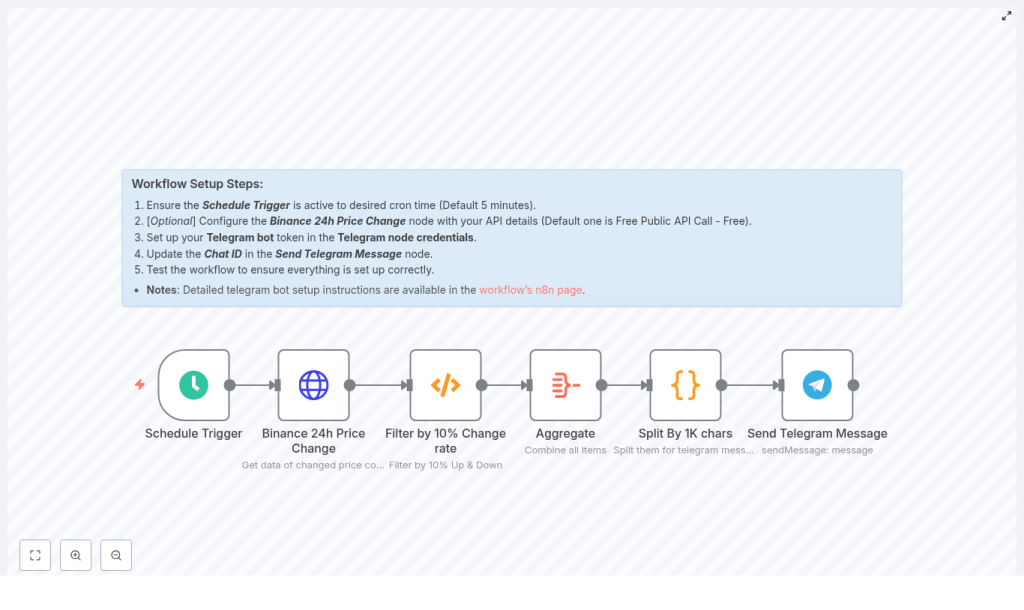
n8n Crypto Alert: Binance to Telegram Workflow
Timely visibility into sharp cryptocurrency price movements is critical for traders, quants, and monitoring teams. This n8n workflow template provides an automated, production-ready pattern that connects Binance 24-hour price change data to Telegram, delivering structured alerts directly into your chosen channel or group.
This article explains the end-to-end design of the workflow, how each node is configured, and how to adapt the logic to your own trading, monitoring, or alerting requirements.
Use case and value proposition
By orchestrating Binance market data and Telegram notifications with n8n, you can implement a robust crypto alerting system without maintaining custom infrastructure or glue code.
Using n8n for crypto market alerts gives you:
- Fully automated monitoring of Binance markets without manual refreshes
- Flexible, configurable thresholds for significant price changes
- Message aggregation and splitting that respect Telegram length limits
- A modular workflow that can be extended with filters, persistence, logging, or webhooks
The result is a maintainable automation that surfaces only the most relevant moves and routes them to Telegram in a clean, readable format.
High-level architecture of the workflow
The workflow is built as a periodic polling and notification pipeline. At a high level, it:
- Triggers on a schedule
- Fetches 24-hour ticker data from Binance
- Filters for assets with large percentage moves
- Aggregates and chunks messages to fit Telegram constraints
- Sends formatted alerts to a Telegram chat via a bot
Concretely, the workflow uses the following n8n nodes:
- Schedule Trigger – Defines the polling cadence
- Binance 24h Price Change (HTTP Request) – Calls the Binance 24-hour ticker endpoint
- Filter node (Function) – Detects significant percentage changes and formats message payloads
- Aggregate – Combines all matching items into a single structure for batching
- Split By 1K chars – Splits long text into approximately 1,000-character chunks
- Send Telegram Message – Delivers each chunk to the configured Telegram chat
Configuring the workflow step by step
1. Schedule Trigger – define polling frequency
The workflow starts with a Schedule Trigger node. Configure it to match your operational and rate-limit constraints. Typical intervals include:
- 1 minute for highly responsive monitoring
- 5 minutes as a balanced default
- 15 minutes or more for lower-frequency checks
When choosing the interval, consider:
- Binance API rate limits – Avoid unnecessary calls that may trigger throttling
- n8n instance capacity – Ensure your infrastructure can handle the polling and processing load
2. Binance 24h Price Change – retrieve market data
The next node is an HTTP Request to Binance, using the public 24-hour ticker endpoint:
https://api.binance.com/api/v1/ticker/24hr
This endpoint returns 24-hour statistics for all trading pairs, including:
symbolpriceChangePercentlastPrice- and other metrics such as volume and high/low prices
Key points for this node:
- No authentication is required for this public endpoint
- If you later need higher rate limits or additional private data, configure Binance API credentials in n8n and adjust the endpoint accordingly
- Make sure the node is configured to return JSON so it can be processed easily by the following Function node
3. Function node – detect and format significant price moves
The core of the alerting logic resides in a Function node. This node processes the Binance response, filters for assets with meaningful percentage changes, and prepares a structured list of messages for Telegram.
The sample logic used in the workflow is:
// Example logic used in the Function node
const significantChanges = [];
for (const coin of items[0].json) {  const priceChangePercent = parseFloat(coin.priceChangePercent);  if (Math.abs(priceChangePercent) >= 15) {  significantChanges.push({  symbol: coin.symbol,  priceChangePercent,  lastPrice: coin.lastPrice  });  }
}

// Sort by highest percent change
significantChanges.sort((a, b) => b.priceChangePercent - a.priceChangePercent);

// Format messages for Telegram
const sortedOutput = significantChanges.map(change => ({  json: {  message: `\`\`\`${change.symbol} Price changed by ${change.priceChangePercent}% \n Last Price: ${change.lastPrice}\`\`\``  }
}));

return sortedOutput;
Key configuration and customization options:
- Threshold – The default threshold is
15percent. Adjust this line:
if (Math.abs(priceChangePercent) >= 15)
to any desired value, for example10or20, depending on your alert sensitivity. - Symbol filtering – To restrict alerts to specific quote assets or markets, introduce conditions such as:
if (!coin.symbol.endsWith('USDT')) continue;
to only include USDT pairs, or implement whitelists/blacklists for specific instruments. - Sorting – The list is sorted by highest percentage change, so the most extreme moves appear first in Telegram.
- Formatting – Messages are wrapped in triple backticks for Telegram code formatting. You can adjust this to use bold, italics, or additional text as needed.
Aggregating and chunking messages for Telegram
4. Aggregate – build a combined message payload
After filtering, each item contains a single message field. To send a consolidated alert rather than many individual Telegram messages, the Aggregate node combines these items into a single data structure, typically an array or concatenated string.
This step improves readability and reduces noise in your Telegram channel, especially when multiple assets cross the threshold in the same polling interval.
5. Split By 1K chars – enforce Telegram message limits
Telegram imposes limits on message length. To avoid failures or truncated messages, the workflow uses a Split By 1K chars node that divides the aggregated text into chunks of roughly 1,000 characters.
The logic resembles the following pseudo-code:
// Pseudo-code used in 'Split By 1K chars'
function splitDataIntoChunks(data) {  const chunks = [];  let currentChunk = "";  data.forEach(item => {  const message = item.message + "\n";  if (currentChunk.length + message.length > 1000) {  chunks.push({ json: { data: currentChunk } });  currentChunk = message;  } else {  currentChunk += message;  }  });  if (currentChunk) chunks.push({ json: { data: currentChunk } });  return chunks;
}
Each output item from this node contains a data field with a safe-length text block, which is then passed to the Telegram node.
If you encounter messages that are still too long because of additional formatting or metadata, reduce the limit in the splitting logic or adjust how much data you include per asset.
Sending alerts to Telegram
6. Send Telegram Message – deliver notifications
The final node is the Send Telegram Message node, which posts each chunked message to your chosen Telegram chat.
Configuration steps:
- Create a Telegram Bot using BotFather and obtain the bot token.
- Add the bot to your target channel or group and ensure it has permission to post messages.
- Retrieve the chat ID:
- For channels, this typically looks like
-1001234567890 - For private chats or groups, use a helper bot or API call to identify the chat ID
- For channels, this typically looks like
- Store the token as an n8n credential, then reference it in the Telegram node configuration.
- Set the
chatIdfield to the target channel or group ID and map thedatafield from the previous node as the message text.
Once configured, each chunk generated by the previous node is sent as an individual Telegram message, giving you a clean, structured alert stream.
Security and operational best practices
For a production-grade crypto alerting workflow, observe the following practices:
- Credential management – Store your Telegram bot token in n8n credentials, not as plaintext parameters in nodes or environment variables exposed in logs.
- API rate limits – Respect Binance limits by tuning the Schedule Trigger interval and avoiding unnecessary retries. Consider adding basic caching if you expand the workflow to multiple Binance endpoints.
- Secure deployment – Run your n8n instance over TLS and host it on secure infrastructure, especially if it is accessible from the public internet.
- Audit and logging – Optionally log alerts to a database or external logging system for traceability, compliance, and later analysis.
Advanced customization options
Symbol whitelisting and blacklisting
For more focused alerting, refine the Function node so it only processes:
- A curated whitelist of symbols, such as major pairs or specific strategies
- Or excludes a blacklist of low-liquidity or irrelevant pairs
This can be implemented with simple arrays and conditional checks inside the Function node, for example:
const whitelist = ['BTCUSDT', 'ETHUSDT', 'BNBUSDT'];
if (!whitelist.includes(coin.symbol)) continue;
Enhanced message content and metrics
To provide richer context in each alert, you can extend the logic to include:
- 24-hour volume or quote volume
- Weighted average price
- High and low prices for the period
- Additional timeframes by combining data from other Binance endpoints
Update the Function node to extract and format these fields into the message string so that Telegram alerts carry more actionable information.
Alert severity levels and routing
Introduce severity tiers based on the magnitude of price changes. For example:
- Notice for 5 to 10 percent moves
- Warning for 10 to 20 percent moves
- Critical for moves above 20 percent
You can then:
- Apply different Telegram formatting such as bold labels, emojis, or section headers
- Route critical alerts to a separate admin or incident channel
- Maintain different thresholds per symbol or asset class
Persistence and analytics
For longer-term analysis and backtesting of your alert thresholds, extend the workflow to write matching events to a data store such as:
- PostgreSQL or MySQL
- Airtable or Google Sheets
- A data warehouse or analytics pipeline
Storing these events enables you to analyze the frequency and impact of large moves, refine thresholds, and correlate alerts with downstream trading or risk signals.
Troubleshooting common issues
If the workflow does not behave as expected, review the following checks:
- No Telegram messages received:
- Verify the Telegram bot token is valid and correctly stored in n8n credentials
- Confirm the
chatIdis correct and that the bot has permission to post in the channel or group
- No matching assets:
- Lower the percentage threshold in the Function node
- Inspect the raw Binance API response to ensure data is returned as expected
- Binance rate limit or error responses:
- Increase the schedule interval to reduce request frequency
- Consider implementing basic error handling or backoff logic in the HTTP Request node
- Messages exceeding Telegram limits:
- Reduce the chunk size in the splitting logic
- Trim less critical fields from the message content
- Be aware that formatting characters also contribute to total length
Testing and staging recommendations
Before deploying this workflow in a live environment, validate it in a controlled setup:
- Use a private Telegram chat or dedicated test group for initial runs
- Temporarily set a very low threshold such as
0.1percent so that you can easily generate test alerts - Optionally mock the Binance response using a separate node or saved JSON to verify formatting, sorting, and chunking behavior without hitting the live API
Once you are satisfied with the output, revert the threshold to a realistic level and point the Telegram node to your production channel.
Conclusion and next steps
This n8n workflow template provides a solid foundation for automated Binance crypto alerts delivered directly to Telegram. By combining a scheduled HTTP poll, flexible filtering logic, message aggregation, and robust Telegram integration, you can:
- Continuously monitor the Binance market for significant price changes
- Receive concise, structured alerts in near real time
- Easily adapt the workflow to your own symbols, thresholds, and routing rules
Deploy the template in your n8n instance, configure your Telegram credentials securely, and adjust the Function node to match your risk appetite and monitoring strategy. If needed, you can further extend the workflow with persistence, analytics, and advanced alerting logic.
Helpful resources: Review the Binance API documentation, the n8n documentation, and the Telegram Bot API reference for advanced formatting and integration options.
