


Build a Second Brain with n8n, Supabase & OpenAI
Imagine never losing a valuable idea, a powerful video insight, or a crucial PDF again. Imagine being able to ask a simple question and instantly get a clear, context-rich answer from your own notes, documents, and saved content. That is what this n8n workflow template helps you create: an automated “second brain” that quietly organizes your knowledge while you focus on the work that really matters.
In this guide, you will walk through the journey from scattered information to a focused, searchable knowledge base powered by n8n, Telegram, Supabase vector store, OpenAI embeddings and models, and Apify for YouTube transcripts. You will see how each node fits together, how to ingest and retrieve data reliably, and how this template can become the foundation for a more automated and intentional workflow.
The Problem: Information Overload, Fragmented Attention
Your ideas, research, and inspirations are probably spread across PDFs, YouTube videos, voice notes, and chat messages. You save links, download files, record quick thoughts, and tell yourself you will “come back later.” But later rarely comes, and even when it does, finding what you need can feel like searching for a needle in a haystack.
This constant fragmentation drains focus. You repeat work, lose context, and spend time hunting for information instead of using it. The more you create and consume, the more overwhelming it can become.
The Possibility: A Second Brain That Works While You Work
A Second Brain is a system that captures, organizes, and makes your knowledge instantly retrievable. With automation, you no longer rely on memory or manual filing. Instead, your tools cooperate in the background.
By combining:
- n8n for automation and orchestration
- Supabase as a vector database for long-term storage
- OpenAI embeddings and chat models for understanding and reasoning
- Apify and PDF extractors for pulling content from external sources
you can create a personal or team knowledge base that ingests PDFs, YouTube videos, voice notes, and Telegram messages, then answers questions with retrieval-augmented generation (RAG). You are not just storing information, you are building a system that helps you think, remember, and act faster.
The Mindset: Start Small, Automate Boldly, Improve Over Time
You do not need a perfect system to begin. This n8n template is designed as a practical starting point, not a finished product. You can deploy it quickly, test it with a few documents, and then evolve it as your needs grow.
Think of this workflow as a stepping stone:
- First, capture what already flows through your daily tools, like Telegram.
- Then, let automation handle the repetitive tasks: extracting, summarizing, chunking, and embedding.
- Finally, build confidence by asking questions and refining the system as you see how it responds.
Each improvement you make, each small automation you add, frees a bit more of your time and attention. Over weeks and months, that compounds into a powerful advantage.
The Architecture: How Your Automated Second Brain Fits Together
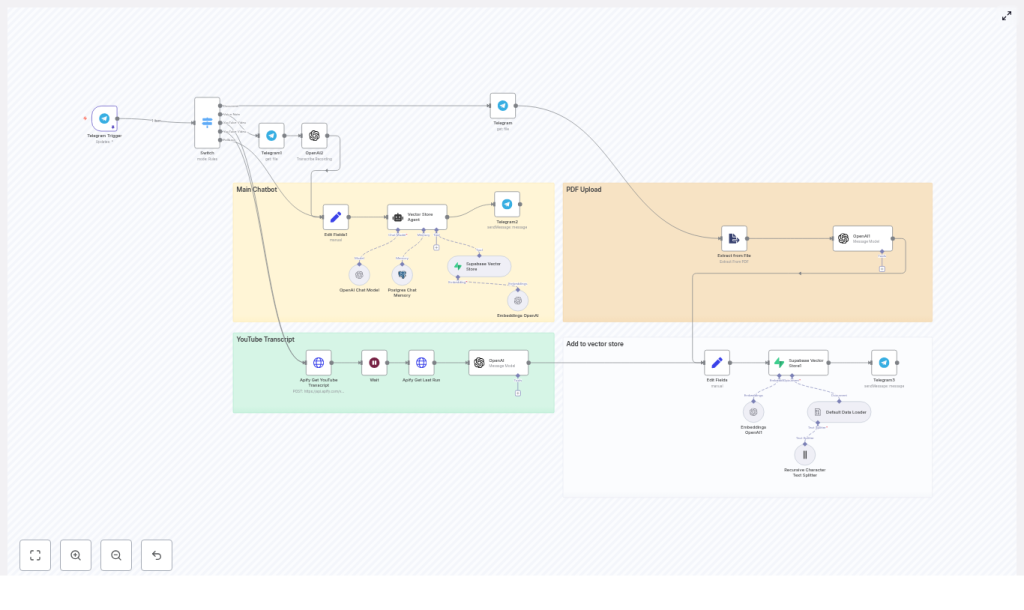
The provided n8n template connects several services into a single coherent workflow:
- Telegram Trigger – receives messages, documents, voice notes, and links
- Switch node – routes each input to the right processor (PDF, YouTube, voice, plain text)
- Apify – extracts YouTube transcripts when a video URL is detected
- OpenAI (Whisper / Chat) – transcribes audio and summarizes content into articles
- Text splitter – breaks long text into chunks optimized for embeddings
- OpenAI Embeddings – converts each chunk into a vector representation
- Supabase vector store – stores vectors and metadata for fast semantic retrieval
- Vector Store Agent – uses RAG with Postgres chat memory and OpenAI Chat to answer your questions
Each component plays a specific role, but you do not have to wire it all from scratch. The template gives you a working baseline that you can inspect, adapt, and extend.
The Journey: From Raw Input To Searchable Knowledge
Step 1: Capture Everything With The Telegram Trigger
Your journey starts with the Telegram Trigger node. This is your capture point, the place where you send anything you want your Second Brain to remember.
The Telegram Trigger listens for:
- Messages and notes you type directly
- Documents such as PDFs you upload
- Audio voice notes you record on the go
- Links, including YouTube URLs you want to process
As soon as something arrives, the workflow passes it to a Switch node that decides how to handle it. You simply keep using Telegram as usual, while the automation quietly does the heavy lifting.
Step 2: Route Each Input With The Switch Node
The Switch node is your intelligent traffic controller. It inspects each incoming message and sends it to the appropriate flow:
- PDF upload processor when a document is attached
- Voice note transcription when a voice file is present
- YouTube transcript flow when a YouTube URL is detected
- Plain text flow for direct notes and messages
This routing step is what allows one single entry point (Telegram) to feed many different types of content into your Second Brain without manual sorting.
Step 3: Extract The Actual Content
Once the Switch node has routed the input, the workflow focuses on turning each item into usable text.
For PDFs:
- Use an “Extract from File” node or a dedicated PDF extractor.
- Pull the raw text from the uploaded PDF.
- Send that text to an OpenAI model to convert the document into a summarized article or structured content.
For voice notes:
- Send the audio file to OpenAI Whisper for transcription.
- Receive clean text that you can store, search, and use in RAG later.
For YouTube videos:
- Call an Apify actor with the YouTube URL.
- The workflow waits for Apify to finish extracting the transcript.
- Retrieve the dataset from the last Apify run.
- Send the transcript to an OpenAI summarization task to turn it into a more concise article.
At this point, your scattered inputs are transformed into structured text that your Second Brain can understand and work with.
Step 4: Normalize And Enrich With Metadata
Before storing anything, you want a consistent structure. This is where you shape your knowledge so it remains usable months or years from now.
Use an “Edit Fields” or a mapping node to build a standard document format. Typical metadata you might attach includes:
- title
- source (YouTube URL, Telegram chat id, filename, etc.)
- date
- author or uploader
- type (pdf, transcript, note)
This metadata is not just “nice to have.” It becomes essential for filtered searches, audits, and trust. When an answer appears, you will want to know where it came from and when it was created.
Step 5: Split, Embed, And Store In Supabase
Large documents are powerful, but they are also hard to search directly. To make them truly useful, the workflow breaks them into overlapping chunks and converts each chunk into a vector embedding.
The process looks like this:
- Use a recursive character splitter to split long text into manageable pieces.
- Configure chunk sizes and overlap so that context is preserved across chunks.
- Send each chunk to OpenAI Embeddings to generate a vector representation.
- Insert every chunk, along with its embedding and metadata, into a Supabase vector table.
Once stored in Supabase, these chunks can be retrieved by semantic similarity. That means your Second Brain can find relevant information based on meaning, not just exact keyword matches.
Step 6: Confirm That Ingestion Succeeded
To close the loop and keep you confident in the system, the workflow sends a short confirmation back to Telegram, such as:
“Successfully added to Second Brain!”
This small message matters. It reassures you that the content is now indexed, searchable, and ready to support your future questions.
Turning Knowledge Into Answers: Querying With RAG
Once your Second Brain has ingested some content, the real magic begins. You can ask questions in Telegram or another interface, and the workflow will respond using RAG, combining retrieval and generation to give you context-aware answers.
The Vector Store Agent As Your Orchestrator
The Vector Store Agent node coordinates the retrieval-augmented generation process. When you send a query, it:
- searches the Supabase vector store for the most relevant document chunks
- retrieves these chunks, along with any necessary metadata
- optionally uses Postgres chat memory to maintain session context
- passes both your query and the retrieved chunks to an OpenAI chat model
- returns a concise, context-aware answer directly in your chat
Instead of manually searching through files, you simply ask questions like “What were the main points from that marketing PDF I uploaded last week?” or “Summarize the key ideas from the last few YouTube videos I saved,” and let the system do the work.
Session Memory For Ongoing Conversations
To make your Second Brain feel more like a real assistant, the workflow uses Postgres chat memory. This memory stores conversational context per session, typically keyed by a sessionKey such as the original prompt or chat id.
With session memory:
- Follow-up questions can reference earlier answers.
- Context is preserved across turns, improving coherence.
- Conversations feel natural instead of fragmented.
This is especially powerful when you are exploring a topic or refining a plan over multiple questions.
Best Practices To Keep Your Second Brain Reliable
Design A Smart Chunking Strategy
Chunking is not just a technical detail. It directly affects how well your system can retrieve and understand information.
A good baseline is to use a recursive text splitter with:
- Chunk sizes around 200-500 tokens
- Overlap of about 50-100 tokens
This preserves context across chunks and improves retrieval relevance, especially when answers depend on surrounding sentences or paragraphs.
Treat Metadata As Non-Negotiable
Always store metadata like:
- source
- date
- type
- URL or file reference
Metadata allows you to:
- Filter searches by type or timeframe
- Trace answers back to the original source
- Audit your system when something looks off
This is crucial for trust, especially when your Second Brain starts influencing decisions.
Choose Models And Embeddings Wisely
Your model choices shape both quality and cost. A few guidelines:
- Embeddings: Use a high-quality OpenAI embedding model designed for semantic search.
- Chat model: Choose a model that balances cost and capability, such as gpt-4o-mini or a similar option in the workflow.
You can always start lean and upgrade as your usage and requirements grow.
Manage Cost And Rate Limits Proactively
Automated ingestion of large PDFs and long YouTube transcripts can generate many tokens and embeddings. To keep costs under control:
- Batch your inserts where possible.
- Rate-limit API calls in n8n.
- Track usage and costs over time.
- Use a “wait” node pattern when waiting for Apify runs or heavy external processing so you do not block the workflow unnecessarily.
These small adjustments help you scale confidently without surprises.
Protect Security And Privacy
Your Second Brain may contain sensitive information, so it deserves serious protection:
- Encrypt sensitive data at rest (Supabase provides encryption options).
- Use API keys with restricted scopes and rotate credentials regularly.
- Define data retention policies for personal data and private chats.
By designing with security in mind from the start, you can safely expand your knowledge base over time.
Ideas To Extend And Evolve Your Workflow
Once the core template is running, you can gradually enhance it to match your unique workflows.
- Automated metadata enrichment: Use LLMs to extract tags, categories, and summaries during ingestion.
- Versioning: Keep a history of documents and support rollbacks when content changes.
- Search UI: Build a lightweight web interface that queries Supabase, shows source links, and displays confidence scores.
- Active learning loop: Offer a way to flag wrong answers and then retrain or re-annotate problematic documents.
Each of these improvements turns your Second Brain into an even more powerful partner in your work and learning.
Troubleshooting: When Retrieval Is Not Good Enough
If answers feel off or incomplete, treat it as feedback, not failure. You can systematically improve quality by checking a few key areas:
- Verify the embedding model and text splitter settings.
- Inspect stored metadata for missing or incorrect fields.
- Check chunk size and overlap, and increase them if chunks are too short or lack context.
- Run direct similarity queries against Supabase vectors to confirm that relevant chunks are being returned.
Each tweak brings your Second Brain closer to how you actually think and search.
From Template To Transformation: Your Next Steps
This n8n workflow template shows a complete, extensible approach to building an automated Second Brain. It captures PDFs, YouTube transcripts, voice notes, and chat messages, then turns them into a searchable knowledge base using OpenAI embeddings and Supabase. The Vector Store Agent ties everything together, enabling RAG-powered Q&A over your personal or business content.
To move from idea to impact:
- Deploy the workflow in your n8n instance.
- Connect your Telegram bot and Supabase project.
- Test with a few small documents and transcripts.
- Tune chunking and embedding parameters based on your content.
- Add UI elements or access controls when you are ready to share it with others.
As you use it, you will naturally discover what to automate next. Let that curiosity guide your improvements.
Call To Action: Start Building Your Second Brain Today
You do not need a full-scale knowledge management strategy to begin. You just need one working workflow and the willingness to iterate.
Try this template in n8n, connect your Telegram bot and Supabase instance, and start feeding your knowledge into a searchable system. Let it capture your ideas, transcripts, and documents while you focus on creating, learning, and making decisions.
If you want help customizing the workflow, optimizing costs, or improving retrieval quality, reach out or subscribe for more n8n automation templates and tutorials. Your Second Brain can grow alongside your projects, your business, and your ambitions.
