

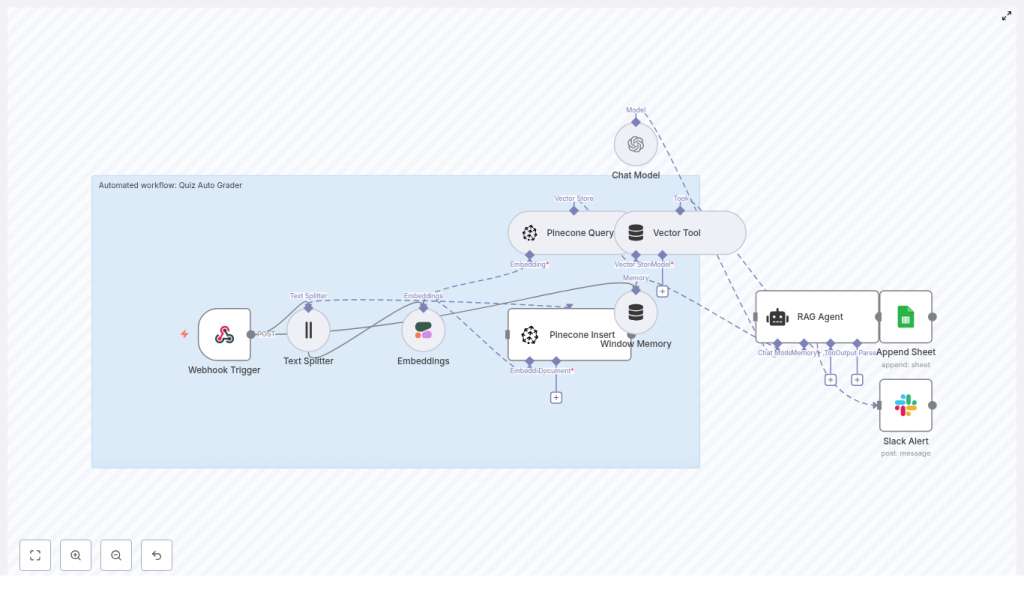
Build a Quiz Auto Grader with n8n & RAG
This guide describes how to implement a production-ready Quiz Auto Grader in n8n using Retrieval-Augmented Generation (RAG). The solution combines:
- n8n for orchestration and workflow automation
- Pinecone as a vector database
- Cohere for text embeddings
- An OpenAI chat model, wrapped in a LangChain RAG agent
- Google Sheets for logging and audit trails
- Slack for automated error notifications
The workflow is designed for educators and technical teams who need scalable, consistent quiz grading for short-answer and open-ended questions.
1. Solution Overview
1.1 Objectives
The automated quiz grading workflow is intended to:
- Produce consistent, repeatable scores for subjective answers
- Scale to large volumes of quiz submissions with minimal manual effort
- Provide structured logs and metadata for auditing and quality review
- Integrate cleanly with existing tools like Google Sheets and Slack
1.2 High-level Flow
At a high level, the n8n workflow:
- Receives quiz submissions via a Webhook trigger
- Splits long answers into chunks with the Text Splitter node
- Generates embeddings using Cohere
- Stores and queries vectors in Pinecone
- Maintains conversational context with Window Memory
- Uses a RAG Agent (LangChain) with an OpenAI Chat Model to grade answers
- Appends grading results to a Google Sheets spreadsheet
- Sends Slack alerts on errors
2. Architecture & Data Flow
2.1 Core Components
- Webhook Trigger – Entry point for quiz submissions via HTTP POST.
- Text Splitter – Splits long responses into overlapping text chunks.
- Cohere Embeddings – Converts text chunks into numeric embedding vectors.
- Pinecone Insert & Query – Persists embeddings and retrieves relevant context.
- Window Memory – Maintains recent message history for the RAG agent.
- RAG Agent (LangChain) – Orchestrates retrieval and generation for grading.
- OpenAI Chat Model – Produces the actual grade, feedback, and confidence values.
- Google Sheets Append – Logs grading outcomes and metadata.
- Slack Alert – Sends error notifications to a designated channel.
2.2 Typical Payload & Metadata
The webhook typically receives a JSON payload with fields such as:
submission_idstudent_idquestion_idquestion_text(optional but recommended)student_answer
These identifiers are reused as metadata in Pinecone and as columns in Google Sheets, making it easier to trace individual grading decisions.
3. Node-by-Node Breakdown
3.1 Webhook Trigger
The workflow starts with an n8n Webhook node configured to accept POST requests over HTTPS. This node:
- Receives the quiz submission payload
- Validates the presence of required fields like student ID and answer text
- Forwards the parsed JSON to downstream nodes
Ensure the webhook URL is secured via HTTPS and optionally protected behind an authentication mechanism if required by your environment.
3.2 Text Splitter
The Text Splitter node processes the student_answer (or combined question + answer text) and splits it into smaller segments. In the template, the typical configuration is:
chunkSize = 400characterschunkOverlap = 40characters
This chunking:
- Improves embedding quality by keeping each segment focused
- Enhances retrieval recall in Pinecone when querying similar content
For very short answers, the splitter may produce a single chunk. For longer answers, overlapping segments preserve context across chunk boundaries.
3.3 Cohere Embeddings Node
Each chunk from the Text Splitter is passed into a Cohere Embeddings node. This node:
- Uses your Cohere API credentials configured in n8n
- Converts each text chunk into an embedding vector
- Outputs vectors that can be stored in or queried from Pinecone
These embeddings are later used for similarity search against:
- Canonical rubrics
- Example answers
- Instructor notes
- Previously graded responses
3.4 Pinecone Insert
The Pinecone Insert node writes embeddings into a Pinecone index, such as:
index name: quiz_auto_grader
For each embedding, the workflow typically stores metadata including:
student_idquestion_idsubmission_idtimestamp- Optionally, flags indicating whether it is a rubric item, example answer, or a live submission
This index acts as a searchable knowledge base of grading-relevant content, allowing the RAG agent to ground its decisions in prior examples and rubrics.
3.5 Pinecone Query
When grading a specific answer, the workflow uses a Pinecone Query node to retrieve context. The node:
- Accepts the embedding of the current answer as the query vector
- Searches the
quiz_auto_graderindex for top-k similar vectors - Returns the most relevant rubric entries, example answers, or past submissions
The retrieved documents are then attached as context to the RAG agent, typically passed via a Vector Tool configured in the LangChain integration.
3.6 Window Memory
A Window Memory node is used to maintain short-term conversational context for the RAG agent. This is particularly useful if:
- You grade multiple questions for the same student within a single workflow run
- You want the agent to maintain consistent grading style across a small sequence of interactions
Window Memory stores the most recent messages up to a configurable limit, preventing the context window from growing indefinitely.
3.7 RAG Agent (LangChain Agent in n8n)
The core grading logic is implemented using a RAG Agent based on LangChain within n8n. The agent:
- Uses the OpenAI Chat Model as the language model
- Has access to a Vector Tool that queries Pinecone
- Receives system and user messages that describe the grading task
- Combines retrieved context with the student answer to produce a grade
The system message is typically configured along the lines of:
“You are an assistant for Quiz Auto Grader”
The agent outputs:
- A numeric grade, often on a 0-100 scale
- Short, human-readable feedback for the student
- An optional confidence score between 0 and 1
3.8 OpenAI Chat Model
The OpenAI Chat node provides the underlying language model for the RAG agent. It:
- Consumes the combined prompt that includes question, rubric, retrieved context, and student answer
- Returns a structured response that the agent interprets as grading output
Model selection, temperature, and other generation parameters can be tuned based on how deterministic you want the grading to be.
3.9 Google Sheets Append
After the grade is produced, a Google Sheets Append node logs the result. Typical columns include:
submission_idstudent_idquestion_idgradefeedbackconfidence(if available)grader_notesor raw model outputtimestamp
This sheet functions as an audit log and makes it easy to review or export grading results for further analysis.
3.10 Slack Error Alert
For reliability, the workflow includes a Slack node that sends alerts when errors occur. If any step, such as:
- Embedding generation
- Pinecone operations
- RAG agent execution
- Google Sheets logging
throws an error, the workflow sends a message to an #alerts channel with:
- The error message or stack trace (as available)
- The
submission_idor related identifiers to locate the failed item
This allows quick triage and manual intervention when needed.
4. Configuration & Integration Notes
4.1 Credentials & Environment
Configure the following credentials in n8n:
- OpenAI API key for the chat model
- Cohere API key for embeddings
- Pinecone API key and environment
- Google credentials for Sheets access
- Slack bot token or webhook for alerts
It is recommended to run n8n in a managed environment or containerized setup and provide these keys via environment variables, not hard-coded in the workflow.
4.2 Data Privacy & Security
When working with student data:
- Use HTTPS for the Webhook endpoint
- Restrict access to Pinecone indexes to only the services that require it
- Encrypt stored credentials in n8n and your hosting environment
- Limit Google Sheets sharing to authorized staff only
- Avoid logging unnecessary personally identifiable information (PII) in external systems
4.3 Rubric & Example Storage Strategy
To improve grading consistency, store:
- Canonical rubrics for each question
- High-quality example answers
- Instructor notes or grading guidelines
in the same Pinecone index as vectors. Label them appropriately in metadata so that the RAG agent can retrieve them alongside live student answers. This makes the grading process more transparent and aligned with instructor expectations.
4.4 Chunk Size & Overlap Tuning
The default template uses:
chunkSize = 400chunkOverlap = 40
Adjust these values based on:
- Typical length of student responses
- Embedding model characteristics
- Desired tradeoff between context richness and noise
Very small chunks may lose context, while very large chunks may reduce retrieval precision.
4.5 Prompt Engineering for the RAG Agent
Clear and constrained prompts are essential. Define:
- A system message that describes the grader’s role and responsibilities
- A user message structure that includes question, rubric, and student answer
- An expected output format, such as JSON, to simplify downstream parsing
A typical system and user prompt combination looks like:
<system>
You are an assistant for Quiz Auto Grader. Given a question, rubric, and a student's answer, return a JSON object with keys: grade (0-100), feedback (short text), confidence (0-1).
</system>

<user>
Question: ...
Rubric: ...
Student answer: ...
</user>
By enforcing a structured JSON output, the Google Sheets node can reliably map fields to columns without additional parsing complexity.
5. Error Handling & Reliability
5.1 Error Scenarios
Common error cases include:
- Network timeouts when calling external APIs (OpenAI, Cohere, Pinecone, Google, Slack)
- Invalid or missing payload fields in the webhook request
- Authentication failures due to expired or misconfigured API keys
The template is designed to detect such failures at each step and trigger the Slack alert path.
5.2 Slack Alerts & Manual Review
When an error is detected, the Slack node:
- Sends a message to an
#alertschannel - Includes the relevant identifiers (for example,
submission_id)
You can then:
- Investigate the underlying issue
- Re-run the workflow for the affected submission
- Perform manual grading if necessary
For additional robustness, consider enabling retries on transient network errors and defining a dead-letter queue or dedicated sheet for failed items that require manual attention.
6. Monitoring, Evaluation & Iteration
6.1 Tracking Model Confidence
The RAG agent can output a

