Automate Recipe Emails with n8n and the Edamam API
Every evening the same question shows up like an unwanted pop-up: “What are we eating tonight?” You open a recipe site, type “easy dinner”, get 4,000 options, and somehow still end up with toast.
If that sounds familiar, this workflow is your new best friend. Using n8n and the Edamam Recipe Search API, you can set up an automation that quietly hunts for recipes that match your diet, calories, and cook time, then emails them to you every day. No more doom-scrolling through food blogs when you’re already hungry.
This guide walks you through an n8n workflow template that:
- Queries Edamam for recipes based on your preferences
- Picks a random set of matching recipes (or based on your criteria)
- Builds a simple HTML email with links
- Sends it on a schedule so recipes just show up in your inbox
Let’s turn your inbox into a personal recipe assistant, instead of a graveyard of unread newsletters.
Why bother automating recipe discovery?
Because manually searching for recipes every day is the culinary equivalent of copy-pasting data into spreadsheets: technically possible, spiritually exhausting.
With an automated n8n recipe email workflow you can:
- Save time – no more 20-minute “quick search” that somehow eats half your evening.
- Plan meals more easily – get a daily or weekly digest that fits your dietary rules.
- Keep variety – randomization keeps you from eating the same pasta 4 nights in a row.
- Use your tools smartly – combine cron scheduling, API calls, and HTML templating in n8n.
Once this is set up, n8n and Edamam quietly do the boring work in the background, while you take the credit for “planning ahead.”
What this n8n + Edamam workflow actually does
At a high level, the workflow behaves like a polite robot sous-chef:
- Runs on a schedule using a Cron node (daily, weekly, whenever-you-like).
- Reads your search criteria like ingredients, diet, health filters, calories, and time.
- Prepares query parameters, including optional random Diet / Health selection.
- Asks Edamam how many recipes match your criteria.
- Picks a random window of results, then fetches that specific set of recipes.
- Builds an HTML email listing each recipe with a clickable link.
- Sends the email using your SMTP provider (Gmail, SendGrid, etc.).
The result is a clean, automated recipe email that feels curated, without you manually curating anything.
What you need before you start
Before you hit “Execute workflow” like a pro, make sure you have:
- n8n instance – cloud or self-hosted, whichever you prefer.
- Edamam Recipe Search API credentials –
app_idandapp_key. - SMTP credentials – Gmail, SendGrid SMTP, or another email provider.
- Basic n8n familiarity – especially with nodes like Set, Function, HTTP Request, Cron, and Email.
If that checklist looks good, you are ready to automate your way out of dinner indecision.
Quick setup overview: from “ugh, what’s for dinner” to inbox recipes
Here is the simplified flow before we dive into the node-by-node details:
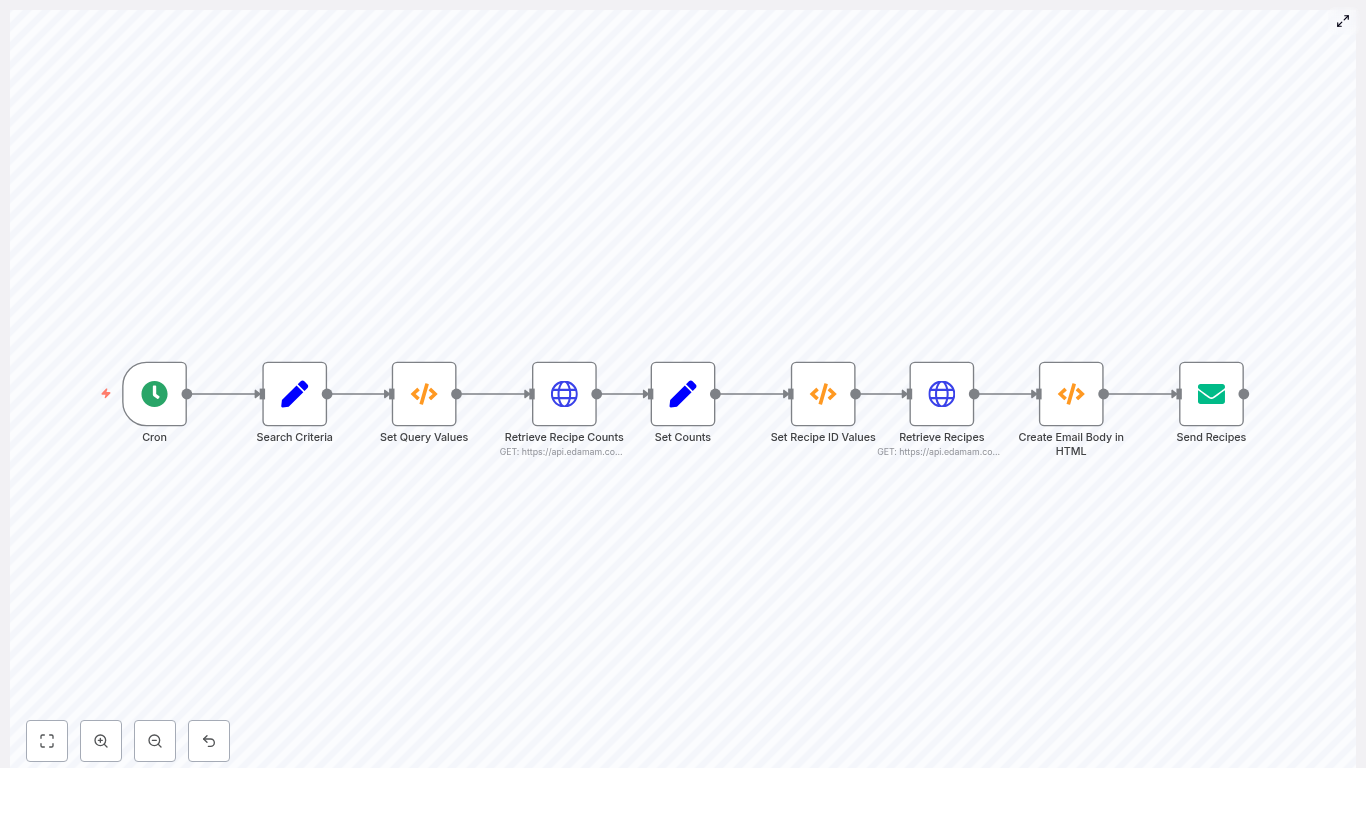
- Cron node fires on your schedule.
- Set node stores your recipe preferences and API keys.
- Function node builds query values and handles random diet/health logic.
- HTTP Request asks Edamam how many recipes match.
- Set + Function decide which slice of results to fetch.
- HTTP Request fetches the actual recipes.
- Function builds an HTML email body with recipe links.
- Email node sends everything to your inbox.
Now let’s dig into each part so you can confidently tweak it for your own diet, preferences, and level of laziness.
Step-by-step: building the n8n recipe email workflow
1. Schedule your recipe delivery with the Cron node
Start with a Cron node. This is what decides when your recipe email goes out.
Examples:
- Daily at 10:00 for a “what’s for dinner tonight” email.
- Every Monday for weekly meal planning.
Configure the Cron node to trigger at your preferred time. This is the entry point for the whole workflow.
2. Define your search criteria (Set node)
Next, use a Set node to store all your configurable inputs. Think of this as your “recipe preferences control panel.”
Fields you will typically include:
- RecipeCount – how many recipes you want per email.
- IngredientCount – maximum number of ingredients per recipe.
- CaloriesMin / CaloriesMax – calorie range.
- TimeMin / TimeMax – prep/cook time limits.
- Diet – for example,
balanced,low-carb, orrandomif you want n8n to surprise you. - Health – for example,
vegan,gluten-free, orrandom. - SearchItem – main search term like “chicken”, “tofu”, “pasta”, etc.
- AppID / AppKey – your Edamam credentials (ideally stored securely in n8n credentials).
Later on, these values become query parameters for the Edamam API requests.
3. Prepare query values and random filters (Function node)
Now comes the fun part: a Function node that turns your raw inputs into ready-to-use query values and handles the optional randomness for diet and health labels.
The template uses this example code:
items[0].json.calories = items[0].json.CaloriesMin + "-" + items[0].json.CaloriesMax;
items[0].json.time = items[0].json.TimeMin + "-" + items[0].json.TimeMax;

if (items[0].json.Diet.toUpperCase() == "RANDOM") {  arrDiet = ["balanced","high-fiber","high-protein","low-carb","low-fat","low-sodium"];  intRandomNumber = Math.floor(Math.random() * 6);  items[0].json.Diet = arrDiet[intRandomNumber];
}

if (items[0].json.Health.toUpperCase() == "RANDOM") {  arrHealth = ["alcohol-free","immuno-supportive","celery-free","crustacean-free","dairy-free","egg-free","fish-free","fodmap-free","gluten-free","keto-friendly","kidney-friendly","kosher","low-potassium","lupine-free","mustard-free","low-fat-abs","no-oil-added","low-sugar","paleo","peanut-free","pecatarian","pork-free","red-meat-free","sesame-free","shellfish-free","soy-free","sugar-conscious","tree-nut-free","vegan","vegetarian","wheat-free"];  intRandomNumber = Math.floor(Math.random() * 31);  items[0].json.Health = arrHealth[intRandomNumber];
}

return items;
Key behavior:
- It converts your min/max values into Edamam-friendly ranges like
300-700for calories or time. - If you typed
randomfor Diet or Health, it picks one from a predefined list.
So you can say “I don’t care, just something healthy-ish”, and the workflow will pick a diet or health label for you.
4. Ask Edamam how many recipes match (HTTP Request)
Before you grab specific recipes, you need to know how many exist for your criteria. That is where the first HTTP Request node comes in.
Configure it to call the Edamam search endpoint with parameters like:
q– your SearchItem.app_idandapp_key– your Edamam credentials.ingr– max ingredient count.diet– diet filter.calories– calorie range from the Function node.time– time range from the Function node.fromandto– a small window, for examplefrom=1,to=2.
The important part of the response is the count field. It tells you the total number of matching recipes, which you will use to pick a random slice of results later.
5. Store counts and how many recipes to return (Set node)
Next, use another Set node to capture:
- RecipeCount – the total count from Edamam’s response.
- ReturnCount – how many recipes you want to fetch for this run (your per-email count).
This keeps things tidy and makes it easy to adjust how many recipes show up in each email without touching the function logic.
6. Choose a random result window (Function node)
Now you decide which recipes to fetch. Instead of always pulling the first few results, you can randomize the offset so you get variety over time.
Use another Function node with logic like this:
items[0].json.from = Math.floor(Math.random() * items[0].json.RecipeCount) + 1;
items[0].json.to = items[0].json.from + items[0].json.ReturnCount;

return items;
What this does:
- Picks a random
fromvalue somewhere inside the totalRecipeCount. - Sets
toasfrom + ReturnCountso you get a block of recipes starting at that offset.
Result: your recipe emails feel fresh, not like the same top 5 search results every time.
7. Retrieve the actual recipes (HTTP Request)
Now you are ready for the second HTTP Request node. This one uses the computed from and to values to fetch the specific recipe objects.
The response includes:
- Recipe labels (titles).
- shareAs links for sharing or opening the recipe.
- images.
- Nutritional info and more.
These results will be used to build your HTML email content.
8. Turn recipes into an HTML email body (Function node)
Next, use a Function node to convert the recipe data into a simple HTML list. The template uses code like this:
arrRecipes = items[0].json.hits;
items[0].json = {};

strEmailBody = "Here are your recipes for today:<br><ul>";

arrRecipes.forEach(createHTML);

function createHTML(value, index, array) {  strEmailBody = strEmailBody + "<li><a href=\"" + value.recipe.shareAs + "\">" + value.recipe.label + "</a></li>";
}

strEmailBody = strEmailBody + "</ul>";

items[0].json.emailBody = strEmailBody

return items;
End result: a neat HTML snippet like:
You can easily extend this to include:
- Images
- Calories per serving
- Short ingredient lists
That way your email looks more like a curated newsletter and less like a plain text reminder.
9. Send the recipes by email (Email node)
Finally, use the Email node to send your masterpiece.
Configure it to:
- Use your SMTP credentials (Gmail, SendGrid SMTP, or another provider).
- Set a dynamic subject line, for example including diet, health, calories, or time ranges.
- Insert the HTML body from the previous Function node using an expression (pointing to
emailBody).
Once this is wired up, your recipes start landing in your inbox on autopilot. No extra clicks, no extra effort, just food ideas appearing like clockwork.
Security and best practices for your workflow
Automation is fun, leaking API keys is not. Keep things safe and stable by following these tips:
- Do not hard-code API keys in Function nodes. Store Edamam credentials in n8n credentials or environment variables and reference them securely.
- Respect Edamam rate limits. If you run the workflow frequently, consider adding delays or caching results.
- Validate responses before using fields like
countandhits. This avoids runtime errors if the API returns something unexpected. - Check your random ranges. Ensure
fromandtodo not exceed Edamam’s allowed limits or the totalRecipeCount.
Troubleshooting: when the robot chef gets confused
If something breaks, it is usually fixable without sacrificing any snacks. Here are common issues and quick checks:
- Empty results
- Try a broader SearchItem.
- Relax filters like time or calories.
- Use a different Diet or Health setting if you are being very strict.
- Authentication errors
- Double check your
app_idandapp_key. - Confirm the credentials are active in your Edamam dashboard.
- Double check your
- SMTP send failures
- Test your email credentials in another SMTP client.
- Review n8n logs for the full error payload.
- Node errors parsing responses
- Add basic guard checks like
if (!items[0].json.hits)
- Add basic guard checks like