


Automate Bigfoot Vlogs with n8n and VEO3
By the time the third Slack notification lit up her screen, Riley knew she was in trouble.
As the lead marketer for a quirky outdoor brand, she had pitched a bold idea: a weekly series of short Bigfoot vlogs starring a lovable character named Sam. The first test episode went viral. The problem was what came next.
Every new episode meant writing scripts, storyboarding scenes, giving notes to freelancers, waiting for renders, and then redoing half of them because Sam’s fur color or camera framing did not match the last video. Each 60-second vlog was taking days of back-and-forth. Her team was exhausted, budgets were creeping up, and the brand wanted more.
One late night, scrolling through automation tools, Riley found something that looked almost too perfect: an n8n workflow template that promised to turn a simple “Bigfoot Video Idea” into a complete, 8-scene vlog using Anthropic Claude for writing and Fal.run’s VEO3 for video generation.
She did not just want another tool. She needed a reliable pipeline. So she opened the template and decided to rebuild her production process around it.
The challenge: character vlogs at scale
Riley’s goal was simple to say and painful to execute: keep Sam the Bigfoot consistent, charming, and on-brand across dozens of short-form vlogs, without burning her team out on repetitive tasks.
Her bottlenecks were clear:
- Too much time spent on manual storyboarding and copywriting
- Inconsistent character details from one episode to the next
- Slow approvals and expensive re-renders
- No clean way to track and store all the final clips
She realized that the repetitive parts of the process were ideal for automation. What if she could lock in Sam’s personality and visual style, let AI handle the heavy lifting, and keep humans focused on approvals and creative direction?
That is where the n8n workflow template came in: an end-to-end, character-driven video pipeline built around a Bigfoot named Sam.
The blueprint: an automated Bigfoot vlog factory
As Riley explored the template, she saw a clear architecture emerge. It was not just a random collection of nodes. It was a structured production line for short-form character vlogs, all orchestrated in n8n.
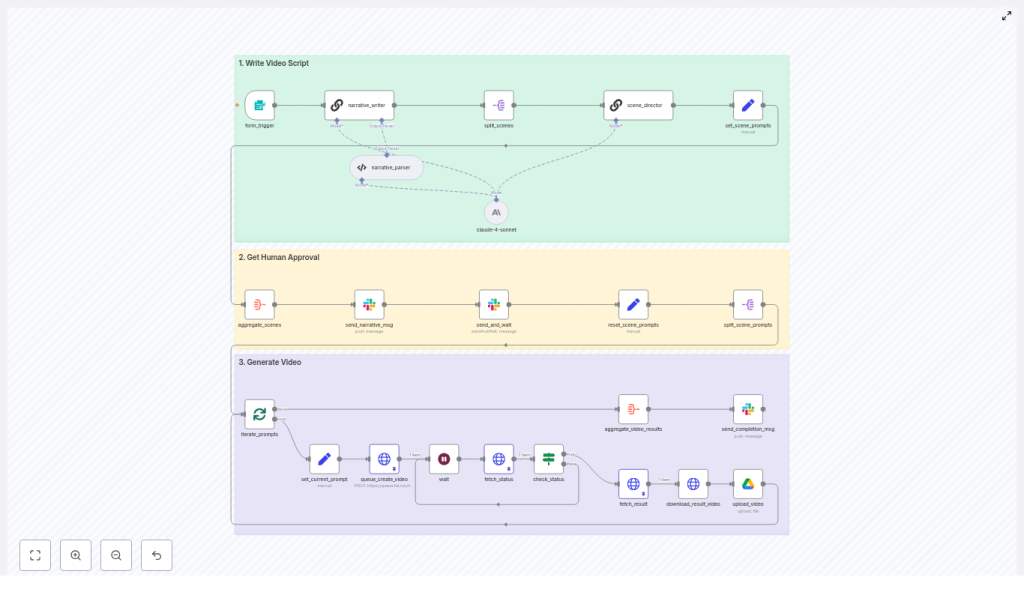
High-level workflow architecture
- Input: a form trigger that captures a single Bigfoot Video Idea
- Creative: a narrative_writer node using Anthropic Claude to build an 8-scene storyboard
- Production: a scene_director node that expands each scene into a production-ready prompt
- Approval: Slack messaging plus a human approval node to control the green light
- Render: scene prompts split and queued to Fal.run VEO3 to generate 8-second clips
- Delivery: finished clips downloaded, uploaded to Google Drive, and shared in Slack
In other words, a repeatable system that could take one focused idea and output a polished, multi-scene Bigfoot vlog with minimal human overhead.
Act I: one idea, one form, one Bigfoot
Where it all starts: the form_trigger
Riley’s first step was simple. She customized the form_trigger node so anyone on her team could submit a Bigfoot Video Idea.
The form asked for a short, focused brief, just one or two sentences. Things like:
- Location (forest trail, snowy mountain, campsite)
- Emotional tone (hopeful, nervous, excited)
- Core gag or hook (Sam tries to use human slang, Sam loses his selfie stick, Sam reviews hiking snacks)
She quickly learned that specificity here mattered. The more concrete the prompt, the better the downstream AI output. The form did not try to capture everything. It simply gave the language model the right constraints and creative direction.
Act II: Claude becomes the showrunner
The writer’s room in a single node: narrative_writer (Claude)
Once an idea hit the workflow, the narrative_writer node took over. Under the hood, it invoked Anthropic Claude with a carefully crafted, persona-rich prompt. Instead of a loose script, Riley wanted a structured storyboard.
Claude returned exactly that: an 8-scene storyboard with timestamps and concise narrative paragraphs, each including Sam’s spoken lines. Every scene was designed to last 8 seconds, so the final video would have a predictable rhythm and duration.
To keep things precise, the workflow included a narrative_parser node. This parser enforced the schema and made sure Claude always produced:
- Exactly 8 scenes
- Each scene locked at 8 seconds
- Clearly separated dialogue and description
For Riley, this was the first turning point. She no longer had to manually outline every beat. The storyboard came out structured, consistent, and ready for production.
Breaking it down: split_scenes
The next obstacle was scale. Riley did not want to render one long video in a single fragile step. She wanted granular control, scene by scene.
The split_scenes node solved that. It took the full storyboard and split it into individual scene items. Each scene became its own payload, ready for the next phase.
This design choice unlocked two crucial benefits:
- Scenes could be rendered in parallel, which sped up production
- Any failed scene could be re-generated without touching the rest
Suddenly, the workflow was not just automated, it was resilient.
Act III: from creative brief to camera-ready prompt
The bridge between imagination and VEO3: scene_director
Now came the part Riley was most worried about: keeping Sam consistent.
In earlier experiments with other tools, Sam’s fur color drifted, his vibe changed, and sometimes he mysteriously lost the selfie stick that was supposed to define his vlog style. She needed a way to stop that drift.
That is where the scene_director node came in. Each individual scene brief flowed into this node, along with two critical prompt components:
- A strict Character Bible
- A detailed Series Style Guide
The scene_director combined the compact scene description with these rules and produced a production-ready prompt for Fal.run’s VEO3. Each output prompt encoded:
- Shot framing: selfie-stick point-of-view, 16:9 horizontal
- Technical specs: 4K resolution at 29.97 fps, 24mm lens at f/2.8, 1/60s shutter
- Character lock: precise fur color, eye catch-lights, hand position, overall silhouette
- Performance notes: Sam’s exact verbatim lines, a mild “geez” speaking style, and a clear rule of no on-screen captions
By embedding these constraints directly into the prompt, Riley dramatically reduced visual and tonal drift. Every generated clip looked and felt like part of the same series.
The Character Bible that kept Sam real
Before this workflow, Riley’s team kept Sam’s details in scattered docs and Slack threads. Now, they were codified in a single source of truth: the Character Bible that lived inside the prompts.
It covered:
- Identity and vibe: Sam is a gentle giant, optimistic, a little awkward, always kind
- Physical details: 8-foot tall male Bigfoot, cedar-brown fur (#6d6048), fluffy cheeks, recognizable silhouette
- Delivery rules: jolly tone, strictly PG-rated, sometimes misuses human slang in a playful way
- Hard constraints: absolutely no on-screen text or subtitles allowed
Riley embedded this Character Bible in both the narrative_writer and scene_director prompts. The redundancy was intentional. Repeating critical constraints across multiple nodes reduced the chance of the models drifting away from Sam’s established identity.
Act IV: humans stay in the loop
Before spending money: aggregate_scenes and Slack approval
Riley knew that AI could move fast, but she still wanted a human checkpoint before paying for video renders.
To handle this, the workflow used an aggregate_scenes step that pulled all the scene prompts together into a single package. This package was then sent to Slack using a message node and a send_and_wait approval control.
Her editors received a clear Slack message with all eight scene prompts. From there they could:
- Approve the full set and let the pipeline continue
- Deny and send it back for revisions
This human-in-the-loop step became a quiet hero. It prevented off-brand lines, caught occasional tonal mismatches, and protected the rendering budget. It was always cheaper to fix a prompt than re-render multiple 8-second clips.
Act V: the machines take over production
Into the queue: set_current_prompt, queue_create_video, and VEO3
Once the team gave the green light in Slack, n8n iterated through each approved scene prompt.
For every scene, the workflow used a set_current_prompt step to prepare the payload, then called Fal.run’s VEO3 queue API via an HTTP request in the queue_create_video node.
Riley configured the request with:
- prompt: the full, production-ready scene description
- aspect_ratio: 16:9
- duration: 8 seconds
- generate_audio: true
The VEO3 queue responded with a request_id for each job. The workflow then polled the status endpoint until each job completed, and finally captured the resulting video URL.
What used to be a flurry of manual uploads and waiting on freelancers was now an automated, monitored rendering loop.
From URLs to assets: download_result_video and upload_video
Once VEO3 finished rendering, n8n moved into delivery mode.
The download_result_video node retrieved each clip from its URL. Then the upload_video node sent it to a shared Google Drive folder that Riley’s team used as their central asset library.
They adopted a simple naming convention like scene_1.mp4, scene_2.mp4, and so on, to keep episodes organized and easy to reference.
After all eight scenes were safely stored, the workflow aggregated the results and posted a final Slack message with a Google Drive link. The team could review, assemble, and schedule the episode without hunting for files.
Technical habits that kept the pipeline stable
As Riley iterated on the workflow, a few best practices emerged that made the system far more robust.
- Fixed scene duration: The entire pipeline assumed 8-second clips. This kept timing consistent across scenes and avoided misalignment issues in downstream editing.
- Detailed camera specs: Including framing, selfie-stick wobble, lens details, and shutter speed in prompts helped VEO3 match the “found footage” vlog aesthetic.
- Explicit forbidden items: By clearly stating “no captions” and “no scene titles on screen” in the prompts, Riley reduced the need for follow-up edits.
- Human approval for brand safety: The Slack approval node caught risky lines or off-tone jokes before any render costs were incurred.
- Rate limiting and batching: She configured rate limits on rendering calls and batched uploads to stay within API quotas and avoid concurrency issues on the rendering backend.
Testing, monitoring, and scaling up the series
Riley did not flip the switch to full production on day one. She started small.
First, she ran a single storyboard and rendered just one scene to confirm that Sam’s look, tone, and audio matched the brand’s expectations. Once that was stable, she added more checks.
The workflow began to track:
- Video duration, to ensure each clip really hit 8 seconds
- File size boundaries, to catch abnormal outputs
- Basic visual heuristics, like dominant color ranges, to confirm Sam’s fur tone stayed in the expected cedar-brown band
Using n8n’s aggregate nodes, she collected job metadata over time. This gave her a performance and quality history that helped with troubleshooting and optimization.
When the series took off and the team needed more episodes, she scaled by:
- Sharding scene generation across multiple worker instances
- Throttling Fal.run requests to respect rate limits and quotas
- Using cloud storage like Google Drive or S3 for long-term asset storage
- Experimenting with an automated QA step that used a lightweight vision model to confirm key visual attributes, such as fur color and presence of the selfie stick, before final upload
Security and cost: the unglamorous but vital part
Behind the scenes, Riley tightened security around the tools that powered the workflow.
She stored all API keys, including Anthropic, Fal.run, Google Drive, and Slack, in n8n’s secure credentials system. Workflow access was restricted so only authorized teammates could trigger production runs or modify key nodes.
On the cost side, she monitored VEO3 rendering and audio generation expenses. Because the workflow only rendered approved prompts, there were fewer wasted jobs. In some episodes, she reused cached assets like recurring background plates or sound beds to further reduce compute time.
The resolution: from bottleneck to Bigfoot content engine
A few weeks after adopting the n8n template, Riley’s team looked very different.
They were no longer bogged down in repetitive scripting and asset wrangling. Instead, they focused on what mattered most: crafting better ideas, refining Sam’s personality, and planning distribution strategies for each episode.
The n8n + Claude + VEO3 pipeline had transformed a scattered, manual process into a reliable system:
- Ideas came in through a simple form
- Claude handled structured storyboarding
- The scene_director locked in style and character consistency
- Slack approvals guarded quality and budget
- VEO3 handled high-quality rendering
- Google Drive and Slack closed the loop on delivery
Sam the Bigfoot stayed on-brand, charming, and recognizable, episode after episode. The team finally had a scalable way to produce character-driven short-form vlogs without losing creative control.
Ready to launch your own Bigfoot vlog workflow?
If Riley’s story sounds like the kind of transformation your team needs, you do not have to start from a blank canvas. The exact n8n workflow template she used is available, complete with:
- The production-ready n8n JSON workflow
- The Character Bible used to keep Sam consistent
- The scene director prompt and checklist for reliable VEO3 outputs
You can adapt it for your own character, brand, or series, while keeping all the technical benefits of the original pipeline.
CTA: Want the n8n workflow JSON or the full prompt pack used in this Bigfoot vlog pipeline? Ask to export the template and you will get implementation notes plus recommended credential settings so you can launch your first automated episode quickly.
