


Automate Daily Motivational Quotes to Slack with n8n: A Story From Burnout to Boosted Morale
The Morning Slump That Wouldn’t Go Away
By 9:30 AM every weekday, Maya could already feel the energy draining from her remote team.
As the marketing lead at a fast-growing startup, she lived inside Slack. It was where campaigns were planned, launches were coordinated, and fires were put out. It was also where she watched her team’s enthusiasm quietly dip as deadlines piled up and messages stacked into long, unread threads.
Maya tried everything. She typed out motivational quotes on Mondays, shared wins on Wednesdays, and dropped inspirational links on Fridays. For a week or two, it worked. People reacted with emojis, replied with their own quotes, and the team felt a bit lighter.
Then her calendar exploded again. Meetings, reports, launches. The quotes stopped. The small ritual that lifted everyone’s mood faded away, simply because she did not have the time or mental space to keep it going manually.
What she really needed was simple:
- Motivational quotes in Slack every morning, at the same time
- No manual copy-pasting or searching for quotes
- A way to customize the channel, timing, and message format
She wanted consistency, engagement, and a bit of personality, without adding another task to her already crowded to-do list.
The Discovery: An n8n Template That Promised to Help
One late evening, while searching for “automate daily motivational quotes in Slack,” Maya stumbled across an n8n workflow template that sounded almost too perfect. It claimed to:
- Trigger every morning at 8 AM
- Fetch a random motivational quote from the free ZenQuotes.io API
- Format the quote into a Slack-ready message
- Send it directly into a Slack channel of her choice
Maya had heard of n8n before, a visual automation tool that did not require heavy coding. She was not a developer, but she was comfortable dragging nodes around and tweaking simple settings.
“If this actually works,” she thought, “I could stop worrying about remembering quotes and still keep that positive energy flowing every morning.”
Setting the Stage: Preparing Slack for Automation
The next morning, coffee in hand, Maya decided to give it a try.
The template instructions were clear. First, she had to create and connect a Slack app so that n8n could send messages on her behalf. It sounded technical, but the steps were surprisingly straightforward.
Step 1 – Creating the Slack App
Maya went to api.slack.com and created a new Slack app for her workspace. She named it “Daily Motivation Bot” and followed the basic setup instructions.
To let n8n send messages to channels, she needed to add specific OAuth scopes. She made sure to include:
chat:writeso the app could post messageschannels:readso it could see what channels were available
Once the scopes were added, she installed the app to her Slack workspace. A quick confirmation message appeared, and the bot was ready to be used by n8n.
Step 2 – Choosing the Right Slack Channel
The template was configured to send quotes to the #general channel by default. Maya paused for a moment.
“Do I want this to go to everyone,” she wondered, “or just the marketing team?”
She decided to start with a dedicated channel called #daily-motivation. It felt intentional, a place people could visit when they needed a lift.
Inside the n8n workflow, she opened the “Send to Slack” node and simply changed the channel name from #general to #daily-motivation. No code, no complexity, just a simple text change.
The Heart of the Workflow: How the Automation Actually Works
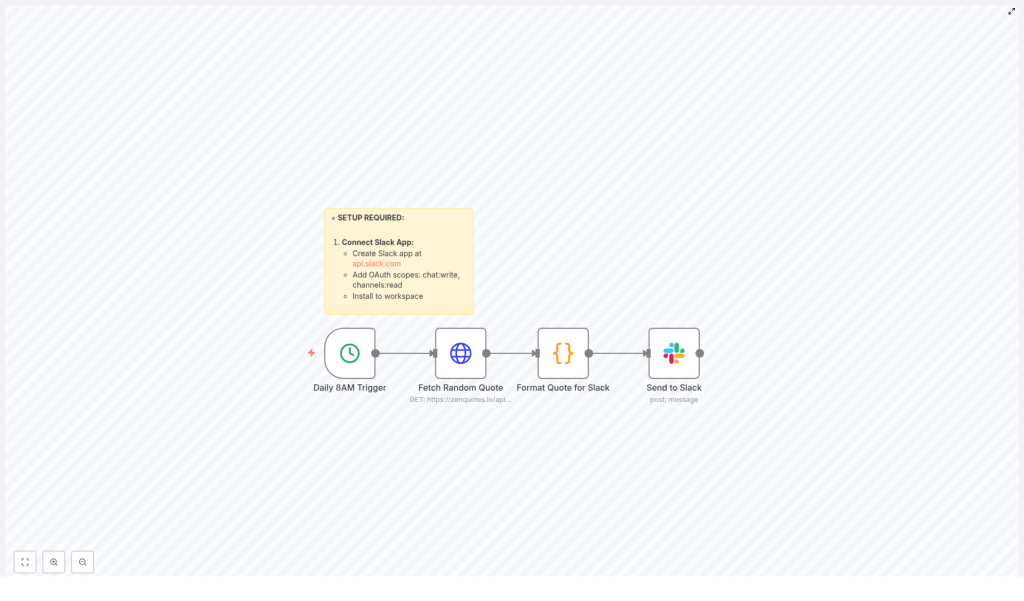
With Slack connected, Maya turned her attention to the automation itself. The workflow in n8n was made of four key parts, each one represented by a node:
- A trigger that fired every day at a specific time
- A call to the ZenQuotes.io API to fetch a random quote
- A code node that formatted the quote for Slack
- A Slack node that posted the final message into her chosen channel
Daily 8 AM Trigger: Starting the Ritual
The first node was a simple time-based trigger. It was set to run at 8 AM in the America/New_York timezone.
Maya’s team was spread across multiple regions, so she adjusted the timezone to match where most of her teammates were based. n8n made this easy. She just updated the workflow’s timezone setting, and the daily schedule adjusted automatically.
Every day at 8 AM, this trigger would quietly start the workflow in the background, without anyone having to remember a thing.
Fetching a Random Quote with ZenQuotes.io
The next node called the free ZenQuotes.io API. No API key was required, which was a relief. Maya did not want to manage tokens or secrets for a simple morale boost.
Each time the workflow ran, it requested a random motivational quote. The API responded with text and an author, which the next node would use to build a clean, friendly Slack message.
Formatting the Quote for Slack
This was the part Maya was most curious about. How would the message actually look in Slack?
Inside the “Format Quote for Slack” node, a small piece of JavaScript transformed the raw API response into a polished message. The format looked like this:
🌟 *Daily Motivation* 🌟

"[Quote text]"

- [Author]
The code did more than just insert text. It checked if the API had actually returned a quote. If, for some reason, there was no quote available, the node would fall back to a default motivational message. That meant the channel would never be empty, even on days when the API had issues.
In other words, Maya’s daily ritual was protected against minor technical hiccups.
Sending the Message to Slack
The final node, “Send to Slack,” took the formatted message and posted it into the channel she had chosen. Thanks to the earlier OAuth setup, the workflow could now act like a friendly bot, dropping a fresh quote into #daily-motivation every morning.
Maya ran a quick test. Within a few seconds, her Slack channel lit up with:
🌟 *Daily Motivation* 🌟

"[Inspiring quote text]"

- [Author]
It looked clean, intentional, and exactly like something she would have crafted herself, only now it was fully automated.
The Turning Point: From Manual Effort to Reliable Automation
The real test came the next day. At 8 AM, while Maya was still getting her first coffee, Slack quietly posted a new quote in #daily-motivation. Team members reacted with emojis. Someone replied, “Love this one.” Another person added their own favorite quote in a thread.
By the end of the week, the channel had become a tiny daily touchpoint. No one had to be reminded. No one had to prepare content. The routine was automated, but the impact was very human.
Maya realized that this small automation had solved several problems at once:
- Consistency – The quotes went out every day, without fail, even when she was busy or away.
- Engagement – People began checking the channel in the morning, reacting, and sharing their own thoughts.
- Customization – She could easily change the channel, tweak the message style, or adjust the time if the team’s schedule changed.
Why n8n Was the Right Fit for This Job
As Maya grew more comfortable with n8n, she realized why this tool was such a good match for her daily motivational quotes idea.
- No coding required – The visual workflow builder let her connect nodes, adjust settings, and test the flow without writing complex code.
- Free API integration – The ZenQuotes.io API did not require an API key, which made setup fast and frictionless.
- Flexible scheduling – She could easily change the time, timezone, or frequency as her team’s needs evolved.
- Easy to customize – She could modify the quote format, add emojis, or even extend the workflow later with additional steps.
What started as a simple motivation bot turned into a gentle example of what automation could do for culture, not just operations.
From One Workflow to a Happier Workspace
Weeks later, the daily quotes had become part of the team’s rhythm. New hires discovered the channel on their first day and often commented on how nice it was to see something uplifting in their feed each morning.
For Maya, the best part was that it all happened in the background. She did not have to remember to post, did not have to search for quotes, and did not have to worry about missing a day. The n8n workflow handled everything.
And because it was built on a visual automation platform, she knew she could expand it later. Maybe she would pull quotes from a spreadsheet, highlight team wins on Fridays, or send different messages to different departments. The foundation was already there.
Bring Daily Motivation to Your Own Slack Workspace
If you are juggling a busy schedule and still want to create a more positive, consistent atmosphere in your Slack workspace, this n8n template gives you a practical starting point.
With just a few steps, you can:
- Connect a Slack app with the right permissions
- Use the free ZenQuotes.io API to fetch random motivational quotes
- Format messages in a Slack-friendly layout
- Schedule them to appear at the perfect time for your team
Once set up, the workflow quietly runs on its own, delivering a small but meaningful boost to your team’s day.
Ready to Try the n8n Motivational Quote Template?
You do not need to be a developer to bring this to life. You just need a Slack workspace, an n8n instance, and a few minutes to connect the pieces.
Transform your mornings, support your team’s mindset, and let automation handle the repetition so you can focus on the work that truly needs you.
