


Automate GitHub → Jenkins with n8n & Supabase
Ever pushed a commit and then spent the next ten minutes clicking around like a DevOps intern on loop? Trigger Jenkins, update a sheet, check logs, ping Slack, repeat. It is like Groundhog Day, but with more YAML.
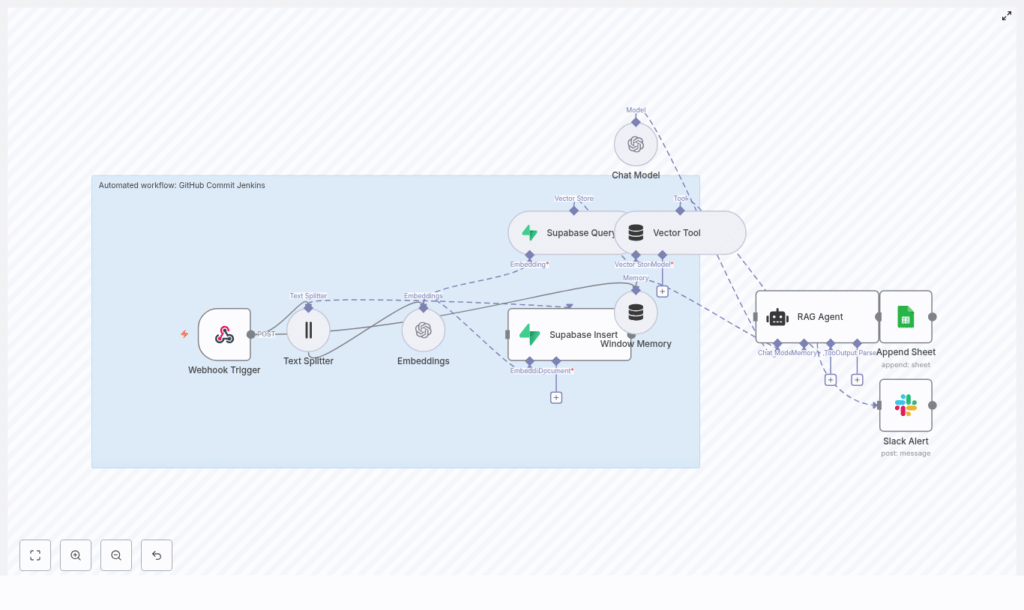
This guide walks you through an n8n workflow template that does all that busywork for you. It listens to GitHub commits, generates embeddings, stores and queries vectors in Supabase, runs a RAG agent with OpenAI for context-aware processing, logs results to Google Sheets, and even yells in Slack when something breaks. You get a production-ready CI/CD automation pipeline that is smart, traceable, and way less annoying than doing it all by hand.
What this n8n workflow actually does (and why you will love it)
At a high level, this template turns a simple GitHub push into a fully automated, context-aware flow:
- Webhook Trigger catches GitHub commit events.
- Text Splitter slices long commit messages or payloads into chunks.
- OpenAI Embeddings converts those chunks into vectors using
text-embedding-3-small. - Supabase Insert stores chunks and embeddings in a Supabase vector index.
- Supabase Query + Vector Tool performs similarity search to pull relevant context.
- Window Memory & Chat Model give the RAG agent short-term memory and an LLM brain.
- RAG Agent combines tools, memory, and the model to produce contextual output.
- Append Sheet writes everything to Google Sheets for auditing and reporting.
- Slack Alert shouts into a channel when errors or important statuses appear.
The result is a GitHub-to-Jenkins automation that is not just a dumb trigger, but an intelligent layer that can:
- Generate release notes from commits.
- Run semantic checks for security or policy issues.
- Feed Jenkins or other CI jobs with rich, contextual data.
- Keep non-technical stakeholders informed with friendly summaries.
Why use n8n, Jenkins, and Supabase together?
Modern DevOps is less about “can we automate this” and more about “why are we still doing this manually.” By wiring GitHub → n8n → Jenkins + Supabase + OpenAI, you get:
- Visual orchestration with n8n, so you can see and tweak the workflow without spelunking through scripts.
- Semantic search and RAG reasoning by storing embeddings in Supabase and using OpenAI to interpret them.
- Faster feedback loops, since every push can be enriched, checked, logged, and acted on automatically.
- Better observability with Google Sheets logs and Slack alerts when something goes sideways.
In short, you get a smarter, more resilient CI/CD automation pipeline that saves time and sanity.
Quick setup: from template to running workflow
Here is the short version of how to get this n8n template running without rage-quitting:
- Import the template
Clone the provided n8n template JSON and import it into your n8n instance. - Create required credentials
Set up and configure:- OpenAI API key
- Supabase account and API keys
- Google Sheets OAuth credentials
- Slack API token
Store all of these in n8n credentials, not hard-coded in nodes.
- Expose your n8n webhook
Deploy a public n8n endpoint or use a tunneling tool like ngrok for testing. Make sure GitHub can reach your webhook URL. - Configure the GitHub webhook
In your GitHub repo go to Settings → Webhooks and:- Point the webhook to your n8n URL + path, for example
https://your-n8n-url/webhook/github-commit-jenkins. - Set the method to POST.
- Filter events to
pushor any other events you want to handle.
- Point the webhook to your n8n URL + path, for example
- Tune text chunking
Adjust the Text Splitter chunk size to match your typical commit messages or diffs. - Validate Supabase vector storage
Confirm that inserts and queries work as expected and that similarity search returns relevant chunks. - Customize the RAG prompts
Tailor the RAG agent’s system and task prompts to your use case, like:- Release note generation
- Triggering Jenkins jobs
- Compliance or security checks
Deep dive: how each n8n node is configured
Webhook Trigger: catching GitHub commits
This is where everything starts. Configure it to:
- Use method POST.
- Use a clear path such as
/github-commit-jenkins.
In GitHub, create a webhook under Settings → Webhooks, point it to your n8n webhook URL plus that path, and filter to push events or any additional events you want. Once that is done, every push politely knocks on your workflow’s door.
Text Splitter: breaking up long commit payloads
Some commits are short and sweet, others are “refactor entire app” essays. The Text Splitter keeps things manageable by using a character-based splitter. In the template, it uses:
{  "chunkSize": 400,  "chunkOverlap": 40
}
This keeps chunks small enough for embeddings while overlapping slightly so context is not lost. It improves the quality of semantic similarity queries later on.
Embeddings (OpenAI): turning text into vectors
The Embeddings node uses OpenAI’s text-embedding-3-small model. Attach your OpenAI credential to this node and it will:
- Take each text chunk from the splitter.
- Generate a vector embedding for it.
- Send those vectors to Supabase for indexing.
Keep an eye on token usage and quotas, especially if your repo is very active. You can tweak chunk sizes or batch operations to stay within rate limits.
Supabase Insert and Query: your vector brain
In Supabase, create a vector index, for example named github_commit_jenkins. The workflow uses two key nodes:
- Supabase Insert Stores:
- Chunked documents.
- Their embeddings.
- Metadata like repo, commit hash, author, and timestamp.
This metadata is gold later when you want to filter or audit.
- Supabase Query Performs a similarity search to fetch the top relevant chunks for the RAG agent. You can tune parameters such as:
top_k(how many neighbors to fetch).- Distance metric, depending on your vector setup.
Vector Tool and Window Memory: giving the agent context
The Vector Tool is how the RAG agent talks to your Supabase vector store. When the agent needs context, it uses this tool to pull relevant chunks.
Window Memory keeps a short rolling history of recent interactions. That way, if several related commits come in a row or you trigger follow-up processing, the agent can “remember” what just happened instead of starting from scratch every time.
RAG Agent and Chat Model: the brains of the operation
The RAG Agent is the orchestration layer that:
- Uses the Chat Model node (OpenAI Chat endpoints) as its language model.
- Calls the Vector Tool to retrieve context from Supabase.
- Uses Window Memory for short-term history.
It is configured with:
- A system message that sets its role, for example: You are an assistant for GitHub Commit Jenkins.
- A task prompt that explains how to process the incoming data, such as generating summaries, checking for security terms, or deciding whether to trigger Jenkins jobs.
Because it is RAG-based, the agent does not just hallucinate. It uses actual commit data pulled from your vector store to produce contextual, grounded output.
Append Sheet (Google Sheets): logging everything
To keep a nice audit trail that even non-engineers can read, the workflow uses the Append Sheet node. It writes the RAG Agent output into a Google Sheet with columns like:
- Status
- Commit
- Author
- Timestamp
The template appends results to a Log sheet, turning it into a simple reporting and review dashboard. Great for managers, auditors, or your future self trying to remember what happened last week.
Slack Alert: instant feedback when things go wrong
When the RAG agent detects errors or important statuses, it triggers the Slack Alert node. You can configure it to post in a channel like #alerts, including fields such as:
- Error message
- Commit hash
- Repository name
- Link to the corresponding row in Google Sheets
Instead of discovering failures hours later in a random log file, you get a clear “hey, fix me” message right in Slack.
Real-world ways to use this GitHub → Jenkins automation
Once this workflow is running, you can plug it into a bunch of practical scenarios:
- Automatic release notes Summarize commit messages and push them to a release dashboard or hand them to Jenkins as part of your deployment pipeline.
- Semantic security checks Scan commit messages for security-related keywords or patterns and automatically trigger Jenkins jobs or security scans when something suspicious appears.
- Context-enriched CI pipelines Use vector search to pull in relevant historical commits so Jenkins jobs have more context about what changed and why.
- Human-friendly reporting Send clear summaries to Google Sheets so non-technical stakeholders can follow along without needing to read diffs.
Security and best practices (so you can sleep at night)
Automation is fun until you accidentally expose secrets or log sensitive data. To keep things safe:
- Use GitHub webhook secrets and validate payload signatures in n8n.
- Store all API keys in n8n credentials, never hard-coded. Limit scope and rotate them regularly.
- Lock down your n8n instance with IP allowlists or VPNs, especially in production.
- Rate-limit embedding requests and cache repeated embeddings where possible to control costs.
- Sanitize payloads before storing them in vector databases or logs so you do not accidentally index sensitive information.
Troubleshooting: when the robots misbehave
No webhook events are showing up
If your workflow is suspiciously quiet:
- Double-check the webhook URL in GitHub.
- Inspect GitHub webhook delivery logs for errors.
- Confirm that your n8n endpoint is reachable. If you use ngrok, make sure the tunnel is running and that GitHub has the latest URL.
Embeddings are failing or super slow
When embedding performance tanks:
- Verify your OpenAI API key and account quota.
- Reduce chunk size or batch embeddings to avoid hitting rate limits.
- Check n8n logs for request latency or error messages.
Supabase query returns random or irrelevant results
If the RAG agent seems confused:
- Confirm you are using the intended embedding model.
- Make sure your vector table is properly populated with representative data.
- Tune similarity search settings like top_k and the distance metric.
Observability and monitoring: watch the pipeline, not just the logs
To keep this GitHub-to-Jenkins automation healthy, track a few key metrics:
- Webhook delivery success and failure rates.
- Embedding API errors and latency.
- Supabase insert and query performance.
- RAG agent execution times.
- Slack alert frequency and error spikes.
You can use tools like Grafana or Prometheus for dashboards, or rely on n8n’s execution history plus your Google Sheets logs as a simple audit trail.
Wrapping up: from repetitive chores to smart automation
This n8n workflow template connects GitHub commits to an intelligent, RAG-powered process that works hand-in-hand with Jenkins, Supabase, and OpenAI. You get:
- Automated handling of commit events.
- Semantic understanding via embeddings and vector search.
- Context-aware processing with a RAG agent.
- Structured logging in Google Sheets.
- Real-time Slack alerts when things go off script.
To get started, simply import the template, plug in your credentials, and test with a few sample commits. Then iterate on:
- Prompt design for the RAG agent.
- Chunking strategy in the Text Splitter.
- Vector metadata design and Supabase query parameters.
As you refine it, the workflow becomes a tailored automation layer that fits your team’s CI/CD style perfectly.
Call to action: Import this n8n template, subscribe for more DevOps automation guides, or reach out if you want help adapting it to your environment. Ready to automate smarter and retire a few repetitive tasks from your daily routine?
