


Turn Your Newsletters into Daily Twitter Threads (Without Losing Your Mind)
If you have ever copied chunks of your newsletter into Twitter, chopped them into 280-character bits, fixed broken links, rewrote the hook, then did it all again tomorrow, this guide is your new best friend.
Instead of manually turning long-form content into Twitter (ok, X) threads every day, you can let an n8n workflow and an LLM do the heavy lifting. You keep the editorial judgment and final say, the robots handle the repetitive stuff that slowly erodes your will to create.
Below is a practical, production-ready setup that combines:
- n8n automation
- An LLM via LangChain or a provider like Anthropic Claude Sonnet
- Structured output parsing so the thread format does not implode
- Slack publishing for human review before anything hits X
The result: reliable, daily Twitter threads from your newsletter with minimal manual effort and maximum control.
Why Turn Newsletters into Twitter Threads Anyway?
Your newsletter is already doing the hard work: curated links, original insights, commentary your audience actually cares about. Letting that live in inboxes only is like writing a book and then hiding it in a drawer.
Repurposing newsletters into Twitter threads helps you:
- Boost reach by surfacing long-form ideas into fast-moving social feeds.
- Bring new people in by driving traffic back to your newsletter and site.
- Reuse what you already have instead of inventing new social content from scratch every day.
In other words, you get more output from the same input, without more caffeine or extra interns.
What This n8n Workflow Actually Does
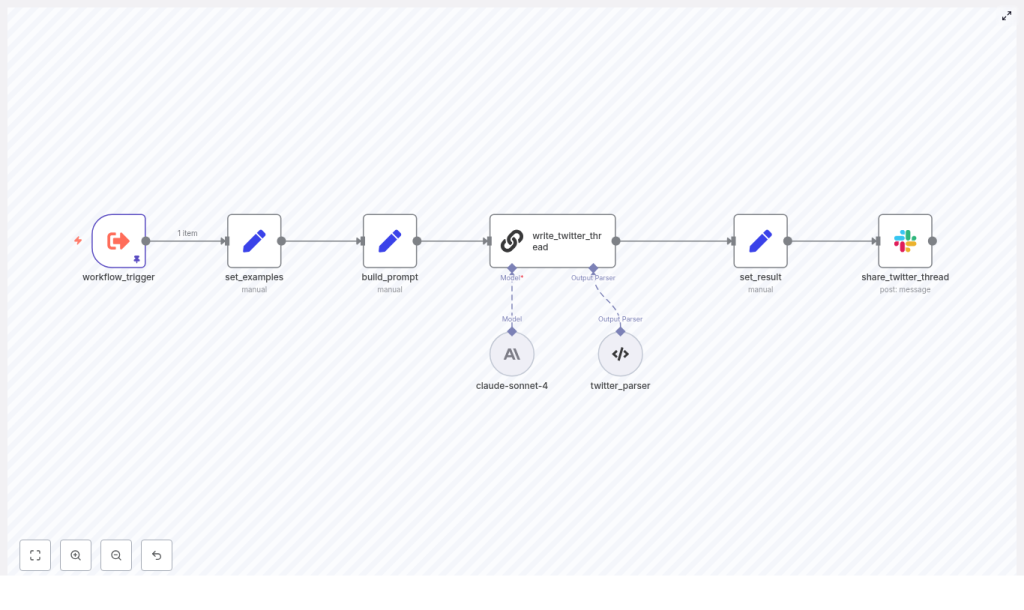
This workflow mimics the core automation pipeline used by modern newsletters to publish daily news threads. Here is the high-level flow:
- Take in your newsletter content using a trigger that fits your stack.
- Feed the model examples of how you like your threads written.
- Build a precise prompt that tells the LLM exactly how to structure the thread.
- Call the LLM using LangChain or a provider node such as Anthropic Claude Sonnet.
- Parse the model output into clean, numbered tweets.
- Send the draft to Slack for editorial review, edits, and scheduling.
So instead of wrestling with character limits and formatting, your team just reviews, tweaks, and approves.
Meet the n8n Nodes Behind the Magic
The sample n8n template uses a handful of nodes, each doing a very specific job so the whole pipeline stays predictable and maintainable.
- workflow_trigger – Entry point where your newsletter content arrives.
- set_examples – Stores thread examples and style guidance for the LLM.
- build_prompt – Combines newsletter text with your prompt template.
- write_twitter_thread – Calls the LLM via LangChain or a provider node like Anthropic Claude Sonnet.
- twitter_parser – Parses the LLM response into a structured, tweet-by-tweet format.
- set_result – Saves the final thread text into the workflow payload.
- share_twitter_thread – Posts the draft thread to Slack for your editors and schedulers.
Each node does one thing well, which makes debugging a lot easier when something inevitably goes off script.
Step-by-Step: Build the Newsletter-to-Twitter Workflow
Let us walk through the setup from start to finish. You can adapt the details to your tech stack, but the structure stays the same.
1. Choose How the Newsletter Enters n8n (Trigger & Input)
First, decide how the workflow gets your newsletter content. A few common options:
- Manual trigger so editors can paste the final copy directly.
- Webhook that receives HTML or text from your CMS once the newsletter is ready.
- Scheduled trigger that pulls the latest edition from storage like S3 or Google Drive.
Pick the one that matches how your newsletter is produced today, not your fantasy future stack.
2. Teach the LLM Your Thread Style (Provide Examples)
LLMs are powerful, but they are not mind readers. Your set_examples node is where you spoon-feed them your preferred style.
In this node, include:
- 2 to 3 examples of high-performing threads from your brand or niche.
- Short, numbered tweets that are informative and easy to skim.
- Guidance like:
- “Use numbered tweets (1/ …)”
- “Bold key terms”
- “Keep paragraphs short”
Think of this as onboarding a very fast junior social media editor.
3. Build a Clear, Bossy Prompt
Next up, the build_prompt node. This is where you merge the newsletter text with a prompt template that tells the model exactly what to do.
Your prompt should instruct the LLM to:
- Select the top 4 to 8 news items from the newsletter.
- Write a strong hook tweet followed by a numbered thread (1/ – N/).
- Use line breaks, minimal emojis, and include @mentions for well-known businesses when referenced.
- Preserve URLs exactly as they appear in the newsletter.
- Finish with a CTA that links back to your newsletter, for example https://recap.aitools.inc.
The more explicit you are here, the fewer surprises you will get in the output.
4. Call the LLM with LangChain or Provider Nodes
Now it is time to let the model cook. In the write_twitter_thread node, you call your chosen LLM through LangChain or a provider-specific n8n node.
In the example template, Claude Sonnet 4 is used, but you can swap in your favorite model. A few key settings to configure:
- System role that defines the persona, for example:
“expert AI tech communicator and social media editor.” - Max tokens so the model does not produce a novel instead of a thread.
- Temperature between 0.0 and 0.4 for more deterministic, less chaotic output.
- Inline inclusion of your prompt examples to keep style consistent.
Set it up once, then let the node quietly do its job in the background every day.
5. Parse the Thread into Clean Tweets
LLM output is naturally free-form, which is charming until you try to schedule it programmatically. The twitter_parser node fixes this.
Use a structured output parser, such as:
- A JSON schema that defines the expected fields, or
- A regex-based node that extracts the numbered tweets
This lets you:
- Split the thread into individual tweets automatically.
- Catch stray formatting, unexpected characters, or markup that might break the thread.
- Keep the output predictable enough for review and scheduling tools.
The parsed result is stored by the set_result node so the rest of the workflow can use it cleanly.
6. Keep Humans in the Loop with Slack QA
Even the best automation should not have direct access to your social accounts without a human sanity check. That is where the share_twitter_thread node comes in.
This final node posts the full thread into an editorial channel in Slack (or similar) along with a permalink back to the original newsletter. Your editors can then:
- Verify that facts and quotes are accurate.
- Check that links and @mentions are correct and not hallucinated.
- Edit copy, tighten hooks, and give the final approve-to-publish signal.
You get the speed of automation without the “why did the bot tag the wrong account” headaches.
Prompt Engineering Tips for Reliable Twitter Threads
A few tweaks to your prompts can make the difference between a clean, on-brand thread and something that looks like it escaped from a prompt playground.
- Always ask for a header tweet with a clear hook and context, for example:
“TODAY’S AI NEWS: …” - Force URL fidelity by telling the model to copy external links exactly as provided.
- Limit tweet length with instructions such as:
“No tweet > 250 characters”
to keep things readable and leave room for quote tweets and comments. - Use @mentions carefully. Specify that mentions should only be used for known accounts explicitly referenced in the newsletter to reduce hallucinations.
- Define formatting rules, such as:
- Numbered tweets
- Bold for emphasis
- Markdown or plaintext depending on your publishing destination
Be specific, be repetitive, and do not assume the model will “just know” what you want.
Handling Edge Cases and Staying Safe in Production
Once this workflow is running daily, you will want it to be boringly reliable. That means handling the weird stuff up front.
- Hallucinated links or quotes
Flag any external URLs that were not in the original newsletter so editors can double-check before publishing. - Sensitive or private data
Sanitize PII and anything confidential before sending content to the model. - Rate limits and retries
Implement exponential backoff or queueing for LLM API calls, especially if you are running multiple newsletters or high volume.
A little defensive engineering here saves a lot of late-night debugging later.
Testing the Workflow Before Full Rollout
Instead of flipping the automation switch for everything on day one, treat this like any other experiment.
- Run an A/B test:
- Half of your threads created manually
- Half generated by the n8n + LLM workflow
- Measure:
- Engagement uplift on X
- Click-through rate back to the newsletter
- Error rate, for example how many manual edits per automated thread
Use the results to refine your prompts, examples, and parsing until the automated threads perform at least as well as your hand-crafted ones.
What This Looks Like with Real Content
Here is a short newsletter excerpt that this workflow can turn into a full thread:
“AI models from Google and OpenAI achieved gold medal performance at the International Mathematical Olympiad, solving five of six problems with human-readable proofs. A separate incident highlighted risks: an AI coding assistant deleted production data, underscoring the need for guardrails.”
From this, the LLM should produce a 6 to 8 tweet thread that includes:
- A hook tweet summarizing “today in AI” style news.
- Bullets or tweets detailing the IMO achievement and what it means.
- A cautionary note about AI agents and production data risks.
- A closing CTA inviting readers to subscribe to the full newsletter.
All of that without you manually trimming sentences to fit the character limit.
What Success Looks Like When This Is Live
Once the pipeline is humming along, you should start to see:
- Faster social distribution for each new newsletter edition.
- More referral traffic from X back to your newsletter signup page.
- Less manual grunt work for your social team, while still keeping editorial control via Slack review.
You get the consistency of automation plus the polish of human editors.
Quick Setup Checklist: From Zero to Automated Threads
Ready to try this with your own newsletter? Here is a simple path to get started:
- Clone or build the n8n workflow and connect your LLM credentials (Anthropic, OpenAI, or similar).
- Create 2 to 3 example threads that match your brand voice and add them to the set_examples node.
- Configure the parser node with a simple JSON schema such as:
{"twitter_thread": "string"}
to extract the full thread from the model output. - Route the final output to Slack in an editorial channel where your social team can review, edit, and schedule.
Next Steps and Where to Get the Template
If you are ready to stop hand-crafting every thread and want a daily stream of high-impact Twitter content from your newsletter, this workflow is a solid starting point.
Try it with your next edition, monitor engagement, and iterate. For more workflows, prompts, and automation templates, subscribe at https://recap.aitools.inc and request the n8n template so you can get up and running quickly.
